'1.0',
'info' => ['style' => 'RPC', 'product' => 'videorecog', 'version' => '2020-03-20'],
'directories' => [
[
'children' => ['GenerateVideoCover', 'DetectVideoShot', 'RecognizeVideoCastCrewList', 'SplitVideoParts', 'EvaluateVideoQuality', 'GetAsyncJobResult'],
'type' => 'directory',
'title' => '视频理解',
'id' => 434555,
],
],
'components' => [
'schemas' => [],
],
'apis' => [
'DetectVideoShot' => [
'methods' => ['post'],
'schemes' => ['http', 'https'],
'security' => [
[
'AK' => [],
],
],
'operationType' => 'readAndWrite',
'deprecated' => false,
'systemTags' => [],
'parameters' => [
[
'name' => 'VideoUrl',
'in' => 'formData',
'schema' => ['description' => '视频URL地址。推荐使用上海地域的OSS链接,对于文件在本地或者非上海地域OSS链接的情况,请参见[文件URL处理](~~155645~~)。', 'type' => 'string', 'required' => true, 'example' => 'http://viapi-test.oss-cn-shanghai.aliyuncs.com/viapi-3.0domepic/videorecog/DetectVideoShot/DetectVideoShot2.mp4', 'isFileTransferUrl' => true],
],
],
'responses' => [
200 => [
'schema' => [
'type' => 'object',
'properties' => [
'RequestId' => ['description' => '请求ID。', 'type' => 'string', 'example' => '0033B795-09C7-4EB9-A33C-EBA325192B0D'],
'Data' => [
'description' => '返回的结果数据内容。'."\n"
.'该数据需要在异步任务执行成功后,通过调用[GetAsyncJobResult](~~607824~~)接口,对其Result字段进行JSON反序列化之后得到。',
'type' => 'object',
'properties' => [
'ShotFrameIds' => [
'description' => '1',
'type' => 'array',
'items' => ['description' => '解析结果,切分点帧号。', 'type' => 'integer', 'format' => 'int32', 'example' => '[0, 109, 185, 251, 341, 393, 468, 629, 715, 762, 1272, 1304, 1331, 1351, 1379, 1414, 1431, 1456, 1504, 1709, 1838, 1893, 1975, 2239, 2364, 2425, 2469, 2532, 2607, 2665, 2737, 2864, 2944, 2979, 2995]'],
],
],
],
'Message' => ['description' => '提交异步任务后的提示信息。', 'type' => 'string', 'example' => '该调用为异步调用,任务已提交成功,请以requestId的值作为jobId参数调用同类目下GetAsyncJobResult接口查询任务执行状态和结果。'],
],
'description' => '',
],
],
],
'errorCodes' => [
400 => [
['errorCode' => 'ParameterError', 'errorMessage' => 'The parameter is invalid. Please check again.', 'description' => '参数错误,请检查参数值'],
],
403 => [
['errorCode' => 'AuthFailed', 'errorMessage' => 'An error occurred while performing authorization. Please check your RAM configuration.', 'description' => '授权失败,请检查RAM权限配置,操作流程可参考https://help.aliyun.com/document_detail/145025.htm。'],
],
408 => [
['errorCode' => 'Timeout', 'errorMessage' => 'The request has timed out.', 'description' => '请求超时,请稍后重试。如重试后还报错请通过钉钉搜索群号23109592,加入阿里云视觉智能开放平台咨询群,与平台取得联系。'],
],
503 => [
['errorCode' => 'ServiceUnavailable', 'errorMessage' => 'The service is unavailable.', 'description' => '算法服务报错,请稍后重试。如重试后还报错请通过钉钉搜索群号23109592,加入阿里云视觉智能开放平台咨询群,与平台取得联系。 '],
],
],
'responseDemo' => '[{"type":"json","example":"{\\n \\"RequestId\\": \\"0033B795-09C7-4EB9-A33C-EBA325192B0D\\",\\n \\"Data\\": {\\n \\"ShotFrameIds\\": [\\n 0\\n ]\\n },\\n \\"Message\\": \\"该调用为异步调用,任务已提交成功,请以requestId的值作为jobId参数调用同类目下GetAsyncJobResult接口查询任务执行状态和结果。\\"\\n}","errorExample":""},{"type":"xml","example":"\\n 0033B795-09C7-4EB9-A33C-EBA325192B0D\\n 该调用为异步调用,任务已提交成功,请以requestId的值作为jobId参数调用同类目下GetAsyncJobResult接口查询任务执行状态和结果。\\n","errorExample":""}]',
'title' => '镜头解析',
'summary' => '镜头解析,对输入的视频按镜头进行切分,返回切分点。',
'description' => '## 功能描述'."\n"
.'镜头解析能力可以对输入的视频按镜头进行切分,返回切分点。'."\n"
."\n"
.'> - 您可以进入[在线咨询](https://www.aliyun.com/core/online-consult?from=aZgW6LJHr2)获取在线人工帮助。'."\n"
.'- 当前能力可在视觉智能开放平台有完整的免费产品体验,您可以单击[立即试用](https://vision.aliyun.com/experience/detail?&tagName=videorecog&children=DetectVideoShot)对该能力进行更直观试用以及在线购买。'."\n"
.'- 阿里云视觉智能开放平台视觉AI能力API接入、接口使用或问题咨询等,请通过钉钉群(23109592)加入阿里云视觉智能开放平台咨询群联系我们。'."\n"
."\n"
.'## 接入指引'."\n"
.'1. 注册阿里云账号:打开[阿里云官网](https://www.aliyun.com),在阿里云官网右上角,单击**立即注册**,按照操作提示完成账号注册。'."\n"
.'2. 开通能力:请确保您已开通[视频理解服务](https://vision.aliyun.com/videorecog),若未开通服务请[立即开通](https://common-buy.aliyun.com/?commodityCode=viapi_videorecog_public_cn#/open)。'."\n"
.'3. 创建AccessKey:请确保您已[创建AccessKey](~~175144~~),如果您使用的是子账号AccessKey,您需要给子账号赋予AliyunVIAPIFullAccess权限,具体操作,请参见[RAM授权](~~145025~~)。'."\n"
.'4. 在线调试(可选):您可以通过[OpenAPI Explorer](https://next.api.aliyun.com/api/videorecog/2020-03-20/DetectVideoShot?lang=JAVA&sdkStyle=dara¶ms=%7B%22VideoUrl%22%3A%22http%3A%2F%2Fviapi-test.oss-cn-shanghai.aliyuncs.com%2Fviapi-3.0domepic%2Fvideorecog%2FDetectVideoShot%2FDetectVideoShot1.mp4%22%7D&tab=DEMO)在线调试能力,查看完整的调用示例代码及SDK依赖信息,也可以下载完整的工程。'."\n"
.'5. 开发接入步骤: '."\n"
.'- 在[SDK总览](~~145033~~)中选择您要接入使用的SDK语言。'."\n"
.'- 在对应语言的SDK文档中找到AI类目为视频理解(videorecog)类目的SDK包进行安装。'."\n"
.'- 参考文档中提供的示例代码进行适当修改后调用。'."\n"
."\n"
.'6. 示例代码及最佳实践:该能力常用语言的示例代码及常见结果后续处理示例,请参见[镜头解析示例代码](~~465560~~),常用语言查询异步任务结果的示例代码,请参见[查询异步任务结果示例代码](~~607974~~)。'."\n"
."\n"
.'7. 客户端直接调用:该能力常用的客户端调用方式包括以下几种。'."\n"
.'- [Web前端直接调用](~~467779~~)'."\n"
.'- [小程序场景下直接调用](~~467780~~)'."\n"
.'- [Android端直接调用](~~467781~~)'."\n"
.'- [iOS端直接调用](~~467782~~)'."\n"
."\n"
.'## 输入限制'."\n"
."\n"
.'- 视频格式:MP4、RMVB、FLV、TS。'."\n"
.'- 视频大小:不超过1 GB。'."\n"
.'- 视频分辨率:不超过1080P。'."\n"
.'- URL地址中不能包含中文字符。'."\n"
."\n"
.'## 计费说明'."\n"
.'关于镜头解析的计费方式及报价,请参见[计费介绍](~~202485~~)。'."\n"
."\n"
.'> 下方调试接口为付费接口。'."\n"
."\n"
.'## 调用步骤'."\n"
.'该能力为异步能力,需分两步进行调用。'."\n"
.'第一步调用DetectVideoShot接口提交任务,请求成功后,得到一个任务ID。'."\n"
.'第二步调用[GetAsyncJobResult](~~607824~~)接口查询结果,根据任务ID查询任务执行状态和结果。如果任务还在处理中,可稍等一段时间后再进行查询。',
'requestParamsDescription' => ' ',
'responseParamsDescription' => '## 查询结果'."\n"
.'该接口为异步接口,当前并未返回真实的请求结果,您需要通过返回的RequestId调用GetAsyncJobResult接口来获取该接口的真实请求结果。详情请参见[GetAsyncJobResult](~~607824~~)。'."\n"
."\n"
.'## SDK参考'."\n"
.'阿里云视觉AI视频理解类目下的镜头解析能力推荐使用SDK调用,支持多种编程语言,调用时请选择AI类目为视频理解(videorecog)的SDK包,文件参数通过SDK调用可支持本地文件及任意URL,具体可参见[SDK总览](~~145033~~)。'."\n"
."\n"
.'## 示例代码及最佳实践'."\n"
.'该能力常用语言的示例代码及常见结果后续处理示例,请参见[镜头解析示例代码](~~465560~~),常用语言查询异步任务结果的示例代码,请参见[查询异步任务结果示例代码](~~607974~~)。',
'extraInfo' => '## 错误码'."\n"
.'关于镜头解析的错误码,详情请参见[常见错误码](~~159312~~)。'."\n"
."\n"
.'## 安全声明'."\n"
.'- 请确保上传的图片或文件来源符合相应的法律法规。'."\n"
.'- 通过体验调试上传的临时文件有效期为1小时,在24小时后会被系统自动清理删除。',
'changeSet' => [
['createdAt' => '2022-10-17T02:07:20.000Z', 'description' => '响应参数发生变更'],
],
'ramActions' => [
[
'operationType' => '',
'ramAction' => [
'action' => 'viapi-videorecog:DetectVideoShot',
'authLevel' => 'operate',
'actionConditions' => [],
'resources' => [
['validationType' => 'always', 'product' => 'VisualIntelligenceAPI', 'resourceType' => '全部资源', 'arn' => '*'],
],
],
],
],
],
'EvaluateVideoQuality' => [
'summary' => '本文介绍视频理解(videorecog)类目下的视频画质评估EvaluateVideoQuality的语法及示例。',
'methods' => ['post'],
'schemes' => ['http', 'https'],
'security' => [
[
'AK' => [],
],
],
'deprecated' => false,
'systemTags' => [],
'parameters' => [
[
'name' => 'VideoUrl',
'in' => 'formData',
'schema' => ['description' => '视频URL地址。推荐使用上海地域的OSS链接,对于文件在本地或者非上海地域OSS链接的情况,请参见[文件URL处理](~~155645~~)。', 'type' => 'string', 'required' => true, 'example' => 'http://public-vigen-video.oss-cn-shanghai.aliyuncs.com/Common/xxx/dont_delete/decaption/123.mp4', 'isFileTransferUrl' => true],
],
[
'name' => 'Mode',
'in' => 'formData',
'schema' => ['description' => '质量评估模式。取值如下:'."\n"
.'- general(默认):基础质量评估。'."\n"
.'- vqa_plus:基础质量评估及瑕疵质量评估。', 'type' => 'string', 'required' => false, 'example' => 'vqa_plus'],
],
],
'responses' => [
200 => [
'headers' => [],
'schema' => [
'title' => 'Schema of Response',
'description' => 'Schema of Response',
'type' => 'object',
'properties' => [
'RequestId' => ['title' => 'Id of the request', 'description' => '请求ID。', 'type' => 'string', 'example' => '1d33e538-c949-4fcd-83f6-4d57e4b31527'],
'Data' => [
'description' => '返回的数据内容。'."\n"
.'该数据需要在异步任务执行成功后,通过调用[GetAsyncJobResult](~~607824~~)接口,对其Result字段进行JSON反序列化之后得到。',
'type' => 'object',
'properties' => [
'JsonUrl' => ['description' => '质量评估详细报告(JSON文件)。'."\n"
."\n"
.'> 该URL地址为临时地址,有效期为30分钟,过期后将无法访问。若需要长时间或者永久保存文件,请在30分钟内访问URL地址,下载文件转存到自己的OSS或者其他存储空间。'."\n", 'type' => 'string', 'example' => 'http://vibktprfx-prod-prod-damo-eas-cn-shanghai.oss-cn-shanghai.aliyuncs.com/eas-video-quality-assessment/2023-01-13-10/31%3A08-cVeN9ZQlzIPfGqsa.json?Expires=1673578869&OSSAccessKeyId=LTAI****************&Signature=AiSsOsZ7rYfhf9w3Mxn%2Fq4GKKy****'],
'PdfUrl' => ['description' => '质量评估综合报告(PDF文件)。'."\n"
."\n"
.'> 该URL地址为临时地址,有效期为30分钟,过期后将无法访问。若需要长时间或者永久保存文件,请在30分钟内访问URL地址,下载文件转存到自己的OSS或者其他存储空间。', 'type' => 'string', 'example' => 'http://vibktprfx-prod-prod-damo-eas-cn-shanghai.oss-cn-shanghai.aliyuncs.com/eas-video-quality-assessment/2023-01-13-10/31%3A08-cVeN9ZQlzIPfGqsa.pdf?Expires=1673578869&OSSAccessKeyId=LTAI****************&Signature=xULlZzVuhoYWAXRbp9A4EzzZcS****'],
'VideoQualityInfo' => [
'description' => '视频质量详情。',
'type' => 'object',
'properties' => [
'CompressiveStrength' => ['description' => '压缩程度。', 'type' => 'number', 'format' => 'float', 'example' => '0.25'],
'NoiseIntensity' => ['description' => '噪声程度。', 'type' => 'number', 'format' => 'float', 'example' => '0.01'],
'Blurriness' => ['description' => '模糊程度。', 'type' => 'number', 'format' => 'float', 'example' => '0.15'],
'ColorContrast' => ['description' => '对比度。', 'type' => 'number', 'format' => 'float', 'example' => '0.55'],
'ColorSaturation' => ['description' => '饱和度。', 'type' => 'number', 'format' => 'float', 'example' => '0.17'],
'Luminance' => ['description' => '亮度。', 'type' => 'number', 'format' => 'float', 'example' => '0.51'],
'Colorfulness' => ['description' => '颜色丰富度。', 'type' => 'number', 'format' => 'float', 'example' => '0.48'],
'MosScore' => ['description' => '表示主观质量评分。', 'type' => 'number', 'format' => 'float', 'example' => '0.7048'],
],
],
],
],
'Message' => ['description' => '提交异步任务后的提示信息。', 'type' => 'string', 'example' => '该调用为异步调用,任务已提交成功,请以requestId的值作为jobId参数调用同类目下GetAsyncJobResult接口查询任务执行状态和结果。'],
],
],
],
],
'errorCodes' => [
400 => [
['errorCode' => 'ParameterError', 'errorMessage' => 'The parameter is invalid. Please check again.', 'description' => '参数错误,请检查参数值'],
],
403 => [
['errorCode' => 'AuthFailed', 'errorMessage' => 'An error occurred while performing authorization. Please check your RAM configuration.', 'description' => '授权失败,请检查RAM权限配置,操作流程可参考https://help.aliyun.com/document_detail/145025.htm。'],
],
408 => [
['errorCode' => 'Timeout', 'errorMessage' => 'The request has timed out.', 'description' => '请求超时,请稍后重试。如重试后还报错请通过钉钉搜索群号23109592,加入阿里云视觉智能开放平台咨询群,与平台取得联系。'],
],
503 => [
['errorCode' => 'ServiceUnavailable', 'errorMessage' => 'The service is unavailable.', 'description' => '算法服务报错,请稍后重试。如重试后还报错请通过钉钉搜索群号23109592,加入阿里云视觉智能开放平台咨询群,与平台取得联系。 '],
],
],
'staticInfo' => ['returnType' => 'synchronous'],
'responseDemo' => '[{"type":"json","example":"{\\n \\"RequestId\\": \\"1d33e538-c949-4fcd-83f6-4d57e4b31527\\",\\n \\"Data\\": {\\n \\"JsonUrl\\": \\"http://vibktprfx-prod-prod-damo-eas-cn-shanghai.oss-cn-shanghai.aliyuncs.com/eas-video-quality-assessment/2023-01-13-10/31%3A08-cVeN9ZQlzIPfGqsa.json?Expires=1673578869&OSSAccessKeyId=LTAI****************&Signature=AiSsOsZ7rYfhf9w3Mxn%2Fq4GKKy****\\",\\n \\"PdfUrl\\": \\"http://vibktprfx-prod-prod-damo-eas-cn-shanghai.oss-cn-shanghai.aliyuncs.com/eas-video-quality-assessment/2023-01-13-10/31%3A08-cVeN9ZQlzIPfGqsa.pdf?Expires=1673578869&OSSAccessKeyId=LTAI****************&Signature=xULlZzVuhoYWAXRbp9A4EzzZcS****\\",\\n \\"VideoQualityInfo\\": {\\n \\"CompressiveStrength\\": 0.25,\\n \\"NoiseIntensity\\": 0.01,\\n \\"Blurriness\\": 0.15,\\n \\"ColorContrast\\": 0.55,\\n \\"ColorSaturation\\": 0.17,\\n \\"Luminance\\": 0.51,\\n \\"Colorfulness\\": 0.48,\\n \\"MosScore\\": 0.7048\\n }\\n },\\n \\"Message\\": \\"该调用为异步调用,任务已提交成功,请以requestId的值作为jobId参数调用同类目下GetAsyncJobResult接口查询任务执行状态和结果。\\"\\n}","errorExample":""},{"type":"xml","example":"\\n 1d33e538-c949-4fcd-83f6-4d57e4b31527\\n 该调用为异步调用,任务已提交成功,请以requestId的值作为jobId参数调用同类目下GetAsyncJobResult接口查询任务执行状态和结果。\\n","errorExample":""}]',
'title' => '视频画质评估',
'description' => '## 功能描述'."\n"
.'视频画质评估可对输入视频的画面质量进行评估,包括通用视频画质与瑕疵视频质量。通用视频画质包括:主观画质评分、客观画质评分(清晰度、点状噪声、压缩噪声)、颜色质量评分(饱和度、丰富度、对比度、亮度评估)等。瑕疵视频画质包括:场纹检测、划痕检测、异常帧检测(卡帧、闪烁、黑屏花屏)等。'."\n"
.'能力使用典型样例请参见下表:'."\n"
.'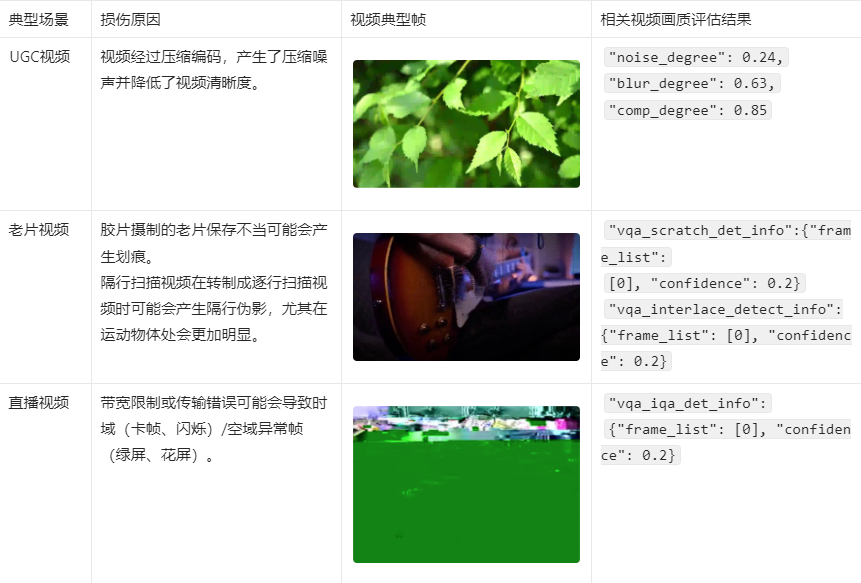'."\n"
."\n"
.'> - 您可以进入[在线咨询](https://www.aliyun.com/core/online-consult?from=aZgW6LJHr2)获取在线人工帮助。'."\n"
.'- 当前能力可在视觉智能开放平台有完整的免费产品体验,您可以单击[立即试用](https://vision.aliyun.com/experience/detail?tagName=videorecog&children=EvaluateVideoQuality)对该能力进行更直观试用以及在线购买。'."\n"
.'- 阿里云视觉智能开放平台视觉AI能力API接入、接口使用或问题咨询等,请通过钉钉群(23109592)加入阿里云视觉智能开放平台咨询群联系我们。'."\n"
."\n"
.'## 应用场景'."\n"
.'- 视频画质评估:标准化视频评估工具集,包括各类无参考指标各项子工具,可服务于视频转码、直播和增强等不同业务场景的画质监控。'."\n"
.'- UGC画质审核:用户自定义上传内容画质把关,对UGC内容进行画面质量检测,对整体画质较低、存在部分显著问题的视频进行筛选过滤。'."\n"
."\n"
.'## 特色优势'."\n"
.'- 视频质量评估:涵盖各种主观/客观通用视频画质指标,提供全方面体系化的质量评估服务。'."\n"
.'- 视频质量监测:涵盖视频中可能出现的各种技术瑕疵的画质监测,保障视频服务品质。'."\n"
."\n"
.'## 接入指引'."\n"
.'1. 注册阿里云账号:打开[阿里云官网](https://www.aliyun.com),在阿里云官网右上角,单击**立即注册**,按照操作提示完成账号注册。'."\n"
.'2. 开通能力:请确保您已开通[视频理解服务](https://vision.aliyun.com/videorecog),若未开通服务请[立即开通](https://common-buy.aliyun.com/?commodityCode=viapi_videorecog_public_cn#/open)。'."\n"
.'3. 创建AccessKey:请确保您已[创建AccessKey](~~175144~~),如果您使用的是子账号AccessKey,您需要给子账号赋予AliyunVIAPIFullAccess权限,具体操作,请参见[RAM授权](~~145025~~)。'."\n"
.'4. 在线调试(可选):您可以通过[OpenAPI Explorer](https://next.api.aliyun.com/api/videorecog/2020-03-20/EvaluateVideoQuality?lang=JAVA&useCommon=true)在线调试能力,查看完整的调用示例代码及SDK依赖信息,也可以下载完整的工程。'."\n"
.'5. 开发接入步骤:'."\n"
.'- 在[SDK总览](~~145033~~)中选择您要接入使用的SDK语言。'."\n"
.'- 在对应语言的SDK文档中找到AI类目为视频理解(videorecog)类目的SDK包进行安装。'."\n"
.'- 参考文档中提供的示例代码进行适当修改后调用。'."\n"
."\n"
.'6. 示例代码:该能力常用语言的示例代码,请参见[视频画质评估示例代码](~~608851~~),常用语言查询异步任务结果的示例代码,请参见[查询异步任务结果示例代码](~~607974~~)。'."\n"
."\n"
.'7. 客户端直接调用:该能力常用的客户端调用方式包括以下几种。'."\n"
.'- [Web前端直接调用](~~467779~~)'."\n"
.'- [小程序场景下直接调用](~~467780~~)'."\n"
.'- [Android端直接调用](~~467781~~)'."\n"
.'- [iOS端直接调用](~~467782~~)'."\n"
."\n"
.'## 输入限制'."\n"
.'- 视频格式:MP4。'."\n"
.'- 视频大小:不超过1 GB。'."\n"
.'- 视频分辨率:不超过1080P,即长边不超过1920像素,短边不超过1080像素。'."\n"
.'- URL地址中不能包含中文字符。'."\n"
."\n"
.'## 计费说明'."\n"
.'关于视频画质评估的计费方式及报价,请参见[计费介绍](~~202485~~)。'."\n"
."\n"
.'> 下方调试接口为付费接口。'."\n"
."\n"
.'## 调用步骤'."\n"
.'该能力为异步能力,需分两步进行调用。'."\n"
.'第一步调用EvaluateVideoQuality接口提交任务,请求成功后,得到一个任务ID。'."\n"
.'第二步调用[GetAsyncJobResult](~~607824~~)接口查询结果,根据任务ID查询任务执行状态和结果。如果任务还在处理中,可稍等一段时间后再进行查询。',
'responseParamsDescription' => '## 查询结果'."\n"
.'该接口为异步接口,当前并未返回真实的请求结果,您需要通过返回的RequestId调用GetAsyncJobResult接口来获取该接口的真实请求结果。详情请参见[GetAsyncJobResult](~~607824~~)。'."\n"
."\n"
.'## SDK参考'."\n"
.'阿里云视觉AI视频理解类目下的视频画质评估能力推荐使用SDK调用,支持多种编程语言,调用时请选择AI类目为视频理解(videorecog)的SDK包,文件参数通过SDK调用可支持本地文件及任意URL,具体可参见[SDK总览](~~145033~~)。'."\n"
."\n"
.'## 示例代码'."\n"
.'该能力常用语言的示例代码,请参见[视频画质评估示例代码](~~608851~~),常用语言查询异步任务结果的示例代码,请参见[查询异步任务结果示例代码](~~607974~~)。'."\n"
."\n"
.'## 视频画质评估各项得分解析'."\n"
.'算法返回**JsonUrl**和**PdfUrl**两个字段,其中**PdfUrl**为该视频PDF格式的整体画质评估综合报告。**JsonUrl**为JSON格式的画质评估详细报告,包括各项画质评估指标的采样帧序列及各分镜/帧分项得分,方便细致分析、处理视频画质问题。'."\n"
."\n"
.'## JsonUrl文件参数样例'."\n"
."\n"
.'```'."\n"
.'{'."\n"
.' "fps": 25.0,'."\n"
.' "frame_num": 252,'."\n"
.' "duration": 10.08,'."\n"
.' "task_id": "2",'."\n"
.' "input_w": 640,'."\n"
.' "input_h": 480,'."\n"
.' "vqa_degradation_info": [{'."\n"
.' "noise_degree": 0.01,'."\n"
.' "blur_degree": 0.15,'."\n"
.' "comp_degree": 0.24,'."\n"
.' "clip": [0, 251],'."\n"
.' "duration": ["00:00:00", "00:00:10"]'."\n"
.' }],'."\n"
.' "vqa_mos_info": ['."\n"
.' [{'."\n"
.' "frame idx": 36,'."\n"
.' "image mos": 0.693'."\n"
.' }, {'."\n"
.' "frame idx": 72,'."\n"
.' "image mos": 0.696'."\n"
.' }, {'."\n"
.' "frame idx": 108,'."\n"
.' "image mos": 0.707'."\n"
.' }, {'."\n"
.' "frame idx": 144,'."\n"
.' "image mos": 0.702'."\n"
.' }, {'."\n"
.' "frame idx": 180,'."\n"
.' "image mos": 0.736'."\n"
.' }]'."\n"
.' ],'."\n"
.' "vqa_color_quality_analysis_info": [{'."\n"
.' "contrast_score": 0.55,'."\n"
.' "luma_score": 0.49,'."\n"
.' "color_saturation_score": 0.17,'."\n"
.' "colorfulness_score": 0.45,'."\n"
.' "clip": [36, 180],'."\n"
.' "duration": ["00:00:01", "00:00:07"]'."\n"
.' }],'."\n"
.' "vqa_damaged_frame_info": {'."\n"
.' "frame_list": [],'."\n"
.' "confidence": 0.0'."\n"
.' },'."\n"
.' "vqa_interlace_frame_info": {'."\n"
.' "frame_list": [],'."\n"
.' "confidence": 0.0'."\n"
.' },'."\n"
.' "vqa_freeze_frame_info": {'."\n"
.' "frame_list": [],'."\n"
.' "confidence": 0.0'."\n"
.' },'."\n"
.' "vqa_flicker_frame_info": {'."\n"
.' "frame_list": [],'."\n"
.' "confidence": 0.0'."\n"
.' },'."\n"
.' "vqa_scratch_frame_info": {'."\n"
.' "frame_list": [104],'."\n"
.' "confidence": 0.012'."\n"
.' }'."\n"
.'}'."\n"
.'```'."\n"
."\n"
.'## JsonUrl文件参数描述说明'."\n"
.'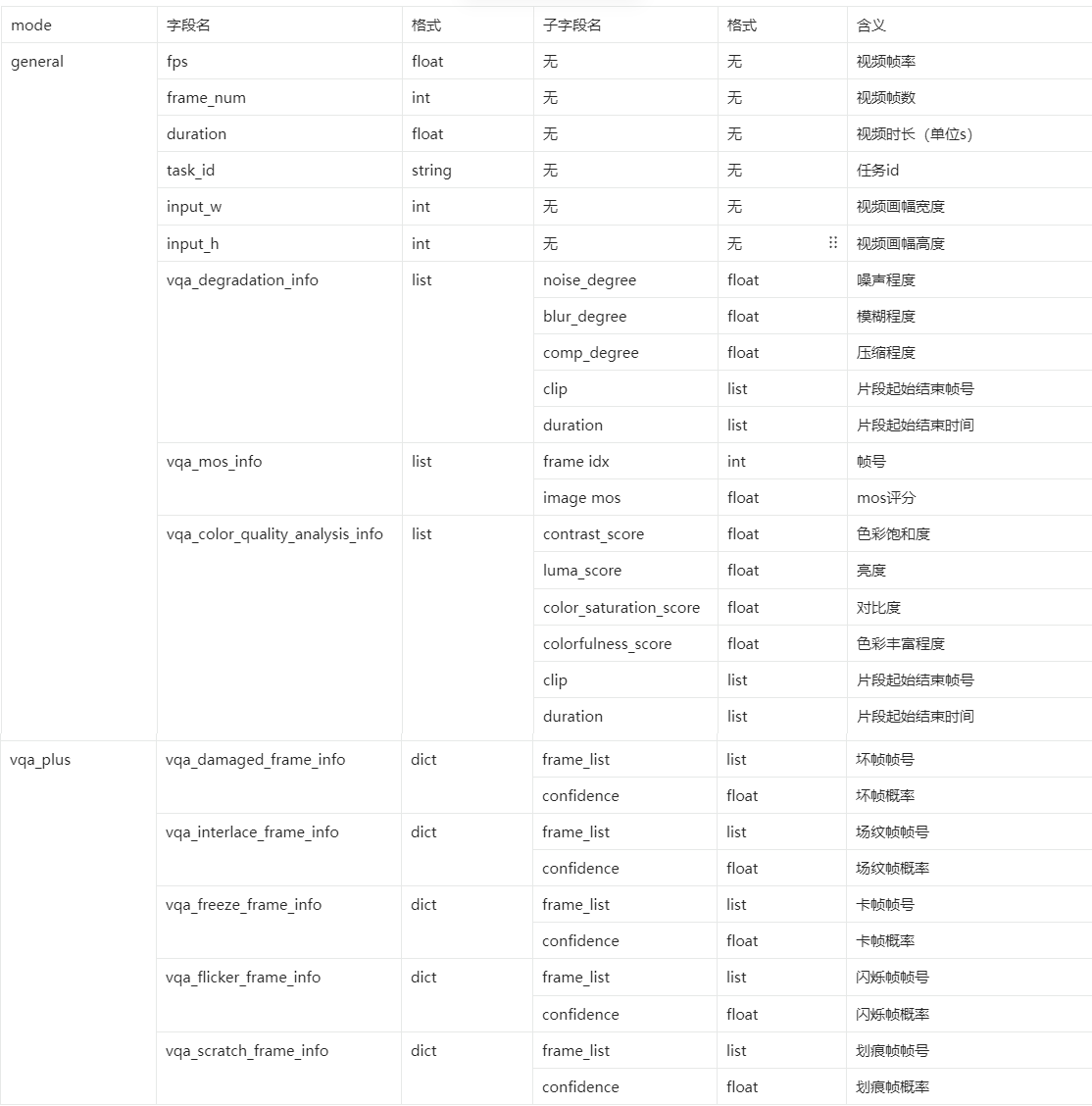'."\n"
."\n"
.'## 视频画质评估参数取值说明'."\n"
.'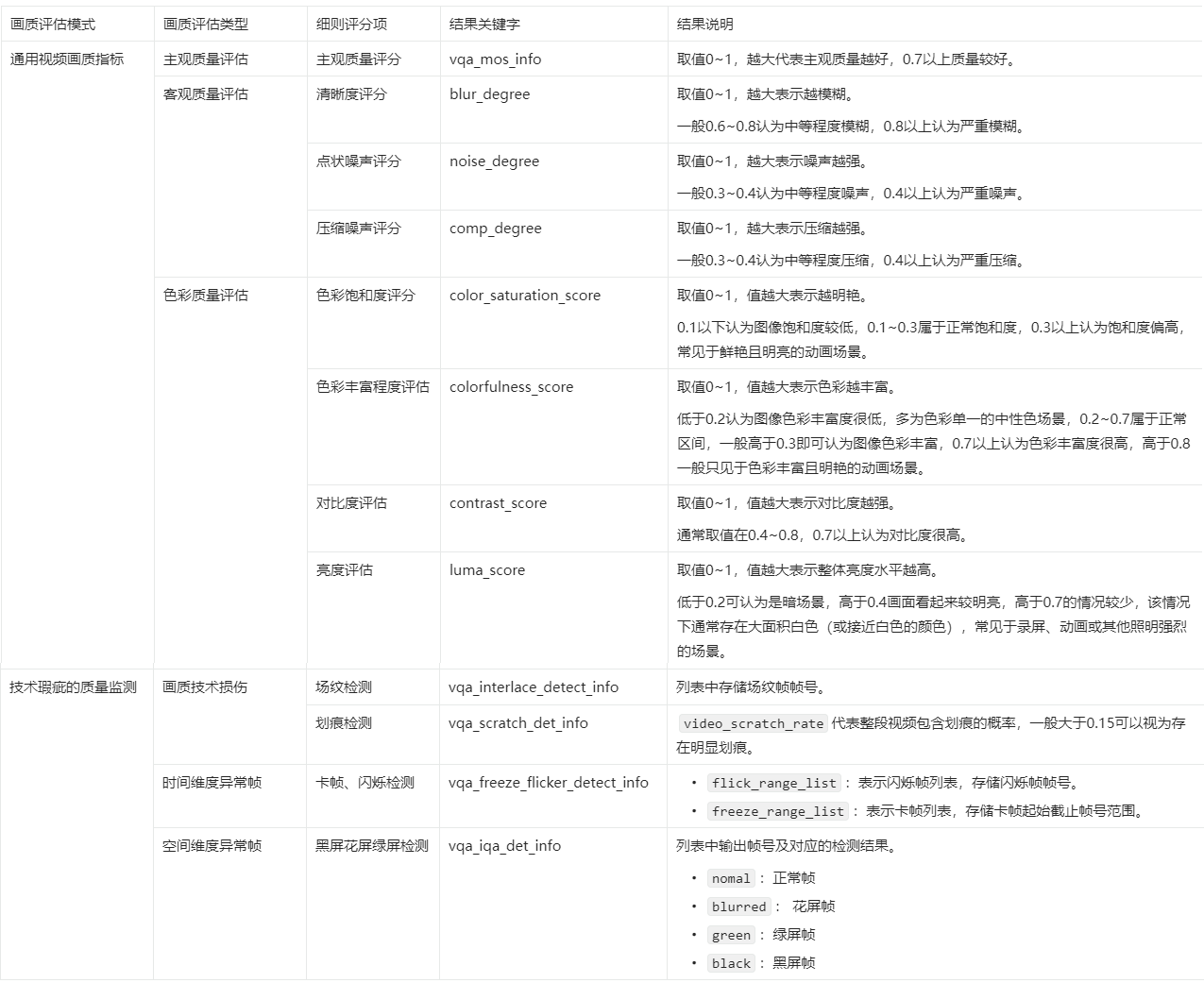',
'extraInfo' => '## 错误码'."\n"
.'关于视频画质评估的错误码,详情请参见[常见错误码](~~159312~~)。'."\n"
."\n"
.'## 安全声明'."\n"
.'- 请确保上传的图片或文件来源符合相应的法律法规。'."\n"
.'- 通过体验调试上传的临时文件有效期为1小时,在24小时后会被系统自动清理删除。',
'changeSet' => [],
],
'GenerateVideoCover' => [
'methods' => ['post'],
'schemes' => ['http', 'https'],
'security' => [
[
'AK' => [],
],
],
'operationType' => 'readAndWrite',
'deprecated' => false,
'systemTags' => [],
'parameters' => [
[
'name' => 'VideoUrl',
'in' => 'formData',
'schema' => ['description' => '视频URL地址。推荐使用上海地域的OSS链接,对于文件在本地或者非上海地域OSS链接的情况,请参见[文件URL处理](~~155645~~)。', 'type' => 'string', 'required' => true, 'example' => 'http://viapi-test.oss-cn-shanghai.aliyuncs.com/viapi-3.0domepic/videorecog/videorecog/videorecog1.mp4', 'isFileTransferUrl' => true],
],
[
'name' => 'IsGif',
'in' => 'formData',
'schema' => ['description' => '是否输出GIF格式的封面。true表示输出GIF格式封面,false表示输出普通图片封面。', 'type' => 'boolean', 'required' => true, 'example' => 'false'],
],
],
'responses' => [
200 => [
'schema' => [
'type' => 'object',
'properties' => [
'RequestId' => ['description' => '请求ID。', 'type' => 'string', 'example' => '5B95B724-C5B9-4F77-A743-0CA4EA95CC82'],
'Data' => [
'description' => '返回的结果数据内容。'."\n"
.'该数据需要在异步任务执行成功后,通过调用[GetAsyncJobResult](~~607824~~)接口,对其Result字段进行JSON反序列化之后得到。',
'type' => 'object',
'properties' => [
'Outputs' => [
'description' => '返回信息列表,每个元素是一张封面图,可能返回多张封面图。成功时有返回信息。'."\n"
."\n",
'type' => 'array',
'items' => [
'type' => 'object',
'properties' => [
'ImageURL' => ['description' => '输出封面图像的URL地址。'."\n"
.'> 该URL地址为临时地址,有效期为30分钟,过期后将无法访问。', 'type' => 'string', 'example' => 'http://algo-app-aic-vd-cn-shanghai-prod.oss-cn-shanghai.aliyuncs.com/video-cover/2020-05-11-07/pic_lOyxGGAqQYSANGxP.mp4_202_544_960_c9f88b2a5f75e17c093d1a65f5edff4d_beautified.png?Expires=1589185385&OSSAccessKeyId=LTAI****************&Signature=PAalKsfeZC4UQzYDTU%2F3D1G7Xt****'],
'Confidence' => ['description' => '置信度,值越高表示可信度越高。', 'type' => 'number', 'format' => 'float', 'example' => '6.1819260887924425'],
],
'description' => '',
],
],
],
],
'Message' => ['description' => '提交异步任务后的提示信息。', 'type' => 'string', 'example' => '该调用为异步调用,任务已提交成功,请以requestId的值作为jobId参数调用同类目下GetAsyncJobResult接口查询任务执行状态和结果。'],
],
'description' => '',
],
],
],
'errorCodes' => [
400 => [
['errorCode' => 'ParameterError', 'errorMessage' => 'The parameter is invalid. Please check again.', 'description' => '参数错误,请检查参数值'],
],
403 => [
['errorCode' => 'AuthFailed', 'errorMessage' => 'An error occurred while performing authorization. Please check your RAM configuration.', 'description' => '授权失败,请检查RAM权限配置,操作流程可参考https://help.aliyun.com/document_detail/145025.htm。'],
],
408 => [
['errorCode' => 'Timeout', 'errorMessage' => 'The request has timed out.', 'description' => '请求超时,请稍后重试。如重试后还报错请通过钉钉搜索群号23109592,加入阿里云视觉智能开放平台咨询群,与平台取得联系。'],
],
503 => [
['errorCode' => 'ServiceUnavailable', 'errorMessage' => 'The service is unavailable.', 'description' => '算法服务报错,请稍后重试。如重试后还报错请通过钉钉搜索群号23109592,加入阿里云视觉智能开放平台咨询群,与平台取得联系。 '],
],
],
'responseDemo' => '[{"type":"json","example":"{\\n \\"RequestId\\": \\"5B95B724-C5B9-4F77-A743-0CA4EA95CC82\\",\\n \\"Data\\": {\\n \\"Outputs\\": [\\n {\\n \\"ImageURL\\": \\"http://algo-app-aic-vd-cn-shanghai-prod.oss-cn-shanghai.aliyuncs.com/video-cover/2020-05-11-07/pic_lOyxGGAqQYSANGxP.mp4_202_544_960_c9f88b2a5f75e17c093d1a65f5edff4d_beautified.png?Expires=1589185385&OSSAccessKeyId=LTAI****************&Signature=PAalKsfeZC4UQzYDTU%2F3D1G7Xt****\\",\\n \\"Confidence\\": 6.1819260887924425\\n }\\n ]\\n },\\n \\"Message\\": \\"该调用为异步调用,任务已提交成功,请以requestId的值作为jobId参数调用同类目下GetAsyncJobResult接口查询任务执行状态和结果。\\"\\n}","errorExample":""},{"type":"xml","example":"\\n 5B95B724-C5B9-4F77-A743-0CA4EA95CC82\\n 该调用为异步调用,任务已提交成功,请以requestId的值作为jobId参数调用同类目下GetAsyncJobResult接口查询任务执行状态和结果。\\n","errorExample":""}]',
'title' => '视频封面',
'summary' => '本文介绍视频封面GenerateVideoCover的语法及示例。',
'description' => '## 功能描述'."\n"
.'视频封面能力可以检测输入的视频,输出多个视频封面。'."\n"
."\n"
.'> - 您可以进入[在线咨询](https://www.aliyun.com/core/online-consult?from=aZgW6LJHr2)获取在线人工帮助。'."\n"
.'- 当前能力可在视觉智能开放平台有完整的免费产品体验,您可以单击[立即试用](https://vision.aliyun.com/experience/detail?b&tagName=videorecog&children=GenerateVideoCover)对该能力进行更直观试用以及在线购买。'."\n"
.'- 阿里云视觉智能开放平台视觉AI能力API接入、接口使用或问题咨询等,请通过钉钉群(23109592)加入阿里云视觉智能开放平台咨询群联系我们。'."\n"
."\n"
.'## 接入指引'."\n"
.'1. 注册阿里云账号:打开[阿里云官网](https://www.aliyun.com),在阿里云官网右上角,单击**立即注册**,按照操作提示完成账号注册。'."\n"
.'2. 开通能力:请确保您已开通[视频理解服务](https://vision.aliyun.com/videorecog),若未开通服务请[立即开通](https://common-buy.aliyun.com/?commodityCode=viapi_videorecog_public_cn#/open)。'."\n"
."\n"
.'3. 创建AccessKey:请确保您已[创建AccessKey](~~175144~~),如果您使用的是子账号AccessKey,您需要给子账号赋予AliyunVIAPIFullAccess权限,具体操作,请参见[RAM授权](~~145025~~)。'."\n"
.'4. 在线调试(可选):您可以通过[OpenAPI Explorer](https://next.api.aliyun.com/api/videorecog/2020-03-20/GenerateVideoCover?lang=JAVA&sdkStyle=dara¶ms=%7B%22VideoUrl%22%3A%22http%3A%2F%2Fviapi-test.oss-cn-shanghai.aliyuncs.com%2Fviapi-3.0domepic%2Fvideorecog%2Fvideorecog%2Fvideorecog1.mp4%22%2C%22IsGif%22%3Afalse%7D&tab=DEMO)在线调试能力,查看完整的调用示例代码及SDK依赖信息,也可以下载完整的工程。'."\n"
."\n"
.'5. 开发接入步骤: '."\n"
.'- 在[SDK总览](~~145033~~)中选择您要接入使用的SDK语言。'."\n"
.'- 在对应语言的SDK文档中找到AI类目为视频理解(videorecog)类目的SDK包进行安装。'."\n"
.'- 参考文档中提供的示例代码进行适当修改后调用。'."\n"
."\n"
.'6. 示例代码:该能力常用语言查询异步任务结果的示例代码,请参见[查询异步任务结果示例代码](~~607974~~)。'."\n"
."\n"
.'7. 客户端直接调用:该能力常用的客户端调用方式包括以下几种。'."\n"
.'- [Web前端直接调用](~~467779~~)'."\n"
.'- [小程序场景下直接调用](~~467780~~)'."\n"
.'- [Android端直接调用](~~467781~~)'."\n"
.'- [iOS端直接调用](~~467782~~)'."\n"
."\n"
.'## 输入限制'."\n"
."\n"
.'- 视频格式:MP4、RMVB、FLV、TS。'."\n"
.'- 视频大小:不超过1 GB。'."\n"
.'- 视频分辨率:不超过1080P。'."\n"
.'- URL地址中不能包含中文字符。'."\n"
."\n"
.'## 计费说明'."\n"
.'关于视频封面的计费方式及报价,请参见[计费介绍](~~202485~~)。'."\n"
.'> 下方调试接口为付费接口。'."\n"
."\n"
.'## 调用步骤'."\n"
.'该能力为异步能力,需分两步进行调用。'."\n"
.'第一步调用GenerateVideoCover接口提交任务,请求成功后,得到一个任务ID。'."\n"
.'第二步调用[GetAsyncJobResult](~~607824~~)接口查询结果,根据任务ID查询任务执行状态和结果。如果任务还在处理中,可稍等一段时间后再进行查询。',
'requestParamsDescription' => ' ',
'responseParamsDescription' => '## 查询结果'."\n"
.'该接口为异步接口,当前并未返回真实的请求结果,您需要通过返回的RequestId调用GetAsyncJobResult接口来获取该接口的真实请求结果。详情请参见[GetAsyncJobResult](~~607824~~)。'."\n"
."\n"
.'## SDK参考'."\n"
.'阿里云视觉AI视频理解类目下的视频封面能力推荐使用SDK调用,支持多种编程语言,调用时请选择AI类目为视频理解(videorecog)的SDK包,文件参数通过SDK调用可支持本地文件及任意URL,具体可参见[SDK总览](~~145033~~)。'."\n"
."\n"
.'## 示例代码'."\n"
.'该能力常用语言查询异步任务结果的示例代码,请参见[查询异步任务结果示例代码](~~607974~~)。',
'extraInfo' => '## 错误码'."\n"
.'关于视频封面的错误码,详情请参见[常见错误码](~~159312~~)。'."\n"
."\n"
.'## 安全声明'."\n"
.'- 请确保上传的图片或文件来源符合相应的法律法规。'."\n"
.'- 通过体验调试上传的临时文件有效期为1小时,在24小时后会被系统自动清理删除。'."\n",
'changeSet' => [],
],
'GetAsyncJobResult' => [
'methods' => ['post'],
'schemes' => ['http', 'https'],
'security' => [
[
'AK' => [],
],
],
'operationType' => 'readAndWrite',
'deprecated' => false,
'systemTags' => ['operationType' => 'create'],
'parameters' => [
[
'name' => 'JobId',
'in' => 'formData',
'schema' => ['description' => '输入异步接口返回的RequestId,输入后可以查询异步接口的真实请求结果。', 'type' => 'string', 'required' => true, 'example' => 'B6590005-5E7C-4A25-8F97-4479888D8271'],
],
],
'responses' => [
200 => [
'schema' => [
'description' => '1',
'type' => 'object',
'properties' => [
'RequestId' => ['description' => '请求ID。', 'type' => 'string', 'example' => '0E448D84-1736-1BCD-BEA5-866C413515A1'],
'Data' => [
'description' => '返回的数据内容。',
'type' => 'object',
'properties' => [
'Status' => ['description' => '异步任务状态。包括:'."\n"
."\n"
.'- QUEUING:任务排队中'."\n"
.'- PROCESSING:异步处理中'."\n"
.'- PROCESS_SUCCESS:处理成功'."\n"
.'- PROCESS_FAILED:处理失败'."\n"
.'- TIMEOUT_FAILED:任务超时未处理完成'."\n"
.'- LIMIT_RETRY_FAILED:超过最大重试次数', 'type' => 'string', 'example' => 'PROCESS_SUCCESS'],
'ErrorMessage' => ['description' => '异步任务错误码信息。', 'type' => 'string', 'example' => 'paramsIllegal'],
'Result' => ['description' => '异步任务返回的真实请求结果。', 'type' => 'string', 'example' => '"{\\"jsonUrl\\":\\"http://vibktprfx-prod-prod-damo-eas-cn-shanghai.oss-cn-shanghai.aliyuncs.com/eas-video-quality-assessment/2023-01-11-16/01%3A52-crxCR763VXTeY0bP.json?Expires=1673425915&OSSAccessKeyId=LTAI4FoLmvQ9urWXgSRp****&Signature=iW07EIZaqaiMNoF3RJZwsLVxOx****\\",\\"pdfUrl\\":\\"http://vibktprfx-prod-prod-damo-eas-cn-shanghai.oss-cn-shanghai.aliyuncs.com/eas-video-quality-assessment/2023-01-11-16/01%3A52-crxCR763VXTeY0bP.pdf?Expires=1673425916&OSSAccessKeyId=LTAI4FoLmvQ9urWXgSRp****&Signature=BvZ3ayeTTxaR65ZvQ2%2FoE8W8Lr****\\"}"'],
'ErrorCode' => ['description' => '异步任务错误码。', 'type' => 'string', 'example' => 'InvalidParameter'],
'JobId' => ['description' => '异步任务ID。', 'type' => 'string', 'example' => 'A421D5F0-4F73-19F5-8D92-D509FAD281D2'],
],
],
],
],
],
],
'errorCodes' => [
400 => [
['errorCode' => 'ParameterError', 'errorMessage' => 'The parameter is invalid. Please check again.', 'description' => '参数错误,请检查参数值'],
],
403 => [
['errorCode' => 'AuthFailed', 'errorMessage' => 'An error occurred while performing authorization. Please check your RAM configuration.', 'description' => '授权失败,请检查RAM权限配置,操作流程可参考https://help.aliyun.com/document_detail/145025.htm。'],
],
408 => [
['errorCode' => 'Timeout', 'errorMessage' => 'The request has timed out.', 'description' => '请求超时,请稍后重试。如重试后还报错请通过钉钉搜索群号23109592,加入阿里云视觉智能开放平台咨询群,与平台取得联系。'],
],
503 => [
['errorCode' => 'ServiceUnavailable', 'errorMessage' => 'The service is unavailable.', 'description' => '算法服务报错,请稍后重试。如重试后还报错请通过钉钉搜索群号23109592,加入阿里云视觉智能开放平台咨询群,与平台取得联系。 '],
],
],
'responseDemo' => '[{"type":"json","example":"{\\n \\"RequestId\\": \\"0E448D84-1736-1BCD-BEA5-866C413515A1\\",\\n \\"Data\\": {\\n \\"Status\\": \\"PROCESS_SUCCESS\\",\\n \\"ErrorMessage\\": \\"paramsIllegal\\",\\n \\"Result\\": \\"\\\\\\"{\\\\\\\\\\\\\\"jsonUrl\\\\\\\\\\\\\\":\\\\\\\\\\\\\\"http://vibktprfx-prod-prod-damo-eas-cn-shanghai.oss-cn-shanghai.aliyuncs.com/eas-video-quality-assessment/2023-01-11-16/01%3A52-crxCR763VXTeY0bP.json?Expires=1673425915&OSSAccessKeyId=LTAI4FoLmvQ9urWXgSRp****&Signature=iW07EIZaqaiMNoF3RJZwsLVxOx****\\\\\\\\\\\\\\",\\\\\\\\\\\\\\"pdfUrl\\\\\\\\\\\\\\":\\\\\\\\\\\\\\"http://vibktprfx-prod-prod-damo-eas-cn-shanghai.oss-cn-shanghai.aliyuncs.com/eas-video-quality-assessment/2023-01-11-16/01%3A52-crxCR763VXTeY0bP.pdf?Expires=1673425916&OSSAccessKeyId=LTAI4FoLmvQ9urWXgSRp****&Signature=BvZ3ayeTTxaR65ZvQ2%2FoE8W8Lr****\\\\\\\\\\\\\\"}\\\\\\"\\",\\n \\"ErrorCode\\": \\"InvalidParameter\\",\\n \\"JobId\\": \\"A421D5F0-4F73-19F5-8D92-D509FAD281D2\\"\\n }\\n}","errorExample":""},{"type":"xml","example":"\\n 0E448D84-1736-1BCD-BEA5-866C413515A1\\n \\n PROCESS_SUCCESS\\n A421D5F0-4F73-19F5-8D92-D509FAD281D2\\n {\\"jsonUrl\\":\\"http://vibktprfx-prod-prod-damo-eas-cn-shanghai.oss-cn-shanghai.aliyuncs.com/eas-video-quality-assessment/2023-01-11-16/01%3A52-crxCR763VXTeY0bP.json?Expires=1673425915&OSSAccessKeyId=LTAI4FoLmvQ9urWXgSRp****&Signature=iW07EIZaqaiMNoF3RJZwsLVxOx****\\",\\"pdfUrl\\":\\"http://vibktprfx-prod-prod-damo-eas-cn-shanghai.oss-cn-shanghai.aliyuncs.com/eas-video-quality-assessment/2023-01-11-16/01%3A52-crxCR763VXTeY0bP.pdf?Expires=1673425916&OSSAccessKeyId=LTAI4FoLmvQ9urWXgSRp****&Signature=BvZ3ayeTTxaR65ZvQ2%2FoE8W8Lr****\\"}\\n \\n","errorExample":""}]',
'title' => '查询异步任务结果',
'summary' => '本文介绍查询异步任务结果GetAsyncJobResult的语法及示例。',
'description' => '## 功能描述'."\n"
.'针对异步接口,调用API接口后,返回的并不是真正的请求结果,您需要保存返回结果中的RequestId,然后调用GetAsyncJobResult来获取真正的请求结果。'."\n"
."\n"
.'> - 异步任务的文件有过期时间,有效期是30分钟。如需长期使用,需及时将文件下载到本地服务器或存储在OSS中。有关OSS更多操作信息,请参见[上传文件](~~31886~~)。'."\n"
.'- 阿里云视觉智能开放平台视觉AI能力API接入、接口使用或问题咨询等,请通过钉钉群(23109592)加入阿里云视觉智能开放平台咨询群联系我们。'."\n"
."\n"
.'## 访问域名'."\n"
.'| Region中文名称 | Region英文名称| 外网Endpoint | 支持HTTPS |'."\n"
.'| ------ | ------ | ------ | ------ |'."\n"
.'| 华东2(上海) | cn-shanghai | viapi.cn-shanghai.aliyuncs.com | 是 |',
'requestParamsDescription' => ' ',
'responseParamsDescription' => '## SDK参考'."\n"
.'阿里云视觉AI能力推荐使用SDK调用,支持多种编程语言,文件参数通过SDK调用可支持本地文件及任意URL,具体可参见[SDK总览](~~145033~~)。',
'extraInfo' => '## 错误码'."\n"
.'关于查询异步任务结果的错误码,详情请参见[常见错误码](~~606865~~)。'."\n"
."\n"
.'## 安全声明'."\n"
.'- 请确保上传的图片或文件来源符合相应的法律法规。'."\n"
.'- 通过体验调试上传的临时文件有效期为1小时,在24小时后会被系统自动清理删除。'."\n",
'changeSet' => [],
],
'RecognizeVideoCastCrewList' => [
'summary' => '本文介绍视频OCR RecognizeVideoCastCrewList的语法及示例。',
'methods' => ['post'],
'schemes' => ['http', 'https'],
'security' => [
[
'AK' => [],
],
],
'deprecated' => false,
'systemTags' => [],
'parameters' => [
[
'name' => 'VideoUrl',
'in' => 'formData',
'schema' => ['description' => '视频URL地址。推荐使用上海地域的OSS链接,对于文件在本地或者非上海地域OSS链接的情况,请参见[文件URL处理](~~155645~~)。', 'type' => 'string', 'required' => true, 'example' => 'https://shanghai.oss-cn-shanghai.aliyuncs.com/download/xxxx.mp4', 'isFileTransferUrl' => true],
],
[
'name' => 'Params',
'in' => 'formData',
'style' => 'json',
'schema' => [
'description' => '场景结果输出功能参数控制。',
'type' => 'array',
'items' => [
'type' => 'object',
'properties' => [
'Type' => ['description' => '视频信息提取类型:'."\n"
.'- subtitles:字幕提取。'."\n"
.'- cast:演职员表提取。', 'type' => 'string', 'required' => false, 'example' => 'cast'],
],
'required' => false,
'description' => '',
],
'required' => false,
],
],
],
'responses' => [
200 => [
'headers' => [],
'schema' => [
'title' => 'Schema of Response',
'description' => 'Schema of Response',
'type' => 'object',
'properties' => [
'RequestId' => ['title' => 'Id of the request', 'description' => '请求ID。', 'type' => 'string', 'example' => 'EE5B1A95-064F-1C5E-A6FE-FEE0D734A632'],
'Data' => [
'description' => '返回的数据内容。'."\n"
.'该数据需要在异步任务执行成功后,通过调用[GetAsyncJobResult](~~607824~~)接口,对其Result字段进行JSON反序列化之后得到。',
'type' => 'object',
'properties' => [
'OcrResults' => [
'description' => '3帧/秒文本识别结果。',
'type' => 'array',
'items' => [
'type' => 'object',
'properties' => [
'DetailInfo' => [
'description' => '详细内容。',
'type' => 'array',
'items' => [
'type' => 'object',
'properties' => [
'Boxes' => [
'description' => '文本位置矩形框坐标,坐标顺序为\\[xmin,ymin,xmax,ymax]。',
'type' => 'array',
'items' => ['description' => '文本位置矩形框坐标,坐标顺序为\\[xmin,ymin,xmax,ymax]。', 'type' => 'integer', 'format' => 'int32', 'example' => '[452,27,505,46]'],
],
'CharProbs' => [
'description' => '文本单个字符对应识别置信度,取值范围0~1.0。',
'type' => 'array',
'items' => [
'description' => '文本单个字符对应识别置信度,取值范围0~1.0。',
'type' => 'array',
'items' => ['description' => '文本单个字符对应识别置信度,取值范围0~1.0。', 'type' => 'number', 'format' => 'float', 'example' => '0.9405716061592102'],
],
],
'FrameIndex' => ['description' => '视频帧序号。', 'type' => 'integer', 'format' => 'int64', 'example' => '17'],
'Position' => [
'description' => '文本位置矩形框点坐标\\[左上,右上,右下,左下]。',
'type' => 'array',
'items' => [
'type' => 'object',
'properties' => [
'X' => ['description' => '水平方向坐标,对应视频宽度,单位:像素。', 'type' => 'integer', 'format' => 'int64', 'example' => '266'],
'Y' => ['description' => '垂直方向坐标,对应视频高度,单位:像素。', 'type' => 'integer', 'format' => 'int64', 'example' => '440'],
],
'description' => '',
],
],
'Score' => ['description' => '文本识别结果置信度,取值范围:0~100。'."\n"
."\n"
.'> Score=100×TextProb。', 'type' => 'number', 'format' => 'float', 'example' => '92.07685702563117'],
'TextProb' => ['description' => '文本识别结果置信度,取值范围:0~1.0。', 'type' => 'number', 'format' => 'float', 'example' => '0.9207685702563116'],
'TimeStamp' => ['description' => '视频帧时间戳,单位:秒。', 'type' => 'number', 'format' => 'float', 'example' => '0.28'],
'TrackId' => ['description' => '跟踪分配ID序号。', 'type' => 'integer', 'format' => 'int64', 'example' => '1'],
'Text' => ['description' => '文本识别结果。', 'type' => 'string', 'example' => '总策划'],
],
'description' => '',
],
],
'EndTime' => ['description' => '视频帧截止时间戳,单位:秒。', 'type' => 'number', 'format' => 'float', 'example' => '0.28'],
'StartTime' => ['description' => '视频帧开始时间戳,单位:秒。', 'type' => 'number', 'format' => 'float', 'example' => '0.28'],
],
'description' => '',
],
],
'VideoOcrResults' => [
'description' => '视频clip级文本识别结果。',
'type' => 'array',
'items' => [
'type' => 'object',
'properties' => [
'DetailInfo' => [
'description' => '详细内容。',
'type' => 'array',
'items' => [
'type' => 'object',
'properties' => [
'Boxes' => [
'description' => '文本位置矩形框坐标,坐标顺序为\\[xmin,ymin,xmax,ymax]。',
'type' => 'array',
'items' => ['description' => '文本位置矩形框坐标,坐标顺序为\\[xmin,ymin,xmax,ymax]。', 'type' => 'integer', 'format' => 'int64', 'example' => '[266,440,314,476]'],
],
'Position' => [
'description' => '文本位置矩形框点坐标\\[左上,右上,右下,左下]。',
'type' => 'array',
'items' => [
'type' => 'object',
'properties' => [
'X' => ['description' => '水平方向坐标,对应视频宽度,单位:像素。', 'type' => 'integer', 'format' => 'int64', 'example' => '269'],
'Y' => ['description' => '垂直方向坐标,对应视频高度,单位:像素。', 'type' => 'integer', 'format' => 'int64', 'example' => '423'],
],
'description' => '',
],
],
'Score' => ['description' => '文本识别结果置信度,取值范围:0~100。', 'type' => 'number', 'format' => 'float', 'example' => '92.07685702563117'],
'Text' => ['description' => '文本识别结果。', 'type' => 'string', 'example' => '总顾问'],
'TextType' => ['description' => '文本类型。取值如下:'."\n"
."\n"
.'- 0:正常字幕'."\n"
.'- 1:滚动字幕'."\n"
.'- 2:定长标识性字幕', 'type' => 'integer', 'format' => 'int64', 'example' => '0'],
],
'description' => '',
],
],
'EndTime' => ['description' => '视频帧截止时间戳,单位:秒。', 'type' => 'number', 'format' => 'float', 'example' => '0.92'],
'StartTime' => ['description' => '视频帧开始时间戳,单位:秒。', 'type' => 'number', 'format' => 'float', 'example' => '0.92'],
],
'description' => '',
],
],
'SubtitlesResults' => [
'description' => '字幕识别结果。',
'type' => 'array',
'items' => [
'description' => '字幕识别结果。',
'type' => 'object',
'properties' => [
'SubtitlesAllResults' => [
'description' => '字幕识别中英文全部识别结果。',
'type' => 'object',
'additionalProperties' => ['type' => 'string', 'example' => '[]', 'description' => '字幕识别中英文全部识别结果。'],
],
'SubtitlesAllResultsUrl' => ['description' => '中英文字幕识别对应的标准SRT格式文件下载地址。', 'type' => 'string', 'example' => 'url'],
'SubtitlesChineseResults' => [
'description' => '字幕识别中文识别结果。',
'type' => 'object',
'additionalProperties' => ['type' => 'string', 'description' => '字幕识别中文识别结果。', 'example' => '你好'],
],
'SubtitlesChineseResultsUrl' => ['description' => '中文字幕识别对应的标准SRT格式文件下载地址。', 'type' => 'string', 'example' => 'url1'],
'SubtitlesEnglishResults' => ['description' => '字幕识别英文识别结果。', 'type' => 'object', 'example' => 'hello'],
'SubtitlesEnglishResultsUrl' => ['description' => '英文字幕识别对应的标准SRT格式文件下载地址。', 'type' => 'string', 'example' => 'url2'],
],
],
],
'CastResults' => [
'description' => '演职员表识别结果。',
'type' => 'array',
'items' => [
'description' => '演职员表识别结果。',
'type' => 'object',
'properties' => [
'DetailInfo' => [
'description' => '详细内容。',
'type' => 'object',
'additionalProperties' => ['type' => 'string', 'description' => '详细内容。', 'example' => 'cast'],
],
'EndTime' => ['description' => '视频帧截止时间戳,单位:秒。', 'type' => 'number', 'format' => 'float', 'example' => '0.6'],
'StartTime' => ['description' => '视频帧截止时间戳,单位:秒。', 'type' => 'number', 'format' => 'float', 'example' => '0.6'],
],
],
],
'OcrResultsUrl' => ['description' => 'OcrResults结果的详细完整内容,即3帧/秒的识别结果。'."\n"
.'> 该字段废弃,返回为空。', 'type' => 'string', 'example' => 'http://vibktprfx-prod-prod-media-ai-cn-shanghai.oss-cn-shanghai.aliyuncs.com/video-ocr/1665475907_bGHMygKsFw.json?Expires=1665477707&OSSAccessKeyId=LTAI****************&Signature=6KQb9OXQldsg30w%2FNurHwAbjiJs%3D'],
'OcrVideoResultsUrl' => ['description' => 'OcrVideoResults结果的详细完整内容。'."\n"
.'> 该字段废弃,返回为空。', 'type' => 'string', 'example' => 'http://vibktprfx-prod-prod-media-ai-cn-shanghai.oss-cn-shanghai.aliyuncs.com/video-ocr/1665475907_VSRvetTHon.json?Expires=1665477707&OSSAccessKeyId=LTAI****************&Signature=wfQviVVSyVRLPVlHDKXi6cTefHY%3D'],
],
],
'Message' => ['description' => '提交异步任务后的提示信息。', 'type' => 'string', 'example' => '该调用为异步调用,任务已提交成功,请以requestId的值作为jobId参数调用同类目下GetAsyncJobResult接口查询任务执行状态和结果。'],
],
],
],
],
'errorCodes' => [
400 => [
['errorCode' => 'ParameterError', 'errorMessage' => 'The parameter is invalid. Please check again.', 'description' => '参数错误,请检查参数值'],
],
403 => [
['errorCode' => 'AuthFailed', 'errorMessage' => 'An error occurred while performing authorization. Please check your RAM configuration.', 'description' => '授权失败,请检查RAM权限配置,操作流程可参考https://help.aliyun.com/document_detail/145025.htm。'],
],
408 => [
['errorCode' => 'Timeout', 'errorMessage' => 'The request has timed out.', 'description' => '请求超时,请稍后重试。如重试后还报错请通过钉钉搜索群号23109592,加入阿里云视觉智能开放平台咨询群,与平台取得联系。'],
],
503 => [
['errorCode' => 'ServiceUnavailable', 'errorMessage' => 'The service is unavailable.', 'description' => '算法服务报错,请稍后重试。如重试后还报错请通过钉钉搜索群号23109592,加入阿里云视觉智能开放平台咨询群,与平台取得联系。 '],
],
],
'responseDemo' => '[{"type":"json","example":"{\\n \\"RequestId\\": \\"EE5B1A95-064F-1C5E-A6FE-FEE0D734A632\\",\\n \\"Data\\": {\\n \\"OcrResults\\": [\\n {\\n \\"DetailInfo\\": [\\n {\\n \\"Boxes\\": [\\n 0\\n ],\\n \\"CharProbs\\": [\\n [\\n 0.9405716061592102\\n ]\\n ],\\n \\"FrameIndex\\": 17,\\n \\"Position\\": [\\n {\\n \\"X\\": 266,\\n \\"Y\\": 440\\n }\\n ],\\n \\"Score\\": 92.07685702563117,\\n \\"TextProb\\": 0.9207685702563116,\\n \\"TimeStamp\\": 0.28,\\n \\"TrackId\\": 1,\\n \\"Text\\": \\"总策划\\"\\n }\\n ],\\n \\"EndTime\\": 0.28,\\n \\"StartTime\\": 0.28\\n }\\n ],\\n \\"VideoOcrResults\\": [\\n {\\n \\"DetailInfo\\": [\\n {\\n \\"Boxes\\": [\\n 0\\n ],\\n \\"Position\\": [\\n {\\n \\"X\\": 269,\\n \\"Y\\": 423\\n }\\n ],\\n \\"Score\\": 92.07685702563117,\\n \\"Text\\": \\"总顾问\\",\\n \\"TextType\\": 0\\n }\\n ],\\n \\"EndTime\\": 0.92,\\n \\"StartTime\\": 0.92\\n }\\n ],\\n \\"SubtitlesResults\\": [\\n {\\n \\"SubtitlesAllResults\\": {\\n \\"key\\": \\"[]\\"\\n },\\n \\"SubtitlesAllResultsUrl\\": \\"url\\",\\n \\"SubtitlesChineseResults\\": {\\n \\"key\\": \\"你好\\"\\n },\\n \\"SubtitlesChineseResultsUrl\\": \\"url1\\",\\n \\"SubtitlesEnglishResults\\": {\\n \\"test\\": \\"test\\",\\n \\"test2\\": 1\\n },\\n \\"SubtitlesEnglishResultsUrl\\": \\"url2\\"\\n }\\n ],\\n \\"CastResults\\": [\\n {\\n \\"DetailInfo\\": {\\n \\"key\\": \\"cast\\"\\n },\\n \\"EndTime\\": 0.6,\\n \\"StartTime\\": 0.6\\n }\\n ],\\n \\"OcrResultsUrl\\": \\"http://vibktprfx-prod-prod-media-ai-cn-shanghai.oss-cn-shanghai.aliyuncs.com/video-ocr/1665475907_bGHMygKsFw.json?Expires=1665477707&OSSAccessKeyId=LTAI****************&Signature=6KQb9OXQldsg30w%2FNurHwAbjiJs%3D\\",\\n \\"OcrVideoResultsUrl\\": \\"http://vibktprfx-prod-prod-media-ai-cn-shanghai.oss-cn-shanghai.aliyuncs.com/video-ocr/1665475907_VSRvetTHon.json?Expires=1665477707&OSSAccessKeyId=LTAI****************&Signature=wfQviVVSyVRLPVlHDKXi6cTefHY%3D\\"\\n },\\n \\"Message\\": \\"该调用为异步调用,任务已提交成功,请以requestId的值作为jobId参数调用同类目下GetAsyncJobResult接口查询任务执行状态和结果。\\"\\n}","errorExample":""},{"type":"xml","example":"\\n EE5B1A95-064F-1C5E-A6FE-FEE0D734A632\\n \\n \\n \\n \\n <0>0.9405716\\n \\n 17\\n \\n 266\\n 440\\n \\n 92.07686\\n 0.92076856\\n 0.28\\n 1\\n 总策划\\n \\n 0.28\\n 0.28\\n \\n \\n \\n \\n 269\\n 423\\n \\n 92.07686\\n 总顾问\\n 0\\n \\n 0.92\\n 0.92\\n \\n \\n \\n []\\n \\n url\\n \\n 你好\\n \\n url1\\n url2\\n \\n \\n \\n cast\\n \\n 0.6\\n 0.6\\n \\n http://vibktprfx-prod-prod-media-ai-cn-shanghai.oss-cn-shanghai.aliyuncs.com/video-ocr/1665475907_bGHMygKsFw.json?Expires=1665477707&OSSAccessKeyId=LTAI****************&Signature=6KQb9OXQldsg30w%2FNurHwAbjiJs%3D\\n http://vibktprfx-prod-prod-media-ai-cn-shanghai.oss-cn-shanghai.aliyuncs.com/video-ocr/1665475907_VSRvetTHon.json?Expires=1665477707&OSSAccessKeyId=LTAI****************&Signature=wfQviVVSyVRLPVlHDKXi6cTefHY%3D\\n \\n 该调用为异步调用,任务已提交成功,请以requestId的值作为jobId参数调用同类目下GetAsyncJobResult接口查询任务执行状态和结果。\\n","errorExample":""}]',
'title' => '视频OCR',
'description' => '## 功能描述'."\n"
.'视频OCR能力可以识别视频中的文本,可涵盖新闻、影视剧、娱乐、体育等多场景的中英文、繁简体、比分等识别,支持普通字幕、定常字幕、滚动字幕、部分自然场景文字、竖排文字及艺术字等多种类型。'."\n"
."\n"
.'> - 您可以进入[在线咨询](https://www.aliyun.com/core/online-consult?from=aZgW6LJHr2)获取在线人工帮助。'."\n"
.'- 当前能力可在视觉智能开放平台有完整的免费产品体验,您可以单击[立即试用](https://vision.aliyun.com/experience/detail?&tagName=videorecog&children=RecognizeVideoCastCrewList)对该能力进行更直观试用以及在线购买。'."\n"
.'- 阿里云视觉智能开放平台视觉AI能力API接入、接口使用或问题咨询等,请通过钉钉群(23109592)加入阿里云视觉智能开放平台咨询群联系我们。'."\n"
."\n"
.'## 应用场景'."\n"
."\n"
.'- 影视字幕识别:对电影、电视剧等长视频中的配音字幕进行识别,包括时间戳与对应文本内容,从而实现外挂字幕生成、敏感内容识别审核等需求。'."\n"
.'- 演职员表识别:识别影视剧内容片尾滚动字幕中的演职员表信息,用于视频信息校对、敏感人物查询等场景。'."\n"
.'- 体育文字识别:在体育赛事场景中识别文本内容,包括比分、广告文字等,实现赛事状态分析、广告查询监播等场景。'."\n"
."\n"
.'## 特色优势'."\n"
."\n"
.'- 覆盖视频类型广:支持多种不同视频类型。'."\n"
.'- 支持文字种类多:支持普通字幕、定常字幕、滚动字幕、部分自然场景文字、竖排文字及艺术字等多种类型。'."\n"
.'- 识别准确性高:对低分辨率、复杂场景等均有较好的识别准确性。'."\n"
."\n"
.'## 接入指引'."\n"
.'1. 注册阿里云账号:打开[阿里云官网](https://www.aliyun.com),在阿里云官网右上角,单击**立即注册**,按照操作提示完成账号注册。'."\n"
.'2. 开通能力:请确保您已开通[视频理解服务](https://vision.aliyun.com/videorecog),若未开通服务请[立即开通](https://common-buy.aliyun.com/?commodityCode=viapi_videorecog_public_cn#/open)。'."\n"
.'3. 创建AccessKey:请确保您已[创建AccessKey](~~175144~~),如果您使用的是子账号AccessKey,您需要给子账号赋予AliyunVIAPIFullAccess权限,具体操作,请参见[RAM授权](~~145025~~)。'."\n"
.'4. 在线调试(可选):您可以通过[OpenAPI Explorer](https://next.api.aliyun.com/api/videorecog/2020-03-20/RecognizeVideoCastCrewList?lang=JAVA)在线调试能力,查看完整的调用示例代码及SDK依赖信息,也可以下载完整的工程。'."\n"
.'5. 开发接入步骤:'."\n"
.'- 在[SDK总览](~~145033~~)中选择您要接入使用的SDK语言。'."\n"
.'- 在对应语言的SDK文档中找到AI类目为视频理解(videorecog)类目的SDK包进行安装。'."\n"
.'- 参考文档中提供的示例代码进行适当修改后调用。'."\n"
."\n"
.'6. 示例代码:该能力常用语言的示例代码,请参见[视频OCR示例代码](~~477832~~),常用语言查询异步任务结果的示例代码,请参见[查询异步任务结果示例代码](~~607974~~)。'."\n"
."\n"
.'7. 客户端直接调用:该能力常用的客户端调用方式包括以下几种。'."\n"
.'- [Web前端直接调用](~~467779~~)'."\n"
.'- [小程序场景下直接调用](~~467780~~)'."\n"
.'- [Android端直接调用](~~467781~~)'."\n"
.'- [iOS端直接调用](~~467782~~)'."\n"
."\n"
.'## 输入限制'."\n"
."\n"
.'- 视频格式:AVI、FLV、MKV、MPG、MP4、TS、MOV、MXF。'."\n"
.'- 编码格式:MPEG-2、MPEG-4、H.264、H.265/HEVC。'."\n"
.'- 视频大小:不超过10 GB。'."\n"
.'- 视频分辨率:不低于240P。'."\n"
.'- URL地址中不能包含中文字符。'."\n"
.'- 建议输入的视频长度不超过30分钟,否则会容易导致处理超时报错。'."\n"
."\n"
.'## 计费说明'."\n"
.'关于视频OCR的计费方式及报价,请参见[计费介绍](~~202485~~)。'."\n"
."\n"
.'> 下方调试接口为付费接口。'."\n"
."\n"
.'## 调用步骤'."\n"
.'该能力为异步能力,需分两步进行调用。'."\n"
.'第一步调用RecognizeVideoCastCrewList接口提交任务,请求成功后,得到一个任务ID。'."\n"
.'第二步调用[GetAsyncJobResult](~~607824~~)接口查询结果,根据任务ID查询任务执行状态和结果。如果任务还在处理中,可稍等一段时间后再进行查询。',
'responseParamsDescription' => '## 查询结果'."\n"
.'该接口为异步接口,当前并未返回真实的请求结果,您需要通过返回的RequestId调用GetAsyncJobResult接口来获取该接口的真实请求结果。详情请参见[GetAsyncJobResult](~~607824~~)。'."\n"
."\n"
.'## SDK参考'."\n"
.'阿里云视觉AI视频理解类目下的视频OCR能力推荐使用SDK调用,支持多种编程语言,调用时请选择AI类目为视频理解(videorecog)的SDK包,文件参数通过SDK调用可支持本地文件及任意URL,具体可参见[SDK总览](~~145033~~)。'."\n"
."\n"
.'## 示例代码'."\n"
.'该能力常用语言的示例代码,请参见[视频OCR示例代码](~~477832~~),常用语言查询异步任务结果的示例代码,请参见[查询异步任务结果示例代码](~~607974~~)。',
'extraInfo' => '## 错误码'."\n"
.'关于视频OCR的错误码,详情请参见[常见错误码](~~159312~~)。'."\n"
."\n"
.'## 安全声明'."\n"
.'- 请确保上传的图片或文件来源符合相应的法律法规。'."\n"
.'- 通过体验调试上传的临时文件有效期为1小时,在24小时后会被系统自动清理删除。',
'changeSet' => [
['createdAt' => '2022-10-17T02:07:20.000Z', 'description' => '响应参数发生变更'],
['createdAt' => '2022-10-12T01:52:43.000Z', 'description' => '响应参数发生变更'],
['createdAt' => '2022-09-29T08:01:40.000Z', 'description' => '请求参数发生变更'],
['createdAt' => '2022-09-27T09:42:20.000Z', 'description' => '请求参数发生变更、响应参数发生变更'],
['createdAt' => '2022-06-28T06:39:56.000Z', 'description' => 'OpenAPI 下线'],
],
'ramActions' => [
[
'operationType' => '',
'ramAction' => [
'action' => 'viapi-videorecog:RecognizeVideoCastCrewList',
'authLevel' => 'operate',
'actionConditions' => [],
'resources' => [
['validationType' => 'always', 'product' => 'VisualIntelligenceAPI', 'resourceType' => '全部资源', 'arn' => '*'],
],
],
],
],
],
'SplitVideoParts' => [
'summary' => '本文介绍视频拆条SplitVideoParts的语法及示例。',
'methods' => ['post'],
'schemes' => ['http', 'https'],
'security' => [
[
'AK' => [],
],
],
'deprecated' => false,
'systemTags' => [],
'parameters' => [
[
'name' => 'VideoUrl',
'in' => 'formData',
'schema' => ['description' => '视频URL地址。推荐使用上海地域的OSS链接,对于文件在本地或者非上海地域OSS链接的情况,请参见[文件URL处理](~~155645~~)。', 'type' => 'string', 'required' => true, 'example' => 'https://viapi-test.oss-cn-shanghai.aliyuncs.com/test-team/ocr/xxxx.mp4', 'isFileTransferUrl' => true],
],
[
'name' => 'Template',
'in' => 'formData',
'schema' => ['description' => '拆条模板,当前只支持`live`模板。', 'type' => 'string', 'required' => false, 'example' => 'live'],
],
[
'name' => 'MinTime',
'in' => 'formData',
'schema' => ['description' => '拆条最小长度,单位为秒,用户可以根据实际业务需求进行灵活配置,也可以不配置。'."\n"
.'> 该入参的设置,只对拆条结果SplitVideoPartResults(视频主题进行拆条)有效,不影响Elements(视频镜头转场维度)的结果。', 'type' => 'integer', 'format' => 'int32', 'required' => false, 'example' => '10'],
],
[
'name' => 'MaxTime',
'in' => 'formData',
'schema' => ['description' => ' 拆条最大长度,单位为秒,用户可以根据实际业务需求进行灵活配置,也可以不配置。'."\n"
.'> 该入参的设置,只对拆条结果SplitVideoPartResults(视频主题进行拆条)有效,不影响Elements(视频镜头转场维度)的结果。', 'type' => 'integer', 'format' => 'int32', 'required' => false, 'example' => '20'],
],
],
'responses' => [
200 => [
'schema' => [
'title' => 'Schema of Response',
'description' => 'Schema of Response',
'type' => 'object',
'properties' => [
'RequestId' => ['title' => 'Id of the request', 'description' => '请求ID。', 'type' => 'string', 'example' => 'A00A3C17-61D5-1489-860D-B709F83A7C40'],
'Data' => [
'description' => '返回的结果数据内容。该数据需要在异步任务执行成功后,通过调用[GetAsyncJobResult](~~607824~~)接口,对其Result字段进行JSON反序列化之后得到。',
'type' => 'object',
'properties' => [
'Elements' => [
'description' => '针对视频镜头转场维度进行拆条。',
'type' => 'array',
'items' => [
'description' => '针对视频镜头转场维度进行拆条。',
'type' => 'object',
'properties' => [
'BeginTime' => ['description' => '该片段的起始时刻,单位:秒。', 'type' => 'number', 'format' => 'float', 'example' => '10.06'],
'EndTime' => ['description' => '该片段的结束时刻,单位:秒。', 'type' => 'number', 'format' => 'float', 'example' => '17.3'],
'Index' => ['description' => '片段序号。', 'type' => 'integer', 'format' => 'int64', 'example' => '1'],
],
],
],
'SplitVideoPartResults' => [
'description' => '针对视频主题进行拆条。',
'type' => 'array',
'items' => [
'description' => '视频拆条结果。',
'type' => 'object',
'properties' => [
'BeginTime' => ['description' => '拆条起始时间点。', 'type' => 'number', 'format' => 'float', 'example' => '0.33'],
'EndTime' => ['description' => '拆条结束时间点。', 'type' => 'number', 'format' => 'float', 'example' => '6.3'],
'Theme' => ['description' => '拆条主题。', 'type' => 'string', 'example' => 'you like to do my work in the world.'],
'Type' => ['description' => '拆条类型,电商直播场景暂时只返回默认值`直播`。', 'type' => 'string', 'example' => '直播'],
'By' => ['description' => '拆条采用的算法。', 'type' => 'string', 'example' => 'multimodal'],
],
],
],
],
],
'Message' => ['description' => '提交异步任务后的提示信息。', 'type' => 'string', 'example' => '该调用为异步调用,任务已提交成功,请以requestId的值作为jobId参数调用同类目下GetAsyncJobResult接口查询任务执行状态和结果。'],
],
],
],
],
'errorCodes' => [
400 => [
['errorCode' => 'ParameterError', 'errorMessage' => 'The parameter is invalid. Please check again.', 'description' => '参数错误,请检查参数值'],
],
403 => [
['errorCode' => 'AuthFailed', 'errorMessage' => 'An error occurred while performing authorization. Please check your RAM configuration.', 'description' => '授权失败,请检查RAM权限配置,操作流程可参考https://help.aliyun.com/document_detail/145025.htm。'],
],
408 => [
['errorCode' => 'Timeout', 'errorMessage' => 'The request has timed out.', 'description' => '请求超时,请稍后重试。如重试后还报错请通过钉钉搜索群号23109592,加入阿里云视觉智能开放平台咨询群,与平台取得联系。'],
],
503 => [
['errorCode' => 'ServiceUnavailable', 'errorMessage' => 'The service is unavailable.', 'description' => '算法服务报错,请稍后重试。如重试后还报错请通过钉钉搜索群号23109592,加入阿里云视觉智能开放平台咨询群,与平台取得联系。 '],
],
],
'responseDemo' => '[{"type":"json","example":"{\\n \\"RequestId\\": \\"A00A3C17-61D5-1489-860D-B709F83A7C40\\",\\n \\"Data\\": {\\n \\"Elements\\": [\\n {\\n \\"BeginTime\\": 10.06,\\n \\"EndTime\\": 17.3,\\n \\"Index\\": 1\\n }\\n ],\\n \\"SplitVideoPartResults\\": [\\n {\\n \\"BeginTime\\": 0.33,\\n \\"EndTime\\": 6.3,\\n \\"Theme\\": \\"you like to do my work in the world.\\",\\n \\"Type\\": \\"直播\\",\\n \\"By\\": \\"multimodal\\"\\n }\\n ]\\n },\\n \\"Message\\": \\"该调用为异步调用,任务已提交成功,请以requestId的值作为jobId参数调用同类目下GetAsyncJobResult接口查询任务执行状态和结果。\\"\\n}","errorExample":""},{"type":"xml","example":"\\n A00A3C17-61D5-1489-860D-B709F83A7C40\\n 该调用为异步调用,任务已提交成功,请以requestId的值作为jobId参数调用同类目下GetAsyncJobResult接口查询任务执行状态和结果。\\n","errorExample":""}]',
'title' => '视频拆条',
'description' => '## 功能描述'."\n"
.'视频拆条能力可以多维度对视频进行分析理解,将视频拆解为多个片段并返回每个片段的边界时间点(不返回具体视频片段),并对片段进行摘要描述,拆分维度包含镜头和主题等。'."\n"
."\n"
.'> - 您可以进入[在线咨询](https://www.aliyun.com/core/online-consult?from=aZgW6LJHr2)获取在线人工帮助。'."\n"
.'- 当前能力可在视觉智能开放平台有完整的免费产品体验,您可以单击[立即试用](https://vision.aliyun.com/experience/detail?spm=a2cvz.27764832.J_7524944390.8.5f1250b5aWPQQw&tagName=videorecog&children=SplitVideoParts)对该能力进行更直观试用以及在线购买。'."\n"
.'- 阿里云视觉智能开放平台视觉AI能力API接入、接口使用或问题咨询等,请通过钉钉群(23109592)加入阿里云视觉智能开放平台咨询群联系我们。'."\n"
."\n"
.'## 应用场景'."\n"
.'影视传媒素材生产:支持影视传媒视频的智能信息分析和片段拆分,可用于长视频完整片段拆分分发、快编素材生成和视频剪辑等场景。'."\n"
."\n"
.'## 特色优势'."\n"
."\n"
.'- 支持多维度信息提取:支持对多种信息维度进行信息提取,并基于该信息进行片段拆分。'."\n"
.'- 拆分粒度细:可对素材进行秒级或帧级拆分。'."\n"
.'- 支持素材摘要信息透出:可对拆分片段进行信息摘要描述。'."\n"
."\n"
.'## 接入指引'."\n"
.'1. 注册阿里云账号:打开[阿里云官网](https://www.aliyun.com),在阿里云官网右上角,单击**立即注册**,按照操作提示完成账号注册。'."\n"
.'2. 开通能力:请确保您已开通[视频理解服务](https://vision.aliyun.com/videorecog),若未开通服务请[立即开通](https://common-buy.aliyun.com/?commodityCode=viapi_videorecog_public_cn#/open)。'."\n"
.'3. 创建AccessKey:请确保您已[创建AccessKey](~~175144~~),如果您使用的是子账号AccessKey,您需要给子账号赋予AliyunVIAPIFullAccess权限,具体操作,请参见[RAM授权](~~145025~~)。'."\n"
.'4. 在线调试(可选):您可以通过[OpenAPI Explorer](https://next.api.aliyun.com/api/videorecog/2020-03-20/SplitVideoParts?lang=JAVA)在线调试能力,查看完整的调用示例代码及SDK依赖信息,也可以下载完整的工程。'."\n"
.'5. 开发接入步骤:'."\n"
.'- 在[SDK总览](~~145033~~)中选择您要接入使用的SDK语言。'."\n"
.'- 在对应语言的SDK文档中找到AI类目为视频理解(videorecog)类目的SDK包进行安装。'."\n"
.'- 参考文档中提供的示例代码进行适当修改后调用。'."\n"
."\n"
.'6. 示例代码:该能力常用语言的示例代码,请参见[视频拆条示例代码](~~2261132~~),常用语言查询异步任务结果的示例代码,请参见[查询异步任务结果示例代码](~~607974~~)。'."\n"
."\n"
.'7. 客户端直接调用:该能力常用的客户端调用方式包括以下几种。'."\n"
.'- [Web前端直接调用](~~467779~~)'."\n"
.'- [小程序场景下直接调用](~~467780~~)'."\n"
.'- [Android端直接调用](~~467781~~)'."\n"
.'- [iOS端直接调用](~~467782~~)'."\n"
."\n"
.'## 输入限制'."\n"
.'- 视频格式:AVI、FLV、MKV、MPG、MP4、TS、MOV、MXF。'."\n"
.'- 视频大小:小于4 GB。'."\n"
.'- 视频时长限制:时长不超过3小时。'."\n"
.'- 视频分辨率:大于等于240P,小于等于1440P。'."\n"
.'- URL地址中不能包含中文字符。'."\n"
."\n"
.'## 计费说明'."\n"
.'关于视频拆条的计费方式及报价,请参见[计费介绍](~~202485~~)。'."\n"
."\n"
.'> 下方调试接口为付费接口。'."\n"
."\n"
.'## 调用步骤'."\n"
.'该能力为异步能力,需分两步进行调用。'."\n"
.'第一步调用SplitVideoParts接口提交任务,请求成功后,得到一个任务ID。'."\n"
.'第二步调用[GetAsyncJobResult](~~607824~~)接口查询结果,根据任务ID查询任务执行状态和结果。如果任务还在处理中,可稍等一段时间后再进行查询。',
'responseParamsDescription' => '## 查询结果'."\n"
.'该接口为异步接口,当前并未返回真实的请求结果,您需要通过返回的RequestId调用GetAsyncJobResult接口来获取该接口的真实请求结果。详情请参见[GetAsyncJobResult](~~607824~~)。'."\n"
."\n"
.'## SDK参考'."\n"
.'阿里云视觉AI视频理解类目下的视频拆条能力推荐使用SDK调用,支持多种编程语言,调用时请选择AI类目为视频理解(videorecog)的SDK包,文件参数通过SDK调用可支持本地文件及任意URL,具体可参见[SDK总览](~~145033~~)。'."\n"
."\n"
.'## 示例代码'."\n"
.'该能力常用语言的示例代码,请参见[视频拆条示例代码](~~2261132~~),常用语言查询异步任务结果的示例代码,请参见[查询异步任务结果示例代码](~~607974~~)。',
'extraInfo' => '## 错误码'."\n"
.'关于视频拆条的错误码,详情请参见[常见错误码](~~159312~~)。'."\n"
."\n"
.'## 安全声明'."\n"
.'- 请确保上传的图片或文件来源符合相应的法律法规。'."\n"
.'- 通过体验调试上传的临时文件有效期为1小时,在24小时后会被系统自动清理删除。',
'changeSet' => [
['createdAt' => '2023-03-14T02:32:18.000Z', 'description' => '请求参数发生变更、响应参数发生变更'],
['createdAt' => '2022-10-17T02:07:20.000Z', 'description' => '响应参数发生变更'],
['createdAt' => '2022-05-13T02:14:26.000Z', 'description' => 'OpenAPI 下线'],
],
],
],
'endpoints' => [
['regionId' => 'cn-shanghai', 'regionName' => '华东2(上海)', 'areaId' => 'asiaPacific', 'areaName' => '亚太', 'public' => 'videorecog.cn-shanghai.aliyuncs.com', 'endpoint' => 'videorecog.cn-shanghai.aliyuncs.com', 'vpc' => 'videorecog-vpc.cn-shanghai.aliyuncs.com'],
],
'errorCodes' => [
['code' => 'AuthFailed', 'message' => 'An error occurred while performing authorization. Please check your RAM configuration.', 'http_code' => 403, 'description' => '授权失败,请检查RAM权限配置,操作流程可参考https://help.aliyun.com/document_detail/145025.htm。'],
['code' => 'ClientError.IllegalArgument', 'message' => '请检查参数,如参数值所代表的数据库是否存在', 'http_code' => 400, 'description' => '请检查参数,如参数值所代表的数据库是否存在'],
['code' => 'EntityNotExist.Role', 'message' => '没有Ram权限,请联系主账号给你添加AliyunVIAPIFullAccess权限,操作流程可参考https://help.aliyun.com/document_detail/145025.htm', 'http_code' => 403, 'description' => '没有Ram权限,请联系主账号给你添加AliyunVIAPIFullAccess权限,操作流程可参考https://help.aliyun.com/document_detail/145025.htm'],
['code' => 'IllegalUrlParameter', 'message' => 'Url不合法,请检查url能否正常打开', 'http_code' => 400, 'description' => 'Url不合法,请检查url能否正常打开 - 非上海OSS图片链接请参考:https://help.aliyun.com/document\\_detail/155645.html '],
['code' => 'InternalError', 'message' => 'An error occurred to the algorithm service.', 'http_code' => 500, 'description' => '算法服务报错,请稍后重试。如重试后还报错请通过钉钉搜索群号23109592,加入阿里云视觉智能开放平台咨询群,与平台取得联系。 '],
['code' => 'InternalError.Algo', 'message' => 'An algorithm error occurred.', 'http_code' => 500, 'description' => '算法服务报错,请稍后重试。如重试后还报错请通过钉钉搜索群号23109592,加入阿里云视觉智能开放平台咨询群,与平台取得联系。 '],
['code' => 'InternalError.Busy', 'message' => 'Server busy.', 'http_code' => 500, 'description' => '后台服务忙,请稍后重试。如重试后还报错请通过钉钉搜索群号23109592,加入阿里云视觉智能开放平台咨询群,与平台取得联系。'],
['code' => 'InternalError.Decode', 'message' => 'Failed to decode the image.', 'http_code' => 500, 'description' => '图像解码失败,请通过钉钉搜索群号23109592,加入阿里云视觉智能开放平台咨询群,与平台取得联系。'],
['code' => 'InternalError.Env', 'message' => 'Failed to initilize the environment.', 'http_code' => 500, 'description' => '初始化环境失败。请稍后重试。如重试后还报错请通过钉钉搜索群号23109592,加入阿里云视觉智能开放平台咨询群,与平台取得联系。'],
['code' => 'InternalError.Model', 'message' => 'Failed to load the model.', 'http_code' => 500, 'description' => '模型加载错误,请通过钉钉搜索群号23109592,加入阿里云视觉智能开放平台咨询群,与平台取得联系。'],
['code' => 'InternalError.Process', 'message' => 'An error occurred during inference.', 'http_code' => 500, 'description' => '推理过程异常,请通过钉钉搜索群号23109592,加入阿里云视觉智能开放平台咨询群,与平台取得联系。'],
['code' => 'InternalError.Remote', 'message' => 'The request processing has failed due to some unknown error.', 'http_code' => 500, 'description' => '远程服务不可用,请稍后重试。如重试后还报错请通过钉钉搜索群号23109592,加入阿里云视觉智能开放平台咨询群,与平台取得联系。'],
['code' => 'InternalError.Server', 'message' => 'The request processing has failed due to some unknown error.', 'http_code' => 500, 'description' => '系统内部错误,请稍后重试。如重试后还报错请通过钉钉搜索群号23109592,加入阿里云视觉智能开放平台咨询群,与平台取得联系。'],
['code' => 'InternalError.Timeout', 'message' => '算法服务报错,请稍后重试', 'http_code' => 500, 'description' => '算法服务报错,请稍后重试。如重试后还报错请通过钉钉搜索群号23109592,加入阿里云视觉智能开放平台咨询群,与平台取得联系。 '],
['code' => 'InternalServerError', 'message' => 'A server error occurred while processing your request.', 'http_code' => 500, 'description' => '系统内部错误,请稍后重试。如重试后还报错请通过钉钉搜索群号23109592,加入阿里云视觉智能开放平台咨询群,与平台取得联系。'],
['code' => 'InvalidAccessKeyId.Inactive', 'message' => 'AccessKeyId非法,请检查AccessKeyId是否被禁用,或者AccessKeyId和AccessKeySecret是否填写正确。', 'http_code' => 403, 'description' => 'AccessKeyId非法,请检查AccessKeyId是否被禁用,或者AccessKeyId和AccessKeySecret是否填写正确。请参考文档:https://help.aliyun.com/document\\_detail/175144.html,进入控制台,将对应的AccessKey启用。 '],
['code' => 'InvalidAccessKeyId.NotFound', 'message' => 'AccessKeyId未找到,请检查AccessKeyId和AccessKeySecret是否填写正确。', 'http_code' => 400, 'description' => 'AccessKeyId未找到,请检查AccessKeyId和AccessKeySecret是否填写正确。请参考文档:https://help.aliyun.com/document\\_detail/175144.html,进入控制台,找到对应的AccessKeyId和AccessKeySecret。如果AccessKeySecret未保存,主账号可以通过查看Secret找回,子账号无法找回,可以新建一个AccessKey。 '],
['code' => 'InvalidAccessKeySecret', 'message' => 'AccessKeyId或AccessKeySecret填写错误,请检查AccessKeyId和AccessKeySecret是否填写正确。', 'http_code' => 400, 'description' => 'AccessKeyId或AccessKeySecret填写错误,请检查AccessKeyId和AccessKeySecret是否填写正确。请参考文档:https://help.aliyun.com/document\\_detail/175144.html,进入控制台,找到对应的AccessKeyId和AccessKeySecret。如果AccessKeySecret未保存,主账号可以通过查看Secret找回,子账号无法找回,可以新建一个AccessKey。 '],
['code' => 'InvalidAction.NotFound', 'message' => '能力未找到,请检查类目与能力是否匹配,检查访问域名与能力是否匹配,关于访问域名可参考:https://help.aliyun.com/document_detail/143103.htm。SDK接入请参考:https://help.aliyun.com/document_detail/145033.html,选择合适编程语言根据实例代码作相关修改进行接入。', 'http_code' => 400, 'description' => '能力未找到,请检查类目与能力是否匹配,检查访问域名与能力是否匹配,关于访问域名可参考:https://help.aliyun.com/document_detail/143103.htm。SDK接入请参考:https://help.aliyun.com/document_detail/145033.html,选择合适编程语言根据实例代码作相关修改进行接入。'],
['code' => 'InvalidApi.ForbiddenInvoke', 'message' => '调用受限,请检查您调用的能力是否为受限能力,受限能力需要在控制台https://vision.console.aliyun.com/找到相应能力申请经过审批之后才能调用。如非上述情况,请检查账号是否欠费', 'http_code' => 400, 'description' => '调用受限,请检查您调用的能力是否为受限能力,受限能力需要在控制台https://vision.console.aliyun.com/找到相应能力申请经过审批或者手动激活之后才能调用。如非上述情况,请检查账号是否欠费 '],
['code' => 'InvalidApi.NotPurchase', 'message' => '产品未开通,请开通产品:https://common-buy.aliyun.com/?commodityCode=viapi_videorecog_public_cn#/open', 'http_code' => 400, 'description' => '产品未开通,请开通产品:https://common-buy.aliyun.com/?commodityCode=viapi_videorecog_public_cn#/open'],
['code' => 'InvalidApi.OutOfService', 'message' => '产品未开通,请开通产品:https://common-buy.aliyun.com/?commodityCode=viapi_videorecog_public_cn#/open', 'http_code' => 421, 'description' => '产品未开通,请开通产品:https://common-buy.aliyun.com/?commodityCode=viapi_videorecog_public_cn#/open'],
['code' => 'InvalidFile.Category', 'message' => 'Invalid file category.', 'http_code' => 400, 'description' => '文件内容类目不符合要求。'],
['code' => 'InvalidFile.Content', 'message' => 'The content format of the image or video is invalid.', 'http_code' => 400, 'description' => '请参考算法文档检查文件内容,更换包含符合算法要求的 '],
['code' => 'InvalidFile.Decode', 'message' => 'Failed to decode the file.', 'http_code' => 400, 'description' => '请检查文件是否能够正常打开 '],
['code' => 'InvalidFile.Download', 'message' => 'Failed to download the file.', 'http_code' => 400, 'description' => '文件无法下载,请检查链接是否可访问和本地网络情况 - 非上海OSS图片链接请参考:https://help.aliyun.com/document\\_detail/155645.html。请检查OSS链接是否过期等。 '],
['code' => 'InvalidFile.Region', 'message' => 'The URL format of the file is invalid.', 'http_code' => 400, 'description' => '文件链接地域不对,非上海OSS图片链接请参考:https://help.aliyun.com/document\\_detail/155645.html '],
['code' => 'InvalidFile.Resolution', 'message' => 'The resolution of the image or video is invalid.', 'http_code' => 400, 'description' => '文件分辨率超出限制,请检查文件分辨率和内容,修改文件分辨率后重试 '],
['code' => 'InvalidFile.Type', 'message' => 'The file type of the image or video is invalid.', 'http_code' => 400, 'description' => '文件类型错误,请检查文件类型 - 请参考算法API文档,使用算法支持的文件类型。阿里云视觉智能开放平台能够读取文件并获取真实的文件类型,不是通过文件后缀名进行类型判断,只看文件后缀名是无效的,关于更多文件类型判断和处理信息可参考:https://help.aliyun.com/document_detail/470250.html'],
['code' => 'InvalidFile.Unsafe', 'message' => 'Risky file URL.', 'http_code' => 400, 'description' => '不安全的文件链接,请确保上传的图片或文件来源符合相应的法律法规。'],
['code' => 'InvalidFile.URL', 'message' => 'The URL format of the file is invalid.', 'http_code' => 400, 'description' => '文件无法下载,请检查链接是否可访问和本地网络情况 - 非上海OSS图片链接请参考:https://help.aliyun.com/document\\_detail/155645.html。请检查OSS链接是否过期等。 '],
['code' => 'InvalidImage.Content', 'message' => '请参考算法文档检查图片内容,更换包含符合算法要求的', 'http_code' => 400, 'description' => '请参考算法文档检查图片内容,更换包含符合算法要求的'],
['code' => 'InvalidImage.Decode', 'message' => '请检查图片是否能够正常打开', 'http_code' => 400, 'description' => '请检查图片是否能够正常打开'],
['code' => 'InvalidImage.Download', 'message' => '图片无法下载,请检查链接是否可访问和本地网络情况 - 非上海OSS图片链接请参考:https://help.aliyun.com/document_detail/155645.html', 'http_code' => 400, 'description' => '图片无法下载,请检查链接是否可访问和本地网络情况 - 非上海OSS图片链接请参考:https://help.aliyun.com/document_detail/155645.html'],
['code' => 'InvalidImage.NotFoundFace', 'message' => '图像中没找到人脸,请检查您的图像中是否包含人脸或人脸太小', 'http_code' => 400, 'description' => '图像中没找到人脸,请检查您的图像中是否包含人脸或人脸太小'],
['code' => 'InvalidImage.REGION', 'message' => '图片链接地域不对,非上海OSS图片链接请参考:https://help.aliyun.com/document_detail/155645.html', 'http_code' => 400, 'description' => '图片链接地域不对,非上海OSS图片链接请参考:https://help.aliyun.com/document_detail/155645.html'],
['code' => 'InvalidImage.Resolution', 'message' => '文件分辨率超出限制,请检查文件分辨率和内容,修改文件分辨率后重试', 'http_code' => 400, 'description' => '文件分辨率超出限制,请检查文件分辨率和内容,修改文件分辨率后重试'],
['code' => 'InvalidImage.Timeout', 'message' => '图片下载超时,请检查链接是否可访问和本地网络情况', 'http_code' => 400, 'description' => '图片下载超时,请检查链接是否可访问和本地网络情况 - 非上海OSS图片链接请参考:https://help.aliyun.com/document\\_detail/155645.html。请检查OSS链接是否过期等。 '],
['code' => 'InvalidImage.Type', 'message' => '图片类型错误,请检查图片类型 - 请参考算法API文档,使用算法支持的图片类型', 'http_code' => 400, 'description' => '图片类型错误,请检查图片类型 - 请参考算法API文档,使用算法支持的图片类型'],
['code' => 'InvalidImage.URL', 'message' => '图片链接非法,请检查图片链接是否可访问 - 非上海OSS图片链接请参考:https://help.aliyun.com/document_detail/155645.html', 'http_code' => 400, 'description' => '图片链接非法,请检查图片链接是否可访问 - 非上海OSS图片链接请参考:https://help.aliyun.com/document_detail/155645.html'],
['code' => 'InvalidImageType', 'message' => 'Invalid image type.', 'http_code' => 400, 'description' => '无效的图片类型。请参考调用能力的文档输入文档中支持的图片类型。'],
['code' => 'InvalidParameter', 'message' => 'Invalid parameter value.', 'http_code' => 400, 'description' => '参数错误,请根据算法API文档和报错Message检查参数值。是否参数值前后多了空格或者其他特殊字符等。 '],
['code' => 'InvalidParameter.BadRequest', 'message' => 'The request parameter or the data has an error.', 'http_code' => 400, 'description' => '参数错误,请根据算法API文档和报错Message检查参数值。是否参数值前后多了空格或者其他特殊字符等。 '],
['code' => 'InvalidParameter.Format', 'message' => 'Invalid format.', 'http_code' => 400, 'description' => '入参格式错误。请参照文档检查入参格式是否是文档要求的。'],
['code' => 'InvalidParameter.NotFound', 'message' => 'Invalid parameter value.', 'http_code' => 400, 'description' => '参数错误,请根据算法API文档和报错Message检查参数值。是否参数值前后多了空格或者其他特殊字符等。'],
['code' => 'InvalidParameter.TooLarge', 'message' => '参数错误,文件大小超出限制,请参考算法API文档调整文件大小', 'http_code' => 400, 'description' => '参数错误,文件大小超出限制,请参考算法API文档调整文件大小'],
['code' => 'InvalidRamRole', 'message' => '没有Ram权限,请联系主账号给你添加AliyunVIAPIFullAccess权限,操作流程可参考https://help.aliyun.com/document_detail/145025.htm', 'http_code' => 403, 'description' => '没有Ram权限,请联系主账号给你添加AliyunVIAPIFullAccess权限,操作流程可参考https://help.aliyun.com/document_detail/145025.htm'],
['code' => 'InvalidResult', 'message' => '参数错误,请参考文档检查参数值,检查文件内容。请检查是否图片内容不完整或者太模糊等。', 'http_code' => 400, 'description' => '参数错误,请参考文档检查参数值,检查文件内容。请检查是否图片内容不完整或者太模糊等。'],
['code' => 'InvalidSide', 'message' => 'Specified parameter Side is not valid. 请参考文档填写正确的Side参数', 'http_code' => 400, 'description' => 'Specified parameter Side is not valid. 请参考文档填写正确的Side参数'],
['code' => 'InvalidTimeStamp.Expired', 'message' => 'The timestamp has expired. Please update the timestamp', 'http_code' => 400, 'description' => '时间戳过期,请更新时间戳。可以参考https://help.aliyun.com/document\\_detail/144904.html文档计算请求签名。如果您的语言比较常用,推荐使用SDK进行调用,详情可参考:https://help.aliyun.com/document\\_detail/145033.html '],
['code' => 'InvalidVersion', 'message' => 'Specified parameter Version is not valid', 'http_code' => 400, 'description' => '版本未找到,请检查SDK版本是否匹配,检查版本与类目和能力是否匹配,关于SDK版本可参考:https://help.aliyun.com/document_detail/145033.html'],
['code' => 'MissingAccessKeyId', 'message' => 'AccessKeyId未填写,请检查AccessKeyId和AccessKeySecret是否填写正确。', 'http_code' => 400, 'description' => 'AccessKeyId未填写,请检查AccessKeyId和AccessKeySecret是否填写正确。请参考文档:https://help.aliyun.com/document\\_detail/175144.html,进入控制台,找到对应的AccessKeyId和AccessKeySecret。如果AccessKeySecret未保存,主账号可以通过查看Secret找回,子账号无法找回,可以新建一个AccessKey。 '],
['code' => 'MissingFileURL', 'message' => 'FileURL is required for this operation.', 'http_code' => 400, 'description' => '缺少文件参数FileURL,该参数为文件URL地址,文件输入推荐使用华东2(上海)区域的OSS链接-非上海OSS文件链接请参考:'."\n"
.'https://help.aliyun.com/document_detail/155645.html'],
['code' => 'MissingImageURL', 'message' => 'ImageURL is required for this operation.', 'http_code' => 400, 'description' => '缺少图像参数ImageURL,该参数为图片URL地址,文件输入推荐使用华东2(上海)区域的OSS链接-非上海OSS文件链接请参考:'."\n"
.'https://help.aliyun.com/document_detail/155645.html'],
['code' => 'MissingLimit', 'message' => 'Limit is required for this operation', 'http_code' => 400, 'description' => '缺少Limit参数,该参数是接口必填参数。推荐使用对应类目的SDK进行调用:https://help.aliyun.com/document_detail/145033.html'],
['code' => 'MissingParameter', 'message' => 'A required parameter is not specified.', 'http_code' => 400, 'description' => '参数缺失,请参考文档检查参数值 '],
['code' => 'MissingTasks', 'message' => 'Tasks is required for this operation.', 'http_code' => 400, 'description' => '缺少Tasks参数,该参数是接口必填参数。推荐使用对应类目的SDK进行调用:https://help.aliyun.com/document_detail/145033.html'],
['code' => 'ParameterError', 'message' => 'The parameter is invalid. Please check again.', 'http_code' => 400, 'description' => '参数错误,请检查参数值'],
['code' => 'ServiceUnavailable', 'message' => 'The service is unavailable.', 'http_code' => 503, 'description' => '算法服务报错,请稍后重试。如重试后还报错请通过钉钉搜索群号23109592,加入阿里云视觉智能开放平台咨询群,与平台取得联系。 '],
['code' => 'SignatureDoesNotMatch', 'message' => '签名不正确,请重新计算签名。关于签名可参考文档:https://help.aliyun.com/document_detail/144904.html', 'http_code' => 400, 'description' => '签名不正确,请重新计算签名。可以参考https://help.aliyun.com/document\\_detail/144904.html文档计算请求签名。如果您的语言比较常用,推荐使用SDK进行调用,详情可参考:https://help.aliyun.com/document\\_detail/145033.html '],
['code' => 'SignatureNonceUsed', 'message' => '签名已经被使用过,请重新计算签名。关于签名可参考文档:https://help.aliyun.com/document_detail/144904.html', 'http_code' => 400, 'description' => '签名已经被使用过,请重新计算签名。可以参考https://help.aliyun.com/document\\_detail/144904.html文档计算请求签名。如果您的语言比较常用,推荐使用SDK进行调用,详情可参考:https://help.aliyun.com/document\\_detail/145033.html '],
['code' => 'Throttling', 'message' => 'The request was denied due to QPS limits.', 'http_code' => 400, 'description' => '调用被限流,请稍后再调用,或者购买QPS提升调用限制。关于QPS限制提升流程和处理请参考:https://help.aliyun.com/document_detail/604963.html。如果因业务需求需要更多QPS可通过钉钉搜索群号23109592,加入阿里云视觉智能开放平台咨询群与平台取得联系。'],
['code' => 'Throttling.User', 'message' => 'The request was denied due to QPS limits.', 'http_code' => 400, 'description' => '调用被限流,请稍后再调用,或者购买QPS提升调用限制。关于QPS限制提升流程和处理请参考:https://help.aliyun.com/document_detail/604963.html。如果因业务需求需要更多QPS可通过钉钉搜索群号23109592,加入阿里云视觉智能开放平台咨询群与平台取得联系。'],
['code' => 'Timeout', 'message' => 'The request has timed out.', 'http_code' => 408, 'description' => '请求超时,请稍后重试。如重试后还报错请通过钉钉搜索群号23109592,加入阿里云视觉智能开放平台咨询群,与平台取得联系。'],
['code' => 'Unauthorized', 'message' => '没有Ram权限,请联系主账号给你添加AliyunVIAPIFullAccess权限,操作流程可参考https://help.aliyun.com/document_detail/145025.htm', 'http_code' => 400, 'description' => '没有Ram权限,请联系主账号给你添加AliyunVIAPIFullAccess权限,操作流程可参考https://help.aliyun.com/document_detail/145025.htm'],
],
'changeSet' => [
[
'apis' => [
['description' => '请求参数发生变更、响应参数发生变更', 'api' => 'SplitVideoParts'],
],
'createdAt' => '2023-03-24T08:22:54.000Z',
'description' => '',
],
[
'apis' => [
['description' => 'OpenAPI 下线', 'api' => 'RecognizeVideoCastCrewList'],
],
'createdAt' => '2022-10-17T02:12:05.000Z',
'description' => '首次发布上线',
],
[
'apis' => [
['description' => '响应参数发生变更', 'api' => 'DetectVideoShot'],
['description' => '响应参数发生变更', 'api' => 'GenerateVideoCover'],
['description' => '响应参数发生变更', 'api' => 'RecognizeVideoCastCrewList'],
['description' => '响应参数发生变更', 'api' => 'SplitVideoParts'],
['description' => '响应参数发生变更', 'api' => 'UnderstandVideoContent'],
],
'createdAt' => '2022-10-17T02:07:32.000Z',
'description' => '修改异步任务Message为可见',
],
[
'apis' => [
['description' => '响应参数发生变更', 'api' => 'RecognizeVideoCastCrewList'],
],
'createdAt' => '2022-10-12T01:52:52.000Z',
'description' => '新增出参参数',
],
[
'apis' => [
['description' => '请求参数发生变更', 'api' => 'RecognizeVideoCastCrewList'],
],
'createdAt' => '2022-09-29T08:01:47.000Z',
'description' => '多url参数支持本地文件上传',
],
[
'apis' => [
['description' => '请求参数发生变更、响应参数发生变更', 'api' => 'RecognizeVideoCastCrewList'],
],
'createdAt' => '2022-09-27T09:42:25.000Z',
'description' => '修改obj为可见',
],
[
'apis' => [
['description' => 'OpenAPI 下线', 'api' => 'SplitVideoParts'],
],
'createdAt' => '2022-05-13T03:10:01.000Z',
'description' => '首次发布',
],
],
'ram' => [
'productCode' => 'VisualIntelligenceAPI',
'productName' => '视觉智能开放平台',
'ramCodes' => ['viapi-imageseg', 'viapi-imageaudit', 'viapi-ocr', 'viapi-objectdet', 'viapi-imageenhan', 'viapi-videorecog', 'viapi-imageprocess', 'viapi', 'viapi-ekyc', 'viapi-imgsearch', 'viapi-goodstech', 'viapi-facebody', 'viapi-threedvision', 'viapi-videoenhan', 'viapi-imagerecog', 'viapi-videoseg', 'viapi-regen', 'viapi-aigen'],
'ramLevel' => '服务级',
'ramConditions' => [],
'ramActions' => [
[
'apiName' => 'GetAsyncJobResult',
'description' => '查询异步任务结果',
'operationType' => 'create',
'ramAction' => [
'action' => 'viapi-videorecog:GetAsyncJobResult',
'authLevel' => 'operate',
'actionConditions' => [],
'resources' => [
['validationType' => 'always', 'product' => 'VisualIntelligenceAPI', 'resourceType' => '全部资源', 'arn' => '*'],
],
],
],
[
'apiName' => 'SplitVideoParts',
'description' => '视频拆条',
'operationType' => '',
'ramAction' => [
'action' => 'viapi-videorecog:SplitVideoParts',
'authLevel' => 'operate',
'actionConditions' => [],
'resources' => [
['validationType' => 'always', 'product' => 'VisualIntelligenceAPI', 'resourceType' => '全部资源', 'arn' => '*'],
],
],
],
[
'apiName' => 'EvaluateVideoQuality',
'description' => '视频画质评估',
'operationType' => '',
'ramAction' => [
'action' => 'viapi-videorecog:EvaluateVideoQuality',
'authLevel' => 'operate',
'actionConditions' => [],
'resources' => [
['validationType' => 'always', 'product' => 'VisualIntelligenceAPI', 'resourceType' => '全部资源', 'arn' => '*'],
],
],
],
[
'apiName' => 'GenerateVideoCover',
'description' => '视频封面',
'operationType' => '',
'ramAction' => [
'action' => 'viapi-videorecog:GenerateVideoCover',
'authLevel' => 'operate',
'actionConditions' => [],
'resources' => [
['validationType' => 'always', 'product' => 'VisualIntelligenceAPI', 'resourceType' => '全部资源', 'arn' => '*'],
],
],
],
[
'apiName' => 'DetectVideoShot',
'description' => '镜头解析',
'operationType' => '',
'ramAction' => [
'action' => 'viapi-videorecog:DetectVideoShot',
'authLevel' => 'operate',
'actionConditions' => [],
'resources' => [
['validationType' => 'always', 'product' => 'VisualIntelligenceAPI', 'resourceType' => '全部资源', 'arn' => '*'],
],
],
],
[
'apiName' => 'UnderstandVideoContent',
'description' => '视频内容理解',
'operationType' => '',
'ramAction' => [
'action' => 'viapi-videorecog:UnderstandVideoContent',
'authLevel' => 'operate',
'actionConditions' => [],
'resources' => [
['validationType' => 'always', 'product' => 'VisualIntelligenceAPI', 'resourceType' => '全部资源', 'arn' => '*'],
],
],
],
[
'apiName' => 'RecognizeVideoCastCrewList',
'description' => '视频OCR',
'operationType' => '',
'ramAction' => [
'action' => 'viapi-videorecog:RecognizeVideoCastCrewList',
'authLevel' => 'operate',
'actionConditions' => [],
'resources' => [
['validationType' => 'always', 'product' => 'VisualIntelligenceAPI', 'resourceType' => '全部资源', 'arn' => '*'],
],
],
],
],
'resourceTypes' => [],
],
];