'1.0',
'info' => [
'style' => 'RPC',
'product' => 'videorecog',
'version' => '2020-03-20',
],
'directories' => [
[
'id' => 205286,
'title' => '视频理解',
'type' => 'directory',
'children' => [
'GenerateVideoCover',
'DetectVideoShot',
'UnderstandVideoContent',
'RecognizeVideoCastCrewList',
'SplitVideoParts',
'EvaluateVideoQuality',
'GetAsyncJobResult',
],
],
],
'components' => [
'schemas' => [],
],
'apis' => [
'GenerateVideoCover' => [
'methods' => [
'post',
],
'schemes' => [
'http',
'https',
],
'security' => [
[
'AK' => [],
],
],
'operationType' => 'readAndWrite',
'deprecated' => false,
'systemTags' => [],
'parameters' => [
[
'name' => 'VideoUrl',
'in' => 'formData',
'schema' => [
'description' => '视频URL地址。推荐使用上海地域的OSS链接,对于文件在本地或者非上海地域OSS链接的情况,请参见[文件URL处理](~~155645~~)。',
'type' => 'string',
'required' => true,
'example' => 'http://viapi-test.oss-cn-shanghai.aliyuncs.com/viapi-3.0domepic/videorecog/videorecog/videorecog1.mp4',
'isFileTransferUrl' => true,
],
],
[
'name' => 'IsGif',
'in' => 'formData',
'schema' => [
'description' => '是否输出GIF格式的封面。true表示输出GIF格式封面,false表示输出普通图片封面。',
'type' => 'boolean',
'required' => true,
'example' => 'false',
],
],
],
'responses' => [
200 => [
'schema' => [
'type' => 'object',
'properties' => [
'RequestId' => [
'description' => '请求ID。',
'type' => 'string',
'example' => '5B95B724-C5B9-4F77-A743-0CA4EA95CC82',
],
'Data' => [
'description' => '返回的结果数据内容。'."\n"
.'该数据需要在异步任务执行成功后,通过调用[GetAsyncJobResult](~~607824~~)接口,对其Result字段进行JSON反序列化之后得到。',
'type' => 'object',
'properties' => [
'Outputs' => [
'description' => '返回信息列表,每个元素是一张封面图,可能返回多张封面图。成功时有返回信息。'."\n"
."\n",
'type' => 'array',
'items' => [
'type' => 'object',
'properties' => [
'ImageURL' => [
'description' => '输出封面图像的URL地址。'."\n"
.'> 该URL地址为临时地址,有效期为30分钟,过期后将无法访问。',
'type' => 'string',
'example' => 'http://algo-app-aic-vd-cn-shanghai-prod.oss-cn-shanghai.aliyuncs.com/video-cover/2020-05-11-07/pic_lOyxGGAqQYSANGxP.mp4_202_544_960_c9f88b2a5f75e17c093d1a65f5edff4d_beautified.png?Expires=1589185385&OSSAccessKeyId=LTAI****************&Signature=PAalKsfeZC4UQzYDTU%2F3D1G7Xt****',
],
'Confidence' => [
'description' => '置信度,值越高表示可信度越高。',
'type' => 'number',
'format' => 'float',
'example' => '6.1819260887924425',
],
],
],
],
],
],
'Message' => [
'description' => '提交异步任务后的提示信息。',
'type' => 'string',
'example' => '该调用为异步调用,任务已提交成功,请以requestId的值作为jobId参数调用同类目下GetAsyncJobResult接口查询任务执行状态和结果。',
],
],
],
],
],
'errorCodes' => [
400 => [
[
'errorCode' => 'ParameterError',
'errorMessage' => 'The parameter is invalid. Please check again.',
],
],
403 => [
[
'errorCode' => 'AuthFailed',
'errorMessage' => 'An error occurred while performing authorization. Please check your RAM configuration.',
],
],
408 => [
[
'errorCode' => 'Timeout',
'errorMessage' => 'The request has timed out.',
],
],
503 => [
[
'errorCode' => 'ServiceUnavailable',
'errorMessage' => 'The service is unavailable.',
],
],
],
'responseDemo' => '[{"type":"json","example":"{\\n \\"RequestId\\": \\"5B95B724-C5B9-4F77-A743-0CA4EA95CC82\\",\\n \\"Data\\": {\\n \\"Outputs\\": [\\n {\\n \\"ImageURL\\": \\"http://algo-app-aic-vd-cn-shanghai-prod.oss-cn-shanghai.aliyuncs.com/video-cover/2020-05-11-07/pic_lOyxGGAqQYSANGxP.mp4_202_544_960_c9f88b2a5f75e17c093d1a65f5edff4d_beautified.png?Expires=1589185385&OSSAccessKeyId=LTAI****************&Signature=PAalKsfeZC4UQzYDTU%2F3D1G7Xt****\\",\\n \\"Confidence\\": 6.1819260887924425\\n }\\n ]\\n },\\n \\"Message\\": \\"该调用为异步调用,任务已提交成功,请以requestId的值作为jobId参数调用同类目下GetAsyncJobResult接口查询任务执行状态和结果。\\"\\n}","errorExample":""},{"type":"xml","example":"\\n 5B95B724-C5B9-4F77-A743-0CA4EA95CC82\\n 该调用为异步调用,任务已提交成功,请以requestId的值作为jobId参数调用同类目下GetAsyncJobResult接口查询任务执行状态和结果。\\n","errorExample":""}]',
'title' => '视频封面',
'summary' => '本文介绍视频封面GenerateVideoCover的语法及示例。',
'description' => '## 功能描述'."\n"
.'视频封面能力可以检测输入的视频,输出多个视频封面。'."\n"
."\n"
.'> - 您可以进入[在线咨询](https://www.aliyun.com/core/online-consult?from=aZgW6LJHr2)获取在线人工帮助。'."\n"
.'- 当前能力可在视觉智能开放平台有完整的免费产品体验,您可以单击[立即试用](https://vision.aliyun.com/experience/detail?b&tagName=videorecog&children=GenerateVideoCover)对该能力进行更直观试用以及在线购买。'."\n"
.'- 阿里云视觉智能开放平台视觉AI能力API接入、接口使用或问题咨询等,请通过钉钉群(23109592)加入阿里云视觉智能开放平台咨询群联系我们。'."\n"
."\n"
.'## 接入指引'."\n"
.'1. 注册阿里云账号:打开[阿里云官网](https://www.aliyun.com),在阿里云官网右上角,单击**立即注册**,按照操作提示完成账号注册。'."\n"
.'2. 开通能力:请确保您已开通[视频理解服务](https://vision.aliyun.com/videorecog),若未开通服务请[立即开通](https://common-buy.aliyun.com/?commodityCode=viapi_videorecog_public_cn#/open)。'."\n"
."\n"
.'3. 创建AccessKey:请确保您已[创建AccessKey](~~175144~~),如果您使用的是子账号AccessKey,您需要给子账号赋予AliyunVIAPIFullAccess权限,具体操作,请参见[RAM授权](~~145025~~)。'."\n"
.'4. 在线调试(可选):您可以通过[OpenAPI Explorer](https://next.api.aliyun.com/api/videorecog/2020-03-20/GenerateVideoCover?lang=JAVA&sdkStyle=dara¶ms=%7B%22VideoUrl%22%3A%22http%3A%2F%2Fviapi-test.oss-cn-shanghai.aliyuncs.com%2Fviapi-3.0domepic%2Fvideorecog%2Fvideorecog%2Fvideorecog1.mp4%22%2C%22IsGif%22%3Afalse%7D&tab=DEMO)在线调试能力,查看完整的调用示例代码及SDK依赖信息,也可以下载完整的工程。'."\n"
."\n"
.'5. 开发接入步骤: '."\n"
.'- 在[SDK总览](~~145033~~)中选择您要接入使用的SDK语言。'."\n"
.'- 在对应语言的SDK文档中找到AI类目为视频理解(videorecog)类目的SDK包进行安装。'."\n"
.'- 参考文档中提供的示例代码进行适当修改后调用。'."\n"
."\n"
.'6. 示例代码:该能力常用语言查询异步任务结果的示例代码,请参见[查询异步任务结果示例代码](~~607974~~)。'."\n"
."\n"
.'7. 客户端直接调用:该能力常用的客户端调用方式包括以下几种。'."\n"
.'- [Web前端直接调用](~~467779~~)'."\n"
.'- [小程序场景下直接调用](~~467780~~)'."\n"
.'- [Android端直接调用](~~467781~~)'."\n"
.'- [iOS端直接调用](~~467782~~)'."\n"
."\n"
.'## 输入限制'."\n"
."\n"
.'- 视频格式:MP4、RMVB、FLV、TS。'."\n"
.'- 视频大小:不超过1 GB。'."\n"
.'- 视频分辨率:不超过1080P。'."\n"
.'- URL地址中不能包含中文字符。'."\n"
."\n"
.'## 计费说明'."\n"
.'关于视频封面的计费方式及报价,请参见[计费介绍](~~202485~~)。'."\n"
.'> 下方调试接口为付费接口。'."\n"
."\n"
.'## 调用步骤'."\n"
.'该能力为异步能力,需分两步进行调用。'."\n"
.'第一步调用GenerateVideoCover接口提交任务,请求成功后,得到一个任务ID。'."\n"
.'第二步调用[GetAsyncJobResult](~~607824~~)接口查询结果,根据任务ID查询任务执行状态和结果。如果任务还在处理中,可稍等一段时间后再进行查询。',
'requestParamsDescription' => ' ',
'responseParamsDescription' => '## 查询结果'."\n"
.'该接口为异步接口,当前并未返回真实的请求结果,您需要通过返回的RequestId调用GetAsyncJobResult接口来获取该接口的真实请求结果。详情请参见[GetAsyncJobResult](~~607824~~)。'."\n"
."\n"
.'## SDK参考'."\n"
.'阿里云视觉AI视频理解类目下的视频封面能力推荐使用SDK调用,支持多种编程语言,调用时请选择AI类目为视频理解(videorecog)的SDK包,文件参数通过SDK调用可支持本地文件及任意URL,具体可参见[SDK总览](~~145033~~)。'."\n"
."\n"
.'## 示例代码'."\n"
.'该能力常用语言查询异步任务结果的示例代码,请参见[查询异步任务结果示例代码](~~607974~~)。',
'extraInfo' => '## 错误码'."\n"
.'关于视频封面的错误码,详情请参见[常见错误码](~~159312~~)。'."\n"
."\n"
.'## 安全声明'."\n"
.'- 请确保上传的图片或文件来源符合相应的法律法规。'."\n"
.'- 通过体验调试上传的临时文件有效期为1小时,在24小时后会被系统自动清理删除。'."\n",
],
'DetectVideoShot' => [
'methods' => [
'post',
],
'schemes' => [
'http',
'https',
],
'security' => [
[
'AK' => [],
],
],
'operationType' => 'readAndWrite',
'deprecated' => false,
'systemTags' => [],
'parameters' => [
[
'name' => 'VideoUrl',
'in' => 'formData',
'schema' => [
'description' => '视频URL地址。推荐使用上海地域的OSS链接,对于文件在本地或者非上海地域OSS链接的情况,请参见[文件URL处理](~~155645~~)。',
'type' => 'string',
'required' => true,
'example' => 'http://viapi-test.oss-cn-shanghai.aliyuncs.com/viapi-3.0domepic/videorecog/DetectVideoShot/DetectVideoShot2.mp4',
'isFileTransferUrl' => true,
],
],
],
'responses' => [
200 => [
'schema' => [
'type' => 'object',
'properties' => [
'RequestId' => [
'description' => '请求ID。',
'type' => 'string',
'example' => '0033B795-09C7-4EB9-A33C-EBA325192B0D',
],
'Data' => [
'description' => '返回的结果数据内容。'."\n"
.'该数据需要在异步任务执行成功后,通过调用[GetAsyncJobResult](~~607824~~)接口,对其Result字段进行JSON反序列化之后得到。',
'type' => 'object',
'properties' => [
'ShotFrameIds' => [
'description' => '1',
'type' => 'array',
'items' => [
'description' => '解析结果,切分点帧号。',
'type' => 'integer',
'format' => 'int32',
'example' => '[0, 109, 185, 251, 341, 393, 468, 629, 715, 762, 1272, 1304, 1331, 1351, 1379, 1414, 1431, 1456, 1504, 1709, 1838, 1893, 1975, 2239, 2364, 2425, 2469, 2532, 2607, 2665, 2737, 2864, 2944, 2979, 2995]',
],
],
],
],
'Message' => [
'description' => '提交异步任务后的提示信息。',
'type' => 'string',
'example' => '该调用为异步调用,任务已提交成功,请以requestId的值作为jobId参数调用同类目下GetAsyncJobResult接口查询任务执行状态和结果。',
],
],
],
],
],
'errorCodes' => [
400 => [
[
'errorCode' => 'ParameterError',
'errorMessage' => 'The parameter is invalid. Please check again.',
],
],
403 => [
[
'errorCode' => 'AuthFailed',
'errorMessage' => 'An error occurred while performing authorization. Please check your RAM configuration.',
],
],
408 => [
[
'errorCode' => 'Timeout',
'errorMessage' => 'The request has timed out.',
],
],
503 => [
[
'errorCode' => 'ServiceUnavailable',
'errorMessage' => 'The service is unavailable.',
],
],
],
'responseDemo' => '[{"type":"json","example":"{\\n \\"RequestId\\": \\"0033B795-09C7-4EB9-A33C-EBA325192B0D\\",\\n \\"Data\\": {\\n \\"ShotFrameIds\\": [\\n 0\\n ]\\n },\\n \\"Message\\": \\"该调用为异步调用,任务已提交成功,请以requestId的值作为jobId参数调用同类目下GetAsyncJobResult接口查询任务执行状态和结果。\\"\\n}","errorExample":""},{"type":"xml","example":"\\n 0033B795-09C7-4EB9-A33C-EBA325192B0D\\n 该调用为异步调用,任务已提交成功,请以requestId的值作为jobId参数调用同类目下GetAsyncJobResult接口查询任务执行状态和结果。\\n","errorExample":""}]',
'title' => '镜头解析',
'summary' => '镜头解析,对输入的视频按镜头进行切分,返回切分点。',
'description' => '## 功能描述'."\n"
.'镜头解析能力可以对输入的视频按镜头进行切分,返回切分点。'."\n"
."\n"
.'> - 您可以进入[在线咨询](https://www.aliyun.com/core/online-consult?from=aZgW6LJHr2)获取在线人工帮助。'."\n"
.'- 当前能力可在视觉智能开放平台有完整的免费产品体验,您可以单击[立即试用](https://vision.aliyun.com/experience/detail?&tagName=videorecog&children=DetectVideoShot)对该能力进行更直观试用以及在线购买。'."\n"
.'- 阿里云视觉智能开放平台视觉AI能力API接入、接口使用或问题咨询等,请通过钉钉群(23109592)加入阿里云视觉智能开放平台咨询群联系我们。'."\n"
."\n"
.'## 接入指引'."\n"
.'1. 注册阿里云账号:打开[阿里云官网](https://www.aliyun.com),在阿里云官网右上角,单击**立即注册**,按照操作提示完成账号注册。'."\n"
.'2. 开通能力:请确保您已开通[视频理解服务](https://vision.aliyun.com/videorecog),若未开通服务请[立即开通](https://common-buy.aliyun.com/?commodityCode=viapi_videorecog_public_cn#/open)。'."\n"
.'3. 创建AccessKey:请确保您已[创建AccessKey](~~175144~~),如果您使用的是子账号AccessKey,您需要给子账号赋予AliyunVIAPIFullAccess权限,具体操作,请参见[RAM授权](~~145025~~)。'."\n"
.'4. 在线调试(可选):您可以通过[OpenAPI Explorer](https://next.api.aliyun.com/api/videorecog/2020-03-20/DetectVideoShot?lang=JAVA&sdkStyle=dara¶ms=%7B%22VideoUrl%22%3A%22http%3A%2F%2Fviapi-test.oss-cn-shanghai.aliyuncs.com%2Fviapi-3.0domepic%2Fvideorecog%2FDetectVideoShot%2FDetectVideoShot1.mp4%22%7D&tab=DEMO)在线调试能力,查看完整的调用示例代码及SDK依赖信息,也可以下载完整的工程。'."\n"
.'5. 开发接入步骤: '."\n"
.'- 在[SDK总览](~~145033~~)中选择您要接入使用的SDK语言。'."\n"
.'- 在对应语言的SDK文档中找到AI类目为视频理解(videorecog)类目的SDK包进行安装。'."\n"
.'- 参考文档中提供的示例代码进行适当修改后调用。'."\n"
."\n"
.'6. 示例代码及最佳实践:该能力常用语言的示例代码及常见结果后续处理示例,请参见[镜头解析示例代码](~~465560~~),常用语言查询异步任务结果的示例代码,请参见[查询异步任务结果示例代码](~~607974~~)。'."\n"
."\n"
.'7. 客户端直接调用:该能力常用的客户端调用方式包括以下几种。'."\n"
.'- [Web前端直接调用](~~467779~~)'."\n"
.'- [小程序场景下直接调用](~~467780~~)'."\n"
.'- [Android端直接调用](~~467781~~)'."\n"
.'- [iOS端直接调用](~~467782~~)'."\n"
."\n"
.'## 输入限制'."\n"
."\n"
.'- 视频格式:MP4、RMVB、FLV、TS。'."\n"
.'- 视频大小:不超过1 GB。'."\n"
.'- 视频分辨率:不超过1080P。'."\n"
.'- URL地址中不能包含中文字符。'."\n"
."\n"
.'## 计费说明'."\n"
.'关于镜头解析的计费方式及报价,请参见[计费介绍](~~202485~~)。'."\n"
."\n"
.'> 下方调试接口为付费接口。'."\n"
."\n"
.'## 调用步骤'."\n"
.'该能力为异步能力,需分两步进行调用。'."\n"
.'第一步调用DetectVideoShot接口提交任务,请求成功后,得到一个任务ID。'."\n"
.'第二步调用[GetAsyncJobResult](~~607824~~)接口查询结果,根据任务ID查询任务执行状态和结果。如果任务还在处理中,可稍等一段时间后再进行查询。',
'requestParamsDescription' => ' ',
'responseParamsDescription' => '## 查询结果'."\n"
.'该接口为异步接口,当前并未返回真实的请求结果,您需要通过返回的RequestId调用GetAsyncJobResult接口来获取该接口的真实请求结果。详情请参见[GetAsyncJobResult](~~607824~~)。'."\n"
."\n"
.'## SDK参考'."\n"
.'阿里云视觉AI视频理解类目下的镜头解析能力推荐使用SDK调用,支持多种编程语言,调用时请选择AI类目为视频理解(videorecog)的SDK包,文件参数通过SDK调用可支持本地文件及任意URL,具体可参见[SDK总览](~~145033~~)。'."\n"
."\n"
.'## 示例代码及最佳实践'."\n"
.'该能力常用语言的示例代码及常见结果后续处理示例,请参见[镜头解析示例代码](~~465560~~),常用语言查询异步任务结果的示例代码,请参见[查询异步任务结果示例代码](~~607974~~)。',
'extraInfo' => '## 错误码'."\n"
.'关于镜头解析的错误码,详情请参见[常见错误码](~~159312~~)。'."\n"
."\n"
.'## 安全声明'."\n"
.'- 请确保上传的图片或文件来源符合相应的法律法规。'."\n"
.'- 通过体验调试上传的临时文件有效期为1小时,在24小时后会被系统自动清理删除。',
],
'UnderstandVideoContent' => [
'summary' => '本文介绍视频内容理解UnderstandVideoContent的语法及示例。',
'methods' => [
'post',
],
'schemes' => [
'http',
'https',
],
'security' => [
[
'AK' => [],
],
],
'deprecated' => false,
'systemTags' => [],
'parameters' => [
[
'name' => 'VideoURL',
'in' => 'formData',
'schema' => [
'title' => 'A short description of struct',
'description' => '视频URL地址。推荐使用上海地域的OSS链接,对于文件在本地或者非上海地域OSS链接的情况,请参见[文件URL处理](~~155645~~)。',
'type' => 'string',
'required' => true,
'example' => 'http://viapi-test.oss-cn-shanghai.aliyuncs.com/viapi-3.0domepic/videorecog/UnderstandVideoContent/UnderstandVideoContent1.mp4',
'isFileTransferUrl' => true,
],
],
],
'responses' => [
200 => [
'schema' => [
'title' => 'Schema of Response',
'description' => 'Schema of Response',
'type' => 'object',
'properties' => [
'RequestId' => [
'title' => 'Id of the request',
'description' => '请求ID。',
'type' => 'string',
'example' => '71EC3F13-F0CA-4558-AC7F-A351106F59F2',
],
'Data' => [
'description' => '返回的结果数据内容。'."\n"
.'该数据需要在异步任务执行成功后,通过调用[GetAsyncJobResult](~~607824~~)接口,对其Result字段进行JSON反序列化之后得到。',
'type' => 'object',
'properties' => [
'TagInfo' => [
'description' => '标签。目前仅输出`sceneInfo`(场景)和`humanInfo`(人)。',
'type' => 'object',
],
'VideoInfo' => [
'description' => '视频信息。',
'type' => 'object',
'properties' => [
'Width' => [
'description' => '视频的宽度。单位:像素。',
'type' => 'integer',
'format' => 'int64',
'example' => '720',
],
'Height' => [
'description' => '视频的高。单位:像素。',
'type' => 'integer',
'format' => 'int64',
'example' => '1280',
],
'Duration' => [
'description' => '视频的时长。单位:毫秒。',
'type' => 'integer',
'format' => 'int64',
'example' => '43380',
],
'Fps' => [
'description' => '视频的帧率。单位:帧。',
'type' => 'number',
'format' => 'float',
'example' => '25.0',
],
],
],
],
],
'Message' => [
'description' => '提交异步任务后的提示信息。',
'type' => 'string',
'example' => '该调用为异步调用,任务已提交成功,请以requestId的值作为jobId参数调用同类目下GetAsyncJobResult接口查询任务执行状态和结果。',
],
],
],
],
],
'errorCodes' => [
400 => [
[
'errorCode' => 'ParameterError',
'errorMessage' => 'The parameter is invalid. Please check again.',
],
],
403 => [
[
'errorCode' => 'AuthFailed',
'errorMessage' => 'An error occurred while performing authorization. Please check your RAM configuration.',
],
],
408 => [
[
'errorCode' => 'Timeout',
'errorMessage' => 'The request has timed out.',
],
],
503 => [
[
'errorCode' => 'ServiceUnavailable',
'errorMessage' => 'The service is unavailable.',
],
],
],
'responseDemo' => '[{"type":"json","example":"{\\n \\"RequestId\\": \\"71EC3F13-F0CA-4558-AC7F-A351106F59F2\\",\\n \\"Data\\": {\\n \\"TagInfo\\": {\\n \\"test\\": \\"test\\",\\n \\"test2\\": 1\\n },\\n \\"VideoInfo\\": {\\n \\"Width\\": 720,\\n \\"Height\\": 1280,\\n \\"Duration\\": 43380,\\n \\"Fps\\": 25\\n }\\n },\\n \\"Message\\": \\"该调用为异步调用,任务已提交成功,请以requestId的值作为jobId参数调用同类目下GetAsyncJobResult接口查询任务执行状态和结果。\\"\\n}","errorExample":""},{"type":"xml","example":"\\n 71EC3F13-F0CA-4558-AC7F-A351106F59F2\\n 该调用为异步调用,任务已提交成功,请以requestId的值作为jobId参数调用同类目下GetAsyncJobResult接口查询任务执行状态和结果。\\n","errorExample":""}]',
'title' => '视频内容理解',
'description' => '## 服务说明'."\n"
.'由于产品业务调整,视频内容理解服务于 即日起停止新用户开通调用,历史开通过该服务的老用户可继续调用,2026年04月20日后该服务将下架,不再支持新老用户调用,请尽早寻找替代方案。如果对视频内容理解 API 服务使用有疑问,可通过搜索钉钉群(23109592)加入阿里云视觉智能开放平台咨询群联系我们。'."\n"
."\n"
.'## 功能描述'."\n"
.'视频内容理解能力可以分析出视频中的明星、素人、游戏画面等各种元素。'."\n"
."\n"
.'> - 您可以进入[在线咨询](https://www.aliyun.com/core/online-consult?from=aZgW6LJHr2)获取在线人工帮助。'."\n"
.'- 阿里云视觉智能开放平台视觉AI能力API接入、接口使用或问题咨询等,请通过钉钉群(23109592)加入阿里云视觉智能开放平台咨询群联系我们。'."\n"
."\n"
.'## 应用场景'."\n"
.'互联网广告分析:可分析互联网广告的内容和效果之间的关系,帮助客户更高的提升广告效果。'."\n"
."\n"
.'## 特色优势'."\n"
.'支持分析各种复杂场景。如夹杂明星、素人等场景。'."\n"
."\n\n"
.'## 输入限制'."\n"
.'- 视频格式:MP4、AVI、FLV、MOV。'."\n"
.'- 视频大小:不超过1 GB。'."\n"
.'- 视频时长限制:时长不超过5分钟,超过时只返回前5分钟的分析结果。'."\n"
.'- URL地址中不能包含中文字符。'."\n"
."\n"
.'## 安全声明'."\n"
.'- 请确保上传的图片或文件来源符合相应的法律法规。'."\n"
.'- 通过体验调试上传的临时文件有效期为1小时,在24小时后会被系统自动清理删除。'."\n"
."\n"
.'## 计费说明'."\n"
.'关于视频内容理解的计费方式及报价,请参见[计费介绍](~~202485~~)。'."\n"
."\n"
.'> 下方调试接口为付费接口。'."\n"
."\n"
.'## 调用步骤'."\n"
.'该能力为异步能力,需分两步进行调用。'."\n"
."\n"
.'第一步调用UnderstandVideoContent接口提交任务,请求成功后,得到一个任务ID。'."\n"
."\n"
.'第二步调用[GetAsyncJobResult](~~607824~~)接口查询结果,根据任务ID查询任务执行状态和结果。如果任务还在处理中,可稍等一段时间后再进行查询。当同一个任务还未处理完时,建议不要重复提交任务。',
'responseParamsDescription' => '### TagInfo字段参数说明'."\n"
.'TagInfo字段参数下会输出sceneInfo(场景)和humanInfo(人),对应场景包含字段参数请参见下表。'."\n"
.'| 字段 | 类型 | 是否必须 | 示例值 | 描述 |'."\n"
.'| -------------- | ------ | -------- | --------------------------- | ------------------------------------------------------------ |'."\n"
.'| TimeRange | list | 是 | [[0,0.1],[0.3,1.0]] | 表示视频中的元素出现的时间相对位置。
例如整段视频时长为20秒,[[0,0.1],[0.3,1.0]]则表示该元素在整段视频中出现了2次,第一次出现的时间段为0~2秒,第二次出现的时间段为6~20秒。 |'."\n"
.'| TimeProportion | float | 是 | 80 | 表示视频中的元素出现的时长占比,输出80则表示该元素在整段视频出现的时间占总时长的80%。取值范围 [0,100.0]。 |'."\n"
.'| Number | int | 是 | 1 | 如果为HumanInfo字段时,当识别为非明星时表示出现的人物数量,被识别为明星时显示为1。 如果为非HumanInfo字段时,可忽略此字段。 |'."\n"
.'| Category | string | 是 | human-real-celebrity-古天乐 | 标签名称。具体分类如下图所示。 |'."\n"
."\n"
.'### Category标签取值'."\n"
.''."\n"
."\n"
.'## 查询结果'."\n"
.'该接口为异步接口,当前并未返回真实的请求结果,您需要通过返回的RequestId调用GetAsyncJobResult接口来获取该接口的真实请求结果。详情请参见[GetAsyncJobResult](~~607824~~)。'."\n"
."\n"
.'## SDK参考'."\n"
.'阿里云视觉AI视频理解类目下的视频内容理解能力推荐使用SDK调用,支持多种编程语言,调用时请选择AI类目为视频理解(videorecog)的SDK包,文件参数通过SDK调用可支持本地文件及任意URL,具体可参见[SDK总览](~~145033~~)。'."\n"
."\n"
.'## 示例代码'."\n"
.'该能力常用语言的示例代码,请参见[视频内容理解示例代码](~~478615~~),常用语言查询异步任务结果的示例代码,请参见[查询异步任务结果示例代码](~~607974~~)。',
],
'RecognizeVideoCastCrewList' => [
'summary' => '本文介绍视频OCR RecognizeVideoCastCrewList的语法及示例。',
'methods' => [
'post',
],
'schemes' => [
'http',
'https',
],
'security' => [
[
'AK' => [],
],
],
'deprecated' => false,
'systemTags' => [],
'parameters' => [
[
'name' => 'VideoUrl',
'in' => 'formData',
'schema' => [
'description' => '视频URL地址。推荐使用上海地域的OSS链接,对于文件在本地或者非上海地域OSS链接的情况,请参见[文件URL处理](~~155645~~)。',
'type' => 'string',
'required' => true,
'example' => 'https://shanghai.oss-cn-shanghai.aliyuncs.com/download/xxxx.mp4',
'isFileTransferUrl' => true,
],
],
[
'name' => 'Params',
'in' => 'formData',
'style' => 'json',
'schema' => [
'description' => '场景结果输出功能参数控制。',
'type' => 'array',
'items' => [
'type' => 'object',
'properties' => [
'Type' => [
'description' => '视频信息提取类型:'."\n"
.'- subtitles:字幕提取。'."\n"
.'- cast:演职员表提取。',
'type' => 'string',
'required' => false,
'example' => 'cast',
],
],
'required' => false,
],
'required' => false,
],
],
],
'responses' => [
200 => [
'headers' => [],
'schema' => [
'title' => 'Schema of Response',
'description' => 'Schema of Response',
'type' => 'object',
'properties' => [
'RequestId' => [
'title' => 'Id of the request',
'description' => '请求ID。',
'type' => 'string',
'example' => 'EE5B1A95-064F-1C5E-A6FE-FEE0D734A632',
],
'Data' => [
'description' => '返回的数据内容。'."\n"
.'该数据需要在异步任务执行成功后,通过调用[GetAsyncJobResult](~~607824~~)接口,对其Result字段进行JSON反序列化之后得到。',
'type' => 'object',
'properties' => [
'OcrResults' => [
'description' => '3帧/秒文本识别结果。',
'type' => 'array',
'items' => [
'type' => 'object',
'properties' => [
'DetailInfo' => [
'description' => '详细内容。',
'type' => 'array',
'items' => [
'type' => 'object',
'properties' => [
'Boxes' => [
'description' => '文本位置矩形框坐标,坐标顺序为\\[xmin,ymin,xmax,ymax]。',
'type' => 'array',
'items' => [
'description' => '文本位置矩形框坐标,坐标顺序为\\[xmin,ymin,xmax,ymax]。',
'type' => 'integer',
'format' => 'int32',
'example' => '[452,27,505,46]',
],
],
'CharProbs' => [
'description' => '文本单个字符对应识别置信度,取值范围0~1.0。',
'type' => 'array',
'items' => [
'description' => '文本单个字符对应识别置信度,取值范围0~1.0。',
'type' => 'array',
'items' => [
'description' => '文本单个字符对应识别置信度,取值范围0~1.0。',
'type' => 'number',
'format' => 'float',
'example' => '0.9405716061592102',
],
],
],
'FrameIndex' => [
'description' => '视频帧序号。',
'type' => 'integer',
'format' => 'int64',
'example' => '17',
],
'Position' => [
'description' => '文本位置矩形框点坐标\\[左上,右上,右下,左下]。',
'type' => 'array',
'items' => [
'type' => 'object',
'properties' => [
'X' => [
'description' => '水平方向坐标,对应视频宽度,单位:像素。',
'type' => 'integer',
'format' => 'int64',
'example' => '266',
],
'Y' => [
'description' => '垂直方向坐标,对应视频高度,单位:像素。',
'type' => 'integer',
'format' => 'int64',
'example' => '440',
],
],
],
],
'Score' => [
'description' => '文本识别结果置信度,取值范围:0~100。'."\n"
."\n"
.'> Score=100×TextProb。',
'type' => 'number',
'format' => 'float',
'example' => '92.07685702563117',
],
'TextProb' => [
'description' => '文本识别结果置信度,取值范围:0~1.0。',
'type' => 'number',
'format' => 'float',
'example' => '0.9207685702563116',
],
'TimeStamp' => [
'description' => '视频帧时间戳,单位:秒。',
'type' => 'number',
'format' => 'float',
'example' => '0.28',
],
'TrackId' => [
'description' => '跟踪分配ID序号。',
'type' => 'integer',
'format' => 'int64',
'example' => '1',
],
'Text' => [
'description' => '文本识别结果。',
'type' => 'string',
'example' => '总策划',
],
],
],
],
'EndTime' => [
'description' => '视频帧截止时间戳,单位:秒。',
'type' => 'number',
'format' => 'float',
'example' => '0.28',
],
'StartTime' => [
'description' => '视频帧开始时间戳,单位:秒。',
'type' => 'number',
'format' => 'float',
'example' => '0.28',
],
],
],
],
'VideoOcrResults' => [
'description' => '视频clip级文本识别结果。',
'type' => 'array',
'items' => [
'type' => 'object',
'properties' => [
'DetailInfo' => [
'description' => '详细内容。',
'type' => 'array',
'items' => [
'type' => 'object',
'properties' => [
'Boxes' => [
'description' => '文本位置矩形框坐标,坐标顺序为\\[xmin,ymin,xmax,ymax]。',
'type' => 'array',
'items' => [
'description' => '文本位置矩形框坐标,坐标顺序为\\[xmin,ymin,xmax,ymax]。',
'type' => 'integer',
'format' => 'int64',
'example' => '[266,440,314,476]',
],
],
'Position' => [
'description' => '文本位置矩形框点坐标\\[左上,右上,右下,左下]。',
'type' => 'array',
'items' => [
'type' => 'object',
'properties' => [
'X' => [
'description' => '水平方向坐标,对应视频宽度,单位:像素。',
'type' => 'integer',
'format' => 'int64',
'example' => '269',
],
'Y' => [
'description' => '垂直方向坐标,对应视频高度,单位:像素。',
'type' => 'integer',
'format' => 'int64',
'example' => '423',
],
],
],
],
'Score' => [
'description' => '文本识别结果置信度,取值范围:0~100。',
'type' => 'number',
'format' => 'float',
'example' => '92.07685702563117',
],
'Text' => [
'description' => '文本识别结果。',
'type' => 'string',
'example' => '总顾问',
],
'TextType' => [
'description' => '文本类型。取值如下:'."\n"
."\n"
.'- 0:正常字幕'."\n"
.'- 1:滚动字幕'."\n"
.'- 2:定长标识性字幕',
'type' => 'integer',
'format' => 'int64',
'example' => '0',
],
],
],
],
'EndTime' => [
'description' => '视频帧截止时间戳,单位:秒。',
'type' => 'number',
'format' => 'float',
'example' => '0.92',
],
'StartTime' => [
'description' => '视频帧开始时间戳,单位:秒。',
'type' => 'number',
'format' => 'float',
'example' => '0.92',
],
],
],
],
'SubtitlesResults' => [
'description' => '字幕识别结果。',
'type' => 'array',
'items' => [
'description' => '字幕识别结果。',
'type' => 'object',
'properties' => [
'SubtitlesAllResults' => [
'description' => '字幕识别中英文全部识别结果。',
'type' => 'object',
'additionalProperties' => [
'type' => 'string',
'example' => '[]',
'description' => '字幕识别中英文全部识别结果。',
],
],
'SubtitlesAllResultsUrl' => [
'description' => '中英文字幕识别对应的标准SRT格式文件下载地址。',
'type' => 'string',
'example' => 'url',
],
'SubtitlesChineseResults' => [
'description' => '字幕识别中文识别结果。',
'type' => 'object',
'additionalProperties' => [
'type' => 'string',
'description' => '字幕识别中文识别结果。',
'example' => '你好',
],
],
'SubtitlesChineseResultsUrl' => [
'description' => '中文字幕识别对应的标准SRT格式文件下载地址。',
'type' => 'string',
'example' => 'url1',
],
'SubtitlesEnglishResults' => [
'description' => '字幕识别英文识别结果。',
'type' => 'object',
'example' => 'hello',
],
'SubtitlesEnglishResultsUrl' => [
'description' => '英文字幕识别对应的标准SRT格式文件下载地址。',
'type' => 'string',
'example' => 'url2',
],
],
],
],
'CastResults' => [
'description' => '演职员表识别结果。',
'type' => 'array',
'items' => [
'description' => '演职员表识别结果。',
'type' => 'object',
'properties' => [
'DetailInfo' => [
'description' => '详细内容。',
'type' => 'object',
'additionalProperties' => [
'type' => 'string',
'description' => '详细内容。',
'example' => 'cast',
],
],
'EndTime' => [
'description' => '视频帧截止时间戳,单位:秒。',
'type' => 'number',
'format' => 'float',
'example' => '0.6',
],
'StartTime' => [
'description' => '视频帧截止时间戳,单位:秒。',
'type' => 'number',
'format' => 'float',
'example' => '0.6',
],
],
],
],
'OcrResultsUrl' => [
'description' => 'OcrResults结果的详细完整内容,即3帧/秒的识别结果。'."\n"
.'> 该字段废弃,返回为空。',
'type' => 'string',
'example' => 'http://vibktprfx-prod-prod-media-ai-cn-shanghai.oss-cn-shanghai.aliyuncs.com/video-ocr/1665475907_bGHMygKsFw.json?Expires=1665477707&OSSAccessKeyId=LTAI****************&Signature=6KQb9OXQldsg30w%2FNurHwAbjiJs%3D',
],
'OcrVideoResultsUrl' => [
'description' => 'OcrVideoResults结果的详细完整内容。'."\n"
.'> 该字段废弃,返回为空。',
'type' => 'string',
'example' => 'http://vibktprfx-prod-prod-media-ai-cn-shanghai.oss-cn-shanghai.aliyuncs.com/video-ocr/1665475907_VSRvetTHon.json?Expires=1665477707&OSSAccessKeyId=LTAI****************&Signature=wfQviVVSyVRLPVlHDKXi6cTefHY%3D',
],
],
],
'Message' => [
'description' => '提交异步任务后的提示信息。',
'type' => 'string',
'example' => '该调用为异步调用,任务已提交成功,请以requestId的值作为jobId参数调用同类目下GetAsyncJobResult接口查询任务执行状态和结果。',
],
],
],
],
],
'errorCodes' => [
400 => [
[
'errorCode' => 'ParameterError',
'errorMessage' => 'The parameter is invalid. Please check again.',
],
],
403 => [
[
'errorCode' => 'AuthFailed',
'errorMessage' => 'An error occurred while performing authorization. Please check your RAM configuration.',
],
],
408 => [
[
'errorCode' => 'Timeout',
'errorMessage' => 'The request has timed out.',
],
],
503 => [
[
'errorCode' => 'ServiceUnavailable',
'errorMessage' => 'The service is unavailable.',
],
],
],
'responseDemo' => '[{"type":"json","example":"{\\n \\"RequestId\\": \\"EE5B1A95-064F-1C5E-A6FE-FEE0D734A632\\",\\n \\"Data\\": {\\n \\"OcrResults\\": [\\n {\\n \\"DetailInfo\\": [\\n {\\n \\"Boxes\\": [\\n 0\\n ],\\n \\"CharProbs\\": [\\n [\\n 0.9405716061592102\\n ]\\n ],\\n \\"FrameIndex\\": 17,\\n \\"Position\\": [\\n {\\n \\"X\\": 266,\\n \\"Y\\": 440\\n }\\n ],\\n \\"Score\\": 92.07685702563117,\\n \\"TextProb\\": 0.9207685702563116,\\n \\"TimeStamp\\": 0.28,\\n \\"TrackId\\": 1,\\n \\"Text\\": \\"总策划\\"\\n }\\n ],\\n \\"EndTime\\": 0.28,\\n \\"StartTime\\": 0.28\\n }\\n ],\\n \\"VideoOcrResults\\": [\\n {\\n \\"DetailInfo\\": [\\n {\\n \\"Boxes\\": [\\n 0\\n ],\\n \\"Position\\": [\\n {\\n \\"X\\": 269,\\n \\"Y\\": 423\\n }\\n ],\\n \\"Score\\": 92.07685702563117,\\n \\"Text\\": \\"总顾问\\",\\n \\"TextType\\": 0\\n }\\n ],\\n \\"EndTime\\": 0.92,\\n \\"StartTime\\": 0.92\\n }\\n ],\\n \\"SubtitlesResults\\": [\\n {\\n \\"SubtitlesAllResults\\": {\\n \\"key\\": \\"[]\\"\\n },\\n \\"SubtitlesAllResultsUrl\\": \\"url\\",\\n \\"SubtitlesChineseResults\\": {\\n \\"key\\": \\"你好\\"\\n },\\n \\"SubtitlesChineseResultsUrl\\": \\"url1\\",\\n \\"SubtitlesEnglishResults\\": {\\n \\"test\\": \\"test\\",\\n \\"test2\\": 1\\n },\\n \\"SubtitlesEnglishResultsUrl\\": \\"url2\\"\\n }\\n ],\\n \\"CastResults\\": [\\n {\\n \\"DetailInfo\\": {\\n \\"key\\": \\"cast\\"\\n },\\n \\"EndTime\\": 0.6,\\n \\"StartTime\\": 0.6\\n }\\n ],\\n \\"OcrResultsUrl\\": \\"http://vibktprfx-prod-prod-media-ai-cn-shanghai.oss-cn-shanghai.aliyuncs.com/video-ocr/1665475907_bGHMygKsFw.json?Expires=1665477707&OSSAccessKeyId=LTAI****************&Signature=6KQb9OXQldsg30w%2FNurHwAbjiJs%3D\\",\\n \\"OcrVideoResultsUrl\\": \\"http://vibktprfx-prod-prod-media-ai-cn-shanghai.oss-cn-shanghai.aliyuncs.com/video-ocr/1665475907_VSRvetTHon.json?Expires=1665477707&OSSAccessKeyId=LTAI****************&Signature=wfQviVVSyVRLPVlHDKXi6cTefHY%3D\\"\\n },\\n \\"Message\\": \\"该调用为异步调用,任务已提交成功,请以requestId的值作为jobId参数调用同类目下GetAsyncJobResult接口查询任务执行状态和结果。\\"\\n}","errorExample":""},{"type":"xml","example":"\\n EE5B1A95-064F-1C5E-A6FE-FEE0D734A632\\n \\n \\n \\n \\n <0>0.9405716\\n \\n 17\\n \\n 266\\n 440\\n \\n 92.07686\\n 0.92076856\\n 0.28\\n 1\\n 总策划\\n \\n 0.28\\n 0.28\\n \\n \\n \\n \\n 269\\n 423\\n \\n 92.07686\\n 总顾问\\n 0\\n \\n 0.92\\n 0.92\\n \\n \\n \\n []\\n \\n url\\n \\n 你好\\n \\n url1\\n url2\\n \\n \\n \\n cast\\n \\n 0.6\\n 0.6\\n \\n http://vibktprfx-prod-prod-media-ai-cn-shanghai.oss-cn-shanghai.aliyuncs.com/video-ocr/1665475907_bGHMygKsFw.json?Expires=1665477707&OSSAccessKeyId=LTAI****************&Signature=6KQb9OXQldsg30w%2FNurHwAbjiJs%3D\\n http://vibktprfx-prod-prod-media-ai-cn-shanghai.oss-cn-shanghai.aliyuncs.com/video-ocr/1665475907_VSRvetTHon.json?Expires=1665477707&OSSAccessKeyId=LTAI****************&Signature=wfQviVVSyVRLPVlHDKXi6cTefHY%3D\\n \\n 该调用为异步调用,任务已提交成功,请以requestId的值作为jobId参数调用同类目下GetAsyncJobResult接口查询任务执行状态和结果。\\n","errorExample":""}]',
'title' => '视频OCR',
'description' => '## 功能描述'."\n"
.'视频OCR能力可以识别视频中的文本,可涵盖新闻、影视剧、娱乐、体育等多场景的中英文、繁简体、比分等识别,支持普通字幕、定常字幕、滚动字幕、部分自然场景文字、竖排文字及艺术字等多种类型。'."\n"
."\n"
.'> - 您可以进入[在线咨询](https://www.aliyun.com/core/online-consult?from=aZgW6LJHr2)获取在线人工帮助。'."\n"
.'- 当前能力可在视觉智能开放平台有完整的免费产品体验,您可以单击[立即试用](https://vision.aliyun.com/experience/detail?&tagName=videorecog&children=RecognizeVideoCastCrewList)对该能力进行更直观试用以及在线购买。'."\n"
.'- 阿里云视觉智能开放平台视觉AI能力API接入、接口使用或问题咨询等,请通过钉钉群(23109592)加入阿里云视觉智能开放平台咨询群联系我们。'."\n"
."\n"
.'## 应用场景'."\n"
."\n"
.'- 影视字幕识别:对电影、电视剧等长视频中的配音字幕进行识别,包括时间戳与对应文本内容,从而实现外挂字幕生成、敏感内容识别审核等需求。'."\n"
.'- 演职员表识别:识别影视剧内容片尾滚动字幕中的演职员表信息,用于视频信息校对、敏感人物查询等场景。'."\n"
.'- 体育文字识别:在体育赛事场景中识别文本内容,包括比分、广告文字等,实现赛事状态分析、广告查询监播等场景。'."\n"
."\n"
.'## 特色优势'."\n"
."\n"
.'- 覆盖视频类型广:支持多种不同视频类型。'."\n"
.'- 支持文字种类多:支持普通字幕、定常字幕、滚动字幕、部分自然场景文字、竖排文字及艺术字等多种类型。'."\n"
.'- 识别准确性高:对低分辨率、复杂场景等均有较好的识别准确性。'."\n"
."\n"
.'## 接入指引'."\n"
.'1. 注册阿里云账号:打开[阿里云官网](https://www.aliyun.com),在阿里云官网右上角,单击**立即注册**,按照操作提示完成账号注册。'."\n"
.'2. 开通能力:请确保您已开通[视频理解服务](https://vision.aliyun.com/videorecog),若未开通服务请[立即开通](https://common-buy.aliyun.com/?commodityCode=viapi_videorecog_public_cn#/open)。'."\n"
.'3. 创建AccessKey:请确保您已[创建AccessKey](~~175144~~),如果您使用的是子账号AccessKey,您需要给子账号赋予AliyunVIAPIFullAccess权限,具体操作,请参见[RAM授权](~~145025~~)。'."\n"
.'4. 在线调试(可选):您可以通过[OpenAPI Explorer](https://next.api.aliyun.com/api/videorecog/2020-03-20/RecognizeVideoCastCrewList?lang=JAVA)在线调试能力,查看完整的调用示例代码及SDK依赖信息,也可以下载完整的工程。'."\n"
.'5. 开发接入步骤:'."\n"
.'- 在[SDK总览](~~145033~~)中选择您要接入使用的SDK语言。'."\n"
.'- 在对应语言的SDK文档中找到AI类目为视频理解(videorecog)类目的SDK包进行安装。'."\n"
.'- 参考文档中提供的示例代码进行适当修改后调用。'."\n"
."\n"
.'6. 示例代码:该能力常用语言的示例代码,请参见[视频OCR示例代码](~~477832~~),常用语言查询异步任务结果的示例代码,请参见[查询异步任务结果示例代码](~~607974~~)。'."\n"
."\n"
.'7. 客户端直接调用:该能力常用的客户端调用方式包括以下几种。'."\n"
.'- [Web前端直接调用](~~467779~~)'."\n"
.'- [小程序场景下直接调用](~~467780~~)'."\n"
.'- [Android端直接调用](~~467781~~)'."\n"
.'- [iOS端直接调用](~~467782~~)'."\n"
."\n"
.'## 输入限制'."\n"
."\n"
.'- 视频格式:AVI、FLV、MKV、MPG、MP4、TS、MOV、MXF。'."\n"
.'- 编码格式:MPEG-2、MPEG-4、H.264、H.265/HEVC。'."\n"
.'- 视频大小:不超过10 GB。'."\n"
.'- 视频分辨率:不低于240P。'."\n"
.'- URL地址中不能包含中文字符。'."\n"
.'- 建议输入的视频长度不超过30分钟,否则会容易导致处理超时报错。'."\n"
."\n"
.'## 计费说明'."\n"
.'关于视频OCR的计费方式及报价,请参见[计费介绍](~~202485~~)。'."\n"
."\n"
.'> 下方调试接口为付费接口。'."\n"
."\n"
.'## 调用步骤'."\n"
.'该能力为异步能力,需分两步进行调用。'."\n"
.'第一步调用RecognizeVideoCastCrewList接口提交任务,请求成功后,得到一个任务ID。'."\n"
.'第二步调用[GetAsyncJobResult](~~607824~~)接口查询结果,根据任务ID查询任务执行状态和结果。如果任务还在处理中,可稍等一段时间后再进行查询。',
'responseParamsDescription' => '## 查询结果'."\n"
.'该接口为异步接口,当前并未返回真实的请求结果,您需要通过返回的RequestId调用GetAsyncJobResult接口来获取该接口的真实请求结果。详情请参见[GetAsyncJobResult](~~607824~~)。'."\n"
."\n"
.'## SDK参考'."\n"
.'阿里云视觉AI视频理解类目下的视频OCR能力推荐使用SDK调用,支持多种编程语言,调用时请选择AI类目为视频理解(videorecog)的SDK包,文件参数通过SDK调用可支持本地文件及任意URL,具体可参见[SDK总览](~~145033~~)。'."\n"
."\n"
.'## 示例代码'."\n"
.'该能力常用语言的示例代码,请参见[视频OCR示例代码](~~477832~~),常用语言查询异步任务结果的示例代码,请参见[查询异步任务结果示例代码](~~607974~~)。',
'extraInfo' => '## 错误码'."\n"
.'关于视频OCR的错误码,详情请参见[常见错误码](~~159312~~)。'."\n"
."\n"
.'## 安全声明'."\n"
.'- 请确保上传的图片或文件来源符合相应的法律法规。'."\n"
.'- 通过体验调试上传的临时文件有效期为1小时,在24小时后会被系统自动清理删除。',
],
'SplitVideoParts' => [
'summary' => '本文介绍视频拆条SplitVideoParts的语法及示例。',
'methods' => [
'post',
],
'schemes' => [
'http',
'https',
],
'security' => [
[
'AK' => [],
],
],
'deprecated' => false,
'systemTags' => [],
'parameters' => [
[
'name' => 'VideoUrl',
'in' => 'formData',
'schema' => [
'description' => '视频URL地址。推荐使用上海地域的OSS链接,对于文件在本地或者非上海地域OSS链接的情况,请参见[文件URL处理](~~155645~~)。',
'type' => 'string',
'required' => true,
'example' => 'https://viapi-test.oss-cn-shanghai.aliyuncs.com/test-team/ocr/xxxx.mp4',
'isFileTransferUrl' => true,
],
],
[
'name' => 'Template',
'in' => 'formData',
'schema' => [
'description' => '拆条模板,当前只支持`live`模板。',
'type' => 'string',
'required' => false,
'example' => 'live',
],
],
[
'name' => 'MinTime',
'in' => 'formData',
'schema' => [
'description' => '拆条最小长度,单位为秒,用户可以根据实际业务需求进行灵活配置,也可以不配置。'."\n"
.'> 该入参的设置,只对拆条结果SplitVideoPartResults(视频主题进行拆条)有效,不影响Elements(视频镜头转场维度)的结果。',
'type' => 'integer',
'format' => 'int32',
'required' => false,
'example' => '10',
],
],
[
'name' => 'MaxTime',
'in' => 'formData',
'schema' => [
'description' => ' 拆条最大长度,单位为秒,用户可以根据实际业务需求进行灵活配置,也可以不配置。'."\n"
.'> 该入参的设置,只对拆条结果SplitVideoPartResults(视频主题进行拆条)有效,不影响Elements(视频镜头转场维度)的结果。',
'type' => 'integer',
'format' => 'int32',
'required' => false,
'example' => '20',
],
],
],
'responses' => [
200 => [
'schema' => [
'title' => 'Schema of Response',
'description' => 'Schema of Response',
'type' => 'object',
'properties' => [
'RequestId' => [
'title' => 'Id of the request',
'description' => '请求ID。',
'type' => 'string',
'example' => 'A00A3C17-61D5-1489-860D-B709F83A7C40',
],
'Data' => [
'description' => '返回的结果数据内容。该数据需要在异步任务执行成功后,通过调用[GetAsyncJobResult](~~607824~~)接口,对其Result字段进行JSON反序列化之后得到。',
'type' => 'object',
'properties' => [
'Elements' => [
'description' => '针对视频镜头转场维度进行拆条。',
'type' => 'array',
'items' => [
'description' => '针对视频镜头转场维度进行拆条。',
'type' => 'object',
'properties' => [
'BeginTime' => [
'description' => '该片段的起始时刻,单位:秒。',
'type' => 'number',
'format' => 'float',
'example' => '10.06',
],
'EndTime' => [
'description' => '该片段的结束时刻,单位:秒。',
'type' => 'number',
'format' => 'float',
'example' => '17.3',
],
'Index' => [
'description' => '片段序号。',
'type' => 'integer',
'format' => 'int64',
'example' => '1',
],
],
],
],
'SplitVideoPartResults' => [
'description' => '针对视频主题进行拆条。',
'type' => 'array',
'items' => [
'description' => '视频拆条结果。',
'type' => 'object',
'properties' => [
'BeginTime' => [
'description' => '拆条起始时间点。',
'type' => 'number',
'format' => 'float',
'example' => '0.33',
],
'EndTime' => [
'description' => '拆条结束时间点。',
'type' => 'number',
'format' => 'float',
'example' => '6.3',
],
'Theme' => [
'description' => '拆条主题。',
'type' => 'string',
'example' => 'you like to do my work in the world.',
],
'Type' => [
'description' => '拆条类型,电商直播场景暂时只返回默认值`直播`。',
'type' => 'string',
'example' => '直播',
],
'By' => [
'description' => '拆条采用的算法。',
'type' => 'string',
'example' => 'multimodal',
],
],
],
],
],
],
'Message' => [
'description' => '提交异步任务后的提示信息。',
'type' => 'string',
'example' => '该调用为异步调用,任务已提交成功,请以requestId的值作为jobId参数调用同类目下GetAsyncJobResult接口查询任务执行状态和结果。',
],
],
],
],
],
'errorCodes' => [
400 => [
[
'errorCode' => 'ParameterError',
'errorMessage' => 'The parameter is invalid. Please check again.',
],
],
403 => [
[
'errorCode' => 'AuthFailed',
'errorMessage' => 'An error occurred while performing authorization. Please check your RAM configuration.',
],
],
408 => [
[
'errorCode' => 'Timeout',
'errorMessage' => 'The request has timed out.',
],
],
503 => [
[
'errorCode' => 'ServiceUnavailable',
'errorMessage' => 'The service is unavailable.',
],
],
],
'responseDemo' => '[{"type":"json","example":"{\\n \\"RequestId\\": \\"A00A3C17-61D5-1489-860D-B709F83A7C40\\",\\n \\"Data\\": {\\n \\"Elements\\": [\\n {\\n \\"BeginTime\\": 10.06,\\n \\"EndTime\\": 17.3,\\n \\"Index\\": 1\\n }\\n ],\\n \\"SplitVideoPartResults\\": [\\n {\\n \\"BeginTime\\": 0.33,\\n \\"EndTime\\": 6.3,\\n \\"Theme\\": \\"you like to do my work in the world.\\",\\n \\"Type\\": \\"直播\\",\\n \\"By\\": \\"multimodal\\"\\n }\\n ]\\n },\\n \\"Message\\": \\"该调用为异步调用,任务已提交成功,请以requestId的值作为jobId参数调用同类目下GetAsyncJobResult接口查询任务执行状态和结果。\\"\\n}","errorExample":""},{"type":"xml","example":"\\n A00A3C17-61D5-1489-860D-B709F83A7C40\\n 该调用为异步调用,任务已提交成功,请以requestId的值作为jobId参数调用同类目下GetAsyncJobResult接口查询任务执行状态和结果。\\n","errorExample":""}]',
'title' => '视频拆条',
'description' => '## 功能描述'."\n"
.'视频拆条能力可以多维度对视频进行分析理解,将视频拆解为多个片段并返回每个片段的边界时间点(不返回具体视频片段),并对片段进行摘要描述,拆分维度包含镜头和主题等。'."\n"
."\n"
.'> - 您可以进入[在线咨询](https://www.aliyun.com/core/online-consult?from=aZgW6LJHr2)获取在线人工帮助。'."\n"
.'- 当前能力可在视觉智能开放平台有完整的免费产品体验,您可以单击[立即试用](https://vision.aliyun.com/experience/detail?spm=a2cvz.27764832.J_7524944390.8.5f1250b5aWPQQw&tagName=videorecog&children=SplitVideoParts)对该能力进行更直观试用以及在线购买。'."\n"
.'- 阿里云视觉智能开放平台视觉AI能力API接入、接口使用或问题咨询等,请通过钉钉群(23109592)加入阿里云视觉智能开放平台咨询群联系我们。'."\n"
."\n"
.'## 应用场景'."\n"
.'影视传媒素材生产:支持影视传媒视频的智能信息分析和片段拆分,可用于长视频完整片段拆分分发、快编素材生成和视频剪辑等场景。'."\n"
."\n"
.'## 特色优势'."\n"
."\n"
.'- 支持多维度信息提取:支持对多种信息维度进行信息提取,并基于该信息进行片段拆分。'."\n"
.'- 拆分粒度细:可对素材进行秒级或帧级拆分。'."\n"
.'- 支持素材摘要信息透出:可对拆分片段进行信息摘要描述。'."\n"
."\n"
.'## 接入指引'."\n"
.'1. 注册阿里云账号:打开[阿里云官网](https://www.aliyun.com),在阿里云官网右上角,单击**立即注册**,按照操作提示完成账号注册。'."\n"
.'2. 开通能力:请确保您已开通[视频理解服务](https://vision.aliyun.com/videorecog),若未开通服务请[立即开通](https://common-buy.aliyun.com/?commodityCode=viapi_videorecog_public_cn#/open)。'."\n"
.'3. 创建AccessKey:请确保您已[创建AccessKey](~~175144~~),如果您使用的是子账号AccessKey,您需要给子账号赋予AliyunVIAPIFullAccess权限,具体操作,请参见[RAM授权](~~145025~~)。'."\n"
.'4. 在线调试(可选):您可以通过[OpenAPI Explorer](https://next.api.aliyun.com/api/videorecog/2020-03-20/SplitVideoParts?lang=JAVA)在线调试能力,查看完整的调用示例代码及SDK依赖信息,也可以下载完整的工程。'."\n"
.'5. 开发接入步骤:'."\n"
.'- 在[SDK总览](~~145033~~)中选择您要接入使用的SDK语言。'."\n"
.'- 在对应语言的SDK文档中找到AI类目为视频理解(videorecog)类目的SDK包进行安装。'."\n"
.'- 参考文档中提供的示例代码进行适当修改后调用。'."\n"
."\n"
.'6. 示例代码:该能力常用语言的示例代码,请参见[视频拆条示例代码](~~2261132~~),常用语言查询异步任务结果的示例代码,请参见[查询异步任务结果示例代码](~~607974~~)。'."\n"
."\n"
.'7. 客户端直接调用:该能力常用的客户端调用方式包括以下几种。'."\n"
.'- [Web前端直接调用](~~467779~~)'."\n"
.'- [小程序场景下直接调用](~~467780~~)'."\n"
.'- [Android端直接调用](~~467781~~)'."\n"
.'- [iOS端直接调用](~~467782~~)'."\n"
."\n"
.'## 输入限制'."\n"
.'- 视频格式:AVI、FLV、MKV、MPG、MP4、TS、MOV、MXF。'."\n"
.'- 视频大小:小于4 GB。'."\n"
.'- 视频时长限制:时长不超过3小时。'."\n"
.'- 视频分辨率:大于等于240P,小于等于1440P。'."\n"
.'- URL地址中不能包含中文字符。'."\n"
."\n"
.'## 计费说明'."\n"
.'关于视频拆条的计费方式及报价,请参见[计费介绍](~~202485~~)。'."\n"
."\n"
.'> 下方调试接口为付费接口。'."\n"
."\n"
.'## 调用步骤'."\n"
.'该能力为异步能力,需分两步进行调用。'."\n"
.'第一步调用SplitVideoParts接口提交任务,请求成功后,得到一个任务ID。'."\n"
.'第二步调用[GetAsyncJobResult](~~607824~~)接口查询结果,根据任务ID查询任务执行状态和结果。如果任务还在处理中,可稍等一段时间后再进行查询。',
'responseParamsDescription' => '## 查询结果'."\n"
.'该接口为异步接口,当前并未返回真实的请求结果,您需要通过返回的RequestId调用GetAsyncJobResult接口来获取该接口的真实请求结果。详情请参见[GetAsyncJobResult](~~607824~~)。'."\n"
."\n"
.'## SDK参考'."\n"
.'阿里云视觉AI视频理解类目下的视频拆条能力推荐使用SDK调用,支持多种编程语言,调用时请选择AI类目为视频理解(videorecog)的SDK包,文件参数通过SDK调用可支持本地文件及任意URL,具体可参见[SDK总览](~~145033~~)。'."\n"
."\n"
.'## 示例代码'."\n"
.'该能力常用语言的示例代码,请参见[视频拆条示例代码](~~2261132~~),常用语言查询异步任务结果的示例代码,请参见[查询异步任务结果示例代码](~~607974~~)。',
'extraInfo' => '## 错误码'."\n"
.'关于视频拆条的错误码,详情请参见[常见错误码](~~159312~~)。'."\n"
."\n"
.'## 安全声明'."\n"
.'- 请确保上传的图片或文件来源符合相应的法律法规。'."\n"
.'- 通过体验调试上传的临时文件有效期为1小时,在24小时后会被系统自动清理删除。',
],
'EvaluateVideoQuality' => [
'summary' => '本文介绍视频理解(videorecog)类目下的视频画质评估EvaluateVideoQuality的语法及示例。',
'methods' => [
'post',
],
'schemes' => [
'http',
'https',
],
'security' => [
[
'AK' => [],
],
],
'deprecated' => false,
'systemTags' => [],
'parameters' => [
[
'name' => 'VideoUrl',
'in' => 'formData',
'schema' => [
'description' => '视频URL地址。推荐使用上海地域的OSS链接,对于文件在本地或者非上海地域OSS链接的情况,请参见[文件URL处理](~~155645~~)。',
'type' => 'string',
'required' => true,
'example' => 'http://public-vigen-video.oss-cn-shanghai.aliyuncs.com/Common/xxx/dont_delete/decaption/123.mp4',
'isFileTransferUrl' => true,
],
],
[
'name' => 'Mode',
'in' => 'formData',
'schema' => [
'description' => '质量评估模式。取值如下:'."\n"
.'- general(默认):基础质量评估。'."\n"
.'- vqa_plus:基础质量评估及瑕疵质量评估。',
'type' => 'string',
'required' => false,
'example' => 'vqa_plus',
],
],
],
'responses' => [
200 => [
'headers' => [],
'schema' => [
'title' => 'Schema of Response',
'description' => 'Schema of Response',
'type' => 'object',
'properties' => [
'RequestId' => [
'title' => 'Id of the request',
'description' => '请求ID。',
'type' => 'string',
'example' => '1d33e538-c949-4fcd-83f6-4d57e4b31527',
],
'Data' => [
'description' => '返回的数据内容。'."\n"
.'该数据需要在异步任务执行成功后,通过调用[GetAsyncJobResult](~~607824~~)接口,对其Result字段进行JSON反序列化之后得到。',
'type' => 'object',
'properties' => [
'JsonUrl' => [
'description' => '质量评估详细报告(JSON文件)。'."\n"
."\n"
.'> 该URL地址为临时地址,有效期为30分钟,过期后将无法访问。若需要长时间或者永久保存文件,请在30分钟内访问URL地址,下载文件转存到自己的OSS或者其他存储空间。'."\n",
'type' => 'string',
'example' => 'http://vibktprfx-prod-prod-damo-eas-cn-shanghai.oss-cn-shanghai.aliyuncs.com/eas-video-quality-assessment/2023-01-13-10/31%3A08-cVeN9ZQlzIPfGqsa.json?Expires=1673578869&OSSAccessKeyId=LTAI****************&Signature=AiSsOsZ7rYfhf9w3Mxn%2Fq4GKKy****',
],
'PdfUrl' => [
'description' => '质量评估综合报告(PDF文件)。'."\n"
."\n"
.'> 该URL地址为临时地址,有效期为30分钟,过期后将无法访问。若需要长时间或者永久保存文件,请在30分钟内访问URL地址,下载文件转存到自己的OSS或者其他存储空间。',
'type' => 'string',
'example' => 'http://vibktprfx-prod-prod-damo-eas-cn-shanghai.oss-cn-shanghai.aliyuncs.com/eas-video-quality-assessment/2023-01-13-10/31%3A08-cVeN9ZQlzIPfGqsa.pdf?Expires=1673578869&OSSAccessKeyId=LTAI****************&Signature=xULlZzVuhoYWAXRbp9A4EzzZcS****',
],
'VideoQualityInfo' => [
'description' => '视频质量详情。',
'type' => 'object',
'properties' => [
'CompressiveStrength' => [
'description' => '压缩程度。',
'type' => 'number',
'format' => 'float',
'example' => '0.25',
],
'NoiseIntensity' => [
'description' => '噪声程度。',
'type' => 'number',
'format' => 'float',
'example' => '0.01',
],
'Blurriness' => [
'description' => '模糊程度。',
'type' => 'number',
'format' => 'float',
'example' => '0.15',
],
'ColorContrast' => [
'description' => '对比度。',
'type' => 'number',
'format' => 'float',
'example' => '0.55',
],
'ColorSaturation' => [
'description' => '饱和度。',
'type' => 'number',
'format' => 'float',
'example' => '0.17',
],
'Luminance' => [
'description' => '亮度。',
'type' => 'number',
'format' => 'float',
'example' => '0.51',
],
'Colorfulness' => [
'description' => '颜色丰富度。',
'type' => 'number',
'format' => 'float',
'example' => '0.48',
],
'MosScore' => [
'description' => '表示主观质量评分。',
'type' => 'number',
'format' => 'float',
'example' => '0.7048',
],
],
],
],
],
'Message' => [
'description' => '提交异步任务后的提示信息。',
'type' => 'string',
'example' => '该调用为异步调用,任务已提交成功,请以requestId的值作为jobId参数调用同类目下GetAsyncJobResult接口查询任务执行状态和结果。',
],
],
],
],
],
'errorCodes' => [
400 => [
[
'errorCode' => 'ParameterError',
'errorMessage' => 'The parameter is invalid. Please check again.',
],
],
403 => [
[
'errorCode' => 'AuthFailed',
'errorMessage' => 'An error occurred while performing authorization. Please check your RAM configuration.',
],
],
408 => [
[
'errorCode' => 'Timeout',
'errorMessage' => 'The request has timed out.',
],
],
503 => [
[
'errorCode' => 'ServiceUnavailable',
'errorMessage' => 'The service is unavailable.',
],
],
],
'staticInfo' => [
'returnType' => 'synchronous',
],
'responseDemo' => '[{"type":"json","example":"{\\n \\"RequestId\\": \\"1d33e538-c949-4fcd-83f6-4d57e4b31527\\",\\n \\"Data\\": {\\n \\"JsonUrl\\": \\"http://vibktprfx-prod-prod-damo-eas-cn-shanghai.oss-cn-shanghai.aliyuncs.com/eas-video-quality-assessment/2023-01-13-10/31%3A08-cVeN9ZQlzIPfGqsa.json?Expires=1673578869&OSSAccessKeyId=LTAI****************&Signature=AiSsOsZ7rYfhf9w3Mxn%2Fq4GKKy****\\",\\n \\"PdfUrl\\": \\"http://vibktprfx-prod-prod-damo-eas-cn-shanghai.oss-cn-shanghai.aliyuncs.com/eas-video-quality-assessment/2023-01-13-10/31%3A08-cVeN9ZQlzIPfGqsa.pdf?Expires=1673578869&OSSAccessKeyId=LTAI****************&Signature=xULlZzVuhoYWAXRbp9A4EzzZcS****\\",\\n \\"VideoQualityInfo\\": {\\n \\"CompressiveStrength\\": 0.25,\\n \\"NoiseIntensity\\": 0.01,\\n \\"Blurriness\\": 0.15,\\n \\"ColorContrast\\": 0.55,\\n \\"ColorSaturation\\": 0.17,\\n \\"Luminance\\": 0.51,\\n \\"Colorfulness\\": 0.48,\\n \\"MosScore\\": 0.7048\\n }\\n },\\n \\"Message\\": \\"该调用为异步调用,任务已提交成功,请以requestId的值作为jobId参数调用同类目下GetAsyncJobResult接口查询任务执行状态和结果。\\"\\n}","errorExample":""},{"type":"xml","example":"\\n 1d33e538-c949-4fcd-83f6-4d57e4b31527\\n 该调用为异步调用,任务已提交成功,请以requestId的值作为jobId参数调用同类目下GetAsyncJobResult接口查询任务执行状态和结果。\\n","errorExample":""}]',
'title' => '视频画质评估',
'description' => '## 功能描述'."\n"
.'视频画质评估可对输入视频的画面质量进行评估,包括通用视频画质与瑕疵视频质量。通用视频画质包括:主观画质评分、客观画质评分(清晰度、点状噪声、压缩噪声)、颜色质量评分(饱和度、丰富度、对比度、亮度评估)等。瑕疵视频画质包括:场纹检测、划痕检测、异常帧检测(卡帧、闪烁、黑屏花屏)等。'."\n"
.'能力使用典型样例请参见下表:'."\n"
.'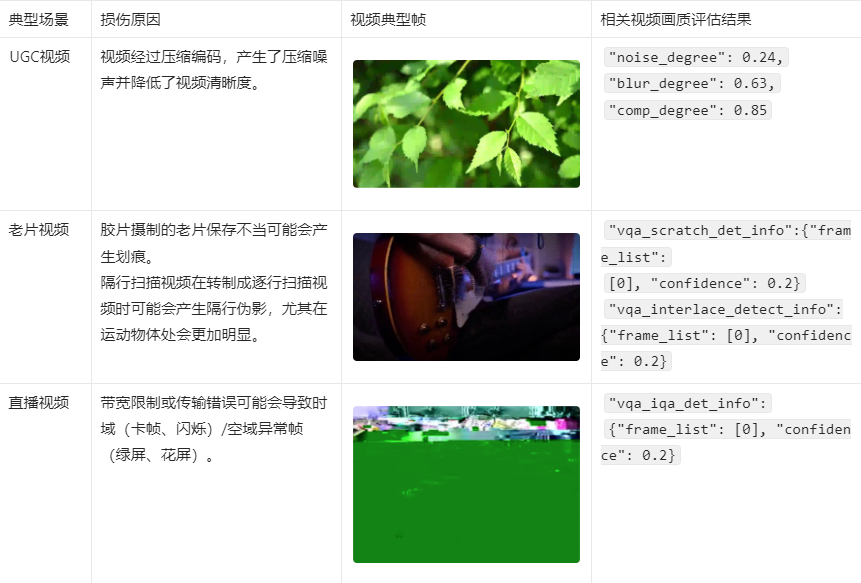'."\n"
."\n"
.'> - 您可以进入[在线咨询](https://www.aliyun.com/core/online-consult?from=aZgW6LJHr2)获取在线人工帮助。'."\n"
.'- 当前能力可在视觉智能开放平台有完整的免费产品体验,您可以单击[立即试用](https://vision.aliyun.com/experience/detail?tagName=videorecog&children=EvaluateVideoQuality)对该能力进行更直观试用以及在线购买。'."\n"
.'- 阿里云视觉智能开放平台视觉AI能力API接入、接口使用或问题咨询等,请通过钉钉群(23109592)加入阿里云视觉智能开放平台咨询群联系我们。'."\n"
."\n"
.'## 应用场景'."\n"
.'- 视频画质评估:标准化视频评估工具集,包括各类无参考指标各项子工具,可服务于视频转码、直播和增强等不同业务场景的画质监控。'."\n"
.'- UGC画质审核:用户自定义上传内容画质把关,对UGC内容进行画面质量检测,对整体画质较低、存在部分显著问题的视频进行筛选过滤。'."\n"
."\n"
.'## 特色优势'."\n"
.'- 视频质量评估:涵盖各种主观/客观通用视频画质指标,提供全方面体系化的质量评估服务。'."\n"
.'- 视频质量监测:涵盖视频中可能出现的各种技术瑕疵的画质监测,保障视频服务品质。'."\n"
."\n"
.'## 接入指引'."\n"
.'1. 注册阿里云账号:打开[阿里云官网](https://www.aliyun.com),在阿里云官网右上角,单击**立即注册**,按照操作提示完成账号注册。'."\n"
.'2. 开通能力:请确保您已开通[视频理解服务](https://vision.aliyun.com/videorecog),若未开通服务请[立即开通](https://common-buy.aliyun.com/?commodityCode=viapi_videorecog_public_cn#/open)。'."\n"
.'3. 创建AccessKey:请确保您已[创建AccessKey](~~175144~~),如果您使用的是子账号AccessKey,您需要给子账号赋予AliyunVIAPIFullAccess权限,具体操作,请参见[RAM授权](~~145025~~)。'."\n"
.'4. 在线调试(可选):您可以通过[OpenAPI Explorer](https://next.api.aliyun.com/api/videorecog/2020-03-20/EvaluateVideoQuality?lang=JAVA&useCommon=true)在线调试能力,查看完整的调用示例代码及SDK依赖信息,也可以下载完整的工程。'."\n"
.'5. 开发接入步骤:'."\n"
.'- 在[SDK总览](~~145033~~)中选择您要接入使用的SDK语言。'."\n"
.'- 在对应语言的SDK文档中找到AI类目为视频理解(videorecog)类目的SDK包进行安装。'."\n"
.'- 参考文档中提供的示例代码进行适当修改后调用。'."\n"
."\n"
.'6. 示例代码:该能力常用语言的示例代码,请参见[视频画质评估示例代码](~~608851~~),常用语言查询异步任务结果的示例代码,请参见[查询异步任务结果示例代码](~~607974~~)。'."\n"
."\n"
.'7. 客户端直接调用:该能力常用的客户端调用方式包括以下几种。'."\n"
.'- [Web前端直接调用](~~467779~~)'."\n"
.'- [小程序场景下直接调用](~~467780~~)'."\n"
.'- [Android端直接调用](~~467781~~)'."\n"
.'- [iOS端直接调用](~~467782~~)'."\n"
."\n"
.'## 输入限制'."\n"
.'- 视频格式:MP4。'."\n"
.'- 视频大小:不超过1 GB。'."\n"
.'- 视频分辨率:不超过1080P,即长边不超过1920像素,短边不超过1080像素。'."\n"
.'- URL地址中不能包含中文字符。'."\n"
."\n"
.'## 计费说明'."\n"
.'关于视频画质评估的计费方式及报价,请参见[计费介绍](~~202485~~)。'."\n"
."\n"
.'> 下方调试接口为付费接口。'."\n"
."\n"
.'## 调用步骤'."\n"
.'该能力为异步能力,需分两步进行调用。'."\n"
.'第一步调用EvaluateVideoQuality接口提交任务,请求成功后,得到一个任务ID。'."\n"
.'第二步调用[GetAsyncJobResult](~~607824~~)接口查询结果,根据任务ID查询任务执行状态和结果。如果任务还在处理中,可稍等一段时间后再进行查询。',
'responseParamsDescription' => '## 查询结果'."\n"
.'该接口为异步接口,当前并未返回真实的请求结果,您需要通过返回的RequestId调用GetAsyncJobResult接口来获取该接口的真实请求结果。详情请参见[GetAsyncJobResult](~~607824~~)。'."\n"
."\n"
.'## SDK参考'."\n"
.'阿里云视觉AI视频理解类目下的视频画质评估能力推荐使用SDK调用,支持多种编程语言,调用时请选择AI类目为视频理解(videorecog)的SDK包,文件参数通过SDK调用可支持本地文件及任意URL,具体可参见[SDK总览](~~145033~~)。'."\n"
."\n"
.'## 示例代码'."\n"
.'该能力常用语言的示例代码,请参见[视频画质评估示例代码](~~608851~~),常用语言查询异步任务结果的示例代码,请参见[查询异步任务结果示例代码](~~607974~~)。'."\n"
."\n"
.'## 视频画质评估各项得分解析'."\n"
.'算法返回**JsonUrl**和**PdfUrl**两个字段,其中**PdfUrl**为该视频PDF格式的整体画质评估综合报告。**JsonUrl**为JSON格式的画质评估详细报告,包括各项画质评估指标的采样帧序列及各分镜/帧分项得分,方便细致分析、处理视频画质问题。'."\n"
."\n"
.'## JsonUrl文件参数样例'."\n"
."\n"
.'```'."\n"
.'{'."\n"
.' "fps": 25.0,'."\n"
.' "frame_num": 252,'."\n"
.' "duration": 10.08,'."\n"
.' "task_id": "2",'."\n"
.' "input_w": 640,'."\n"
.' "input_h": 480,'."\n"
.' "vqa_degradation_info": [{'."\n"
.' "noise_degree": 0.01,'."\n"
.' "blur_degree": 0.15,'."\n"
.' "comp_degree": 0.24,'."\n"
.' "clip": [0, 251],'."\n"
.' "duration": ["00:00:00", "00:00:10"]'."\n"
.' }],'."\n"
.' "vqa_mos_info": ['."\n"
.' [{'."\n"
.' "frame idx": 36,'."\n"
.' "image mos": 0.693'."\n"
.' }, {'."\n"
.' "frame idx": 72,'."\n"
.' "image mos": 0.696'."\n"
.' }, {'."\n"
.' "frame idx": 108,'."\n"
.' "image mos": 0.707'."\n"
.' }, {'."\n"
.' "frame idx": 144,'."\n"
.' "image mos": 0.702'."\n"
.' }, {'."\n"
.' "frame idx": 180,'."\n"
.' "image mos": 0.736'."\n"
.' }]'."\n"
.' ],'."\n"
.' "vqa_color_quality_analysis_info": [{'."\n"
.' "contrast_score": 0.55,'."\n"
.' "luma_score": 0.49,'."\n"
.' "color_saturation_score": 0.17,'."\n"
.' "colorfulness_score": 0.45,'."\n"
.' "clip": [36, 180],'."\n"
.' "duration": ["00:00:01", "00:00:07"]'."\n"
.' }],'."\n"
.' "vqa_damaged_frame_info": {'."\n"
.' "frame_list": [],'."\n"
.' "confidence": 0.0'."\n"
.' },'."\n"
.' "vqa_interlace_frame_info": {'."\n"
.' "frame_list": [],'."\n"
.' "confidence": 0.0'."\n"
.' },'."\n"
.' "vqa_freeze_frame_info": {'."\n"
.' "frame_list": [],'."\n"
.' "confidence": 0.0'."\n"
.' },'."\n"
.' "vqa_flicker_frame_info": {'."\n"
.' "frame_list": [],'."\n"
.' "confidence": 0.0'."\n"
.' },'."\n"
.' "vqa_scratch_frame_info": {'."\n"
.' "frame_list": [104],'."\n"
.' "confidence": 0.012'."\n"
.' }'."\n"
.'}'."\n"
.'```'."\n"
."\n"
.'## JsonUrl文件参数描述说明'."\n"
.'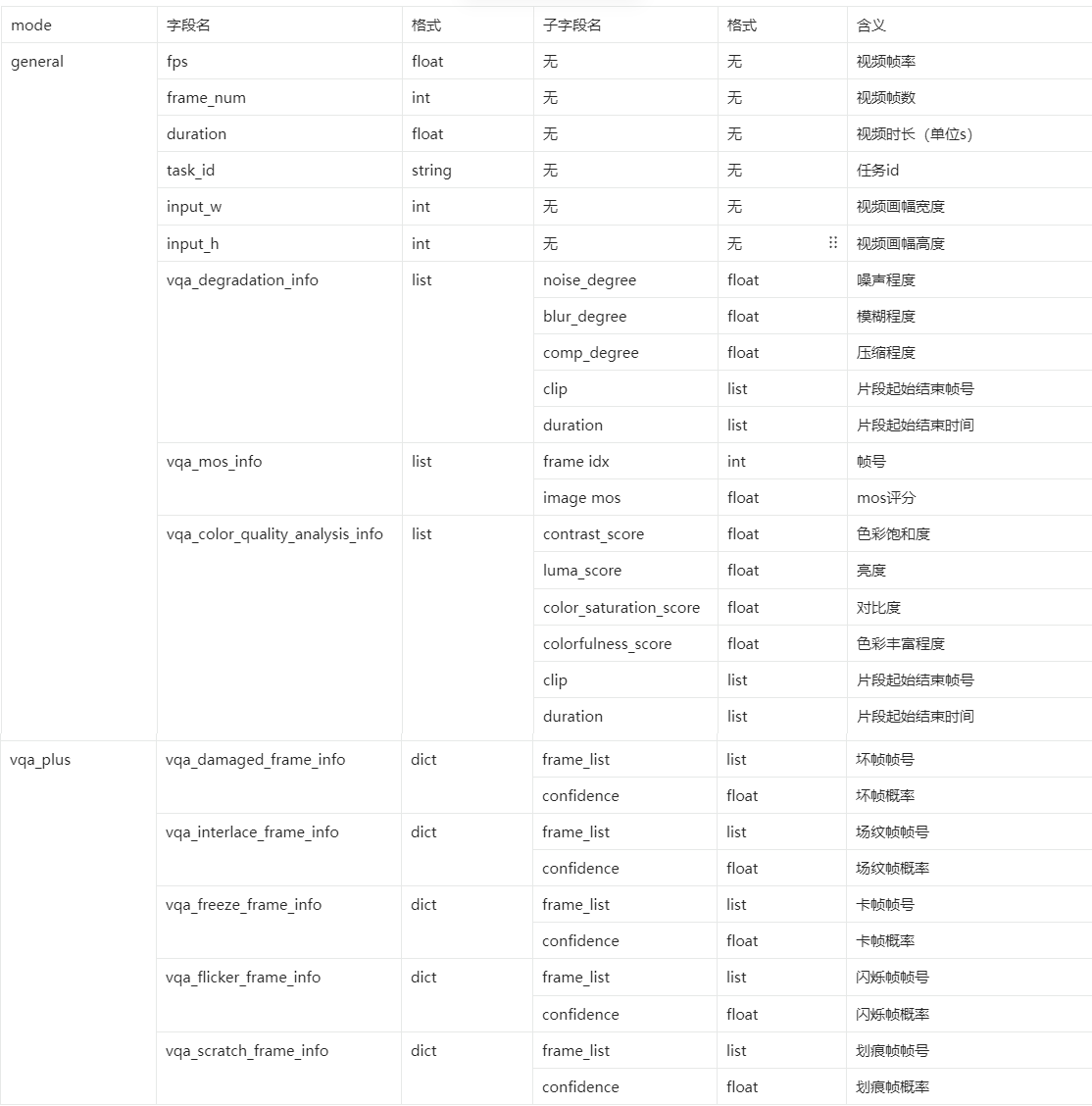'."\n"
."\n"
.'## 视频画质评估参数取值说明'."\n"
.'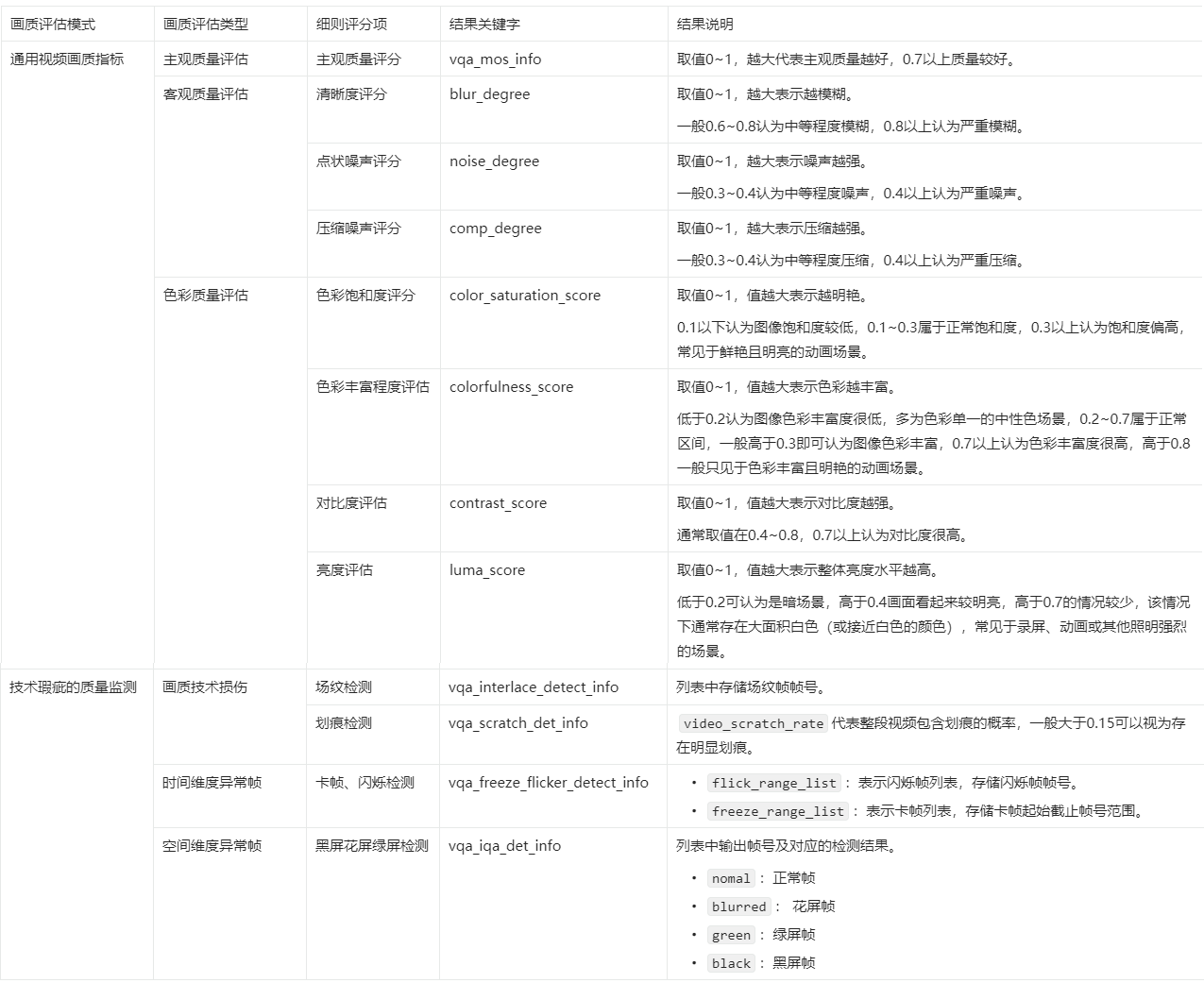',
'extraInfo' => '## 错误码'."\n"
.'关于视频画质评估的错误码,详情请参见[常见错误码](~~159312~~)。'."\n"
."\n"
.'## 安全声明'."\n"
.'- 请确保上传的图片或文件来源符合相应的法律法规。'."\n"
.'- 通过体验调试上传的临时文件有效期为1小时,在24小时后会被系统自动清理删除。',
],
'GetAsyncJobResult' => [
'methods' => [
'post',
],
'schemes' => [
'http',
'https',
],
'security' => [
[
'AK' => [],
],
],
'operationType' => 'readAndWrite',
'deprecated' => false,
'systemTags' => [
'operationType' => 'create',
],
'parameters' => [
[
'name' => 'JobId',
'in' => 'formData',
'schema' => [
'description' => '输入异步接口返回的RequestId,输入后可以查询异步接口的真实请求结果。',
'type' => 'string',
'required' => true,
'example' => 'B6590005-5E7C-4A25-8F97-4479888D8271',
],
],
],
'responses' => [
200 => [
'schema' => [
'description' => '1',
'type' => 'object',
'properties' => [
'RequestId' => [
'description' => '请求ID。',
'type' => 'string',
'example' => '0E448D84-1736-1BCD-BEA5-866C413515A1',
],
'Data' => [
'description' => '返回的数据内容。',
'type' => 'object',
'properties' => [
'Status' => [
'description' => '异步任务状态。包括:'."\n"
."\n"
.'- QUEUING:任务排队中'."\n"
.'- PROCESSING:异步处理中'."\n"
.'- PROCESS_SUCCESS:处理成功'."\n"
.'- PROCESS_FAILED:处理失败'."\n"
.'- TIMEOUT_FAILED:任务超时未处理完成'."\n"
.'- LIMIT_RETRY_FAILED:超过最大重试次数',
'type' => 'string',
'example' => 'PROCESS_SUCCESS',
],
'ErrorMessage' => [
'description' => '异步任务错误码信息。',
'type' => 'string',
'example' => 'paramsIllegal',
],
'Result' => [
'description' => '异步任务返回的真实请求结果。',
'type' => 'string',
'example' => '"{\\"jsonUrl\\":\\"http://vibktprfx-prod-prod-damo-eas-cn-shanghai.oss-cn-shanghai.aliyuncs.com/eas-video-quality-assessment/2023-01-11-16/01%3A52-crxCR763VXTeY0bP.json?Expires=1673425915&OSSAccessKeyId=LTAI4FoLmvQ9urWXgSRp****&Signature=iW07EIZaqaiMNoF3RJZwsLVxOx****\\",\\"pdfUrl\\":\\"http://vibktprfx-prod-prod-damo-eas-cn-shanghai.oss-cn-shanghai.aliyuncs.com/eas-video-quality-assessment/2023-01-11-16/01%3A52-crxCR763VXTeY0bP.pdf?Expires=1673425916&OSSAccessKeyId=LTAI4FoLmvQ9urWXgSRp****&Signature=BvZ3ayeTTxaR65ZvQ2%2FoE8W8Lr****\\"}"',
],
'ErrorCode' => [
'description' => '异步任务错误码。',
'type' => 'string',
'example' => 'InvalidParameter',
],
'JobId' => [
'description' => '异步任务ID。',
'type' => 'string',
'example' => 'A421D5F0-4F73-19F5-8D92-D509FAD281D2',
],
],
],
],
],
],
],
'errorCodes' => [
400 => [
[
'errorCode' => 'ParameterError',
'errorMessage' => 'The parameter is invalid. Please check again.',
],
],
403 => [
[
'errorCode' => 'AuthFailed',
'errorMessage' => 'An error occurred while performing authorization. Please check your RAM configuration.',
],
],
408 => [
[
'errorCode' => 'Timeout',
'errorMessage' => 'The request has timed out.',
],
],
503 => [
[
'errorCode' => 'ServiceUnavailable',
'errorMessage' => 'The service is unavailable.',
],
],
],
'responseDemo' => '[{"type":"json","example":"{\\n \\"RequestId\\": \\"0E448D84-1736-1BCD-BEA5-866C413515A1\\",\\n \\"Data\\": {\\n \\"Status\\": \\"PROCESS_SUCCESS\\",\\n \\"ErrorMessage\\": \\"paramsIllegal\\",\\n \\"Result\\": \\"\\\\\\"{\\\\\\\\\\\\\\"jsonUrl\\\\\\\\\\\\\\":\\\\\\\\\\\\\\"http://vibktprfx-prod-prod-damo-eas-cn-shanghai.oss-cn-shanghai.aliyuncs.com/eas-video-quality-assessment/2023-01-11-16/01%3A52-crxCR763VXTeY0bP.json?Expires=1673425915&OSSAccessKeyId=LTAI4FoLmvQ9urWXgSRp****&Signature=iW07EIZaqaiMNoF3RJZwsLVxOx****\\\\\\\\\\\\\\",\\\\\\\\\\\\\\"pdfUrl\\\\\\\\\\\\\\":\\\\\\\\\\\\\\"http://vibktprfx-prod-prod-damo-eas-cn-shanghai.oss-cn-shanghai.aliyuncs.com/eas-video-quality-assessment/2023-01-11-16/01%3A52-crxCR763VXTeY0bP.pdf?Expires=1673425916&OSSAccessKeyId=LTAI4FoLmvQ9urWXgSRp****&Signature=BvZ3ayeTTxaR65ZvQ2%2FoE8W8Lr****\\\\\\\\\\\\\\"}\\\\\\"\\",\\n \\"ErrorCode\\": \\"InvalidParameter\\",\\n \\"JobId\\": \\"A421D5F0-4F73-19F5-8D92-D509FAD281D2\\"\\n }\\n}","errorExample":""},{"type":"xml","example":"\\n 0E448D84-1736-1BCD-BEA5-866C413515A1\\n \\n PROCESS_SUCCESS\\n A421D5F0-4F73-19F5-8D92-D509FAD281D2\\n {\\"jsonUrl\\":\\"http://vibktprfx-prod-prod-damo-eas-cn-shanghai.oss-cn-shanghai.aliyuncs.com/eas-video-quality-assessment/2023-01-11-16/01%3A52-crxCR763VXTeY0bP.json?Expires=1673425915&OSSAccessKeyId=LTAI4FoLmvQ9urWXgSRp****&Signature=iW07EIZaqaiMNoF3RJZwsLVxOx****\\",\\"pdfUrl\\":\\"http://vibktprfx-prod-prod-damo-eas-cn-shanghai.oss-cn-shanghai.aliyuncs.com/eas-video-quality-assessment/2023-01-11-16/01%3A52-crxCR763VXTeY0bP.pdf?Expires=1673425916&OSSAccessKeyId=LTAI4FoLmvQ9urWXgSRp****&Signature=BvZ3ayeTTxaR65ZvQ2%2FoE8W8Lr****\\"}\\n \\n","errorExample":""}]',
'title' => '查询异步任务结果',
'summary' => '本文介绍查询异步任务结果GetAsyncJobResult的语法及示例。',
'description' => '## 功能描述'."\n"
.'针对异步接口,调用API接口后,返回的并不是真正的请求结果,您需要保存返回结果中的RequestId,然后调用GetAsyncJobResult来获取真正的请求结果。'."\n"
."\n"
.'> - 异步任务的文件有过期时间,有效期是30分钟。如需长期使用,需及时将文件下载到本地服务器或存储在OSS中。有关OSS更多操作信息,请参见[上传文件](~~31886~~)。'."\n"
.'- 阿里云视觉智能开放平台视觉AI能力API接入、接口使用或问题咨询等,请通过钉钉群(23109592)加入阿里云视觉智能开放平台咨询群联系我们。'."\n"
."\n"
.'## 访问域名'."\n"
.'| Region中文名称 | Region英文名称| 外网Endpoint | 支持HTTPS |'."\n"
.'| ------ | ------ | ------ | ------ |'."\n"
.'| 华东2(上海) | cn-shanghai | viapi.cn-shanghai.aliyuncs.com | 是 |',
'requestParamsDescription' => ' ',
'responseParamsDescription' => '## SDK参考'."\n"
.'阿里云视觉AI能力推荐使用SDK调用,支持多种编程语言,文件参数通过SDK调用可支持本地文件及任意URL,具体可参见[SDK总览](~~145033~~)。',
'extraInfo' => '## 错误码'."\n"
.'关于查询异步任务结果的错误码,详情请参见[常见错误码](~~606865~~)。'."\n"
."\n"
.'## 安全声明'."\n"
.'- 请确保上传的图片或文件来源符合相应的法律法规。'."\n"
.'- 通过体验调试上传的临时文件有效期为1小时,在24小时后会被系统自动清理删除。'."\n",
],
],
'endpoints' => [
[
'regionId' => 'cn-shanghai',
'endpoint' => 'videorecog.cn-shanghai.aliyuncs.com',
],
],
];